
If you’re learning how to start a WordPress blog in 2026, my advice is simple: don’t overcomplicate it. The tools have changed, AI has changed how people discover content, but the fundamentals of building a successful blog are still the same.
I’ve been blogging for 15 years, and one thing I’ve learned along the way is that your hosting choice matters far more than most beginner tutorials suggest. That’s especially true when your blog starts growing, which I’ve experienced firsthand while building my blog here into a business that still generates $30,000 to $50,000/mo in the age of AI.
If I were starting over today, I’d still build a WordPress blog. But before you get into themes, plugins, and hosting, make sure you’ve chosen a blog niche that balances your interests with real audience demand. Watch my full tutorial to starting a WordPress blog here:
In this guide, I’ll walk you through the exact setup I’d use if starting from scratch with a WordPress blog today, whether you’re just beginning or migrating an existing site to a better setup that’s designed to grow faster.
Key Takeaways for Starting a WordPress Blog in 2026
- WordPress is still the right move if you want to own your content, control your design, and build real income over time.
- Cheap shared hosting is where a lot of blogs get stuck because performance drops right when traffic starts to matter.
- Managed cloud hosting provides superior site speed and reliable web hosting, removing server headaches because the heavy lifting is handled for you.
- Your first week should be about launching your blog, not perfecting your site. Publish content, get indexed, begin sharing, and start collecting email subscribers.
- Speed and reliability help with discovery because search engines, AI overviews, and chat-based tools all prefer sending people to sites that load fast and work well.
Build Your WordPress Blog on Cloudways
Launch your blog on a fast, scalable hosting platform built to grow with you. Enjoy a free trial and use code RYROB30 to get 30% off your first 3 months!👇
Why This WordPress Setup Is Better Than Cheap Shared Hosting
Most beginner web hosting plans rely on shared hosting. That means your site sits on a server with a pile of other websites, all pulling from the same pool of resources.
Shared hosting providers like Bluehost are common entry points because they’re budget-friendly, which is why so many new bloggers start there. However, the limitations can become apparent once your traffic starts climbing.
That’s where to be careful. A host feels fine when your blog is tiny, but it can turn into a bottleneck the second your content starts getting traction, and it is easy to make common WordPress hosting mistakes that quietly slow your site down. If you decide to start with shared hosting, see my detailed best shared hosting comparison for beginners to find the right plan.
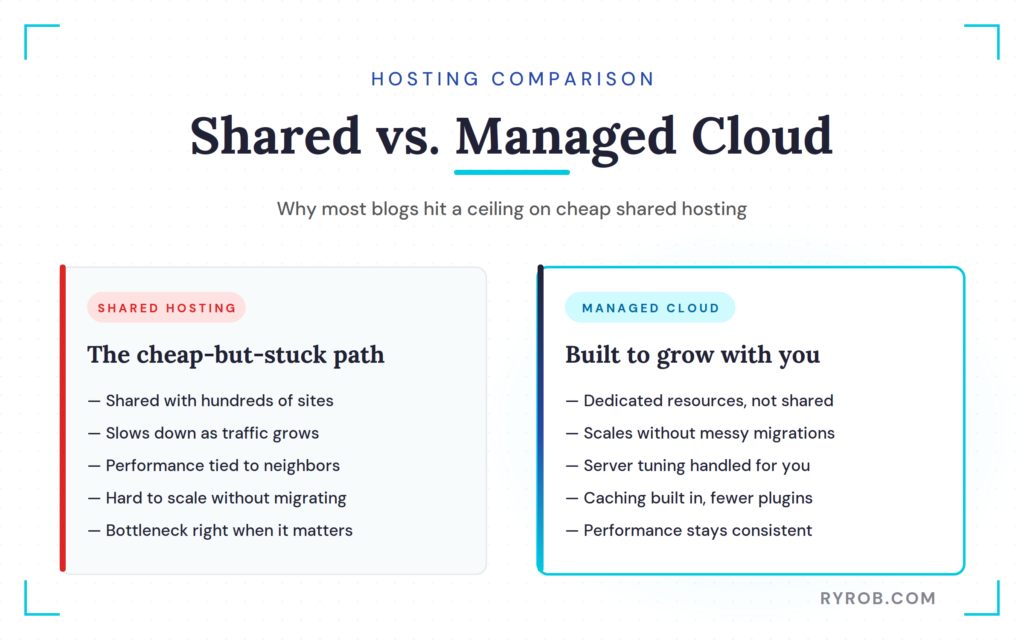
Cloudways takes a different route. Instead of tossing your site onto a crowded shared server, it provides managed cloud hosting. You choose the cloud provider underneath it, like DigitalOcean, Vultr, Linode, AWS, or Google Cloud, and Cloudways handles the WordPress and server management side for you.
That matters because most bloggers do not want to become part-time server admins. You want to publish content, build traffic, grow an email list, and eventually make money blogging, not spend your Saturday figuring out caching rules or troubleshooting a slow database.
I have also learned the hard way that technical foundations matter more when rankings get shaky. Search traffic goes up and down, which is normal, and a faster, more reliable setup does not solve every problem. It does, however, give your content a better shot when every click counts.
What Makes Managed Cloud Hosting a Better Fit for Serious Bloggers
Managed cloud hosting is a better fit when you want your blog to grow without rebuilding everything later.
You get more dedicated resources, which means your site performance is not tied to what hundreds of random other sites are doing on the same box. You also get easier scaling, so if your blog grows past your starter plan, you can move up without going through a messy migration six months from now.
That is the big appeal here. Start simple, then scale when you need it.
Cloudways also handles the parts most beginners either ignore or accidentally break, such as server setup, performance tuning, and caching. That means you do not need a giant stack of speed plugins right out of the gate because a lot of the work is already done behind the scenes.
If budget is the main issue, I get it. When you are starting, every monthly cost feels significant. But if you are weighing your options, my guide to starting a blog on a budget can help you think through the trade-offs.
Why Site Speed Matters for Search and AI Visibility
A slow site costs you twice.
First, readers bounce. If your page drags, people leave before they ever read the post you spent hours writing. When readers leave quickly, you lose the opportunity to convert them into subscribers for your email list.
Second, slow sites make discovery harder. Search engines want to send users to pages that load cleanly and feel trustworthy, and the same logic applies when AI tools surface sources for answers.
That does not mean hosting alone gets you rankings. Great content still does the heavy lifting.
But hosting can absolutely hold you back. If your site is flaky, slow, or constantly weighed down by too many moving parts, you are making it harder for every post to do its job. In 2026, that is a bad bet.
Step-by-Step Guide: How to Start a WordPress Blog
Before you get started, define your path. If you do not have a site yet, you are starting fresh. If you already have a blog on another platform, skip ahead to the migration path.
If you are starting from zero, the process to install WordPress is quick. You can go from buying hosting to having a live site in about 20 minutes.
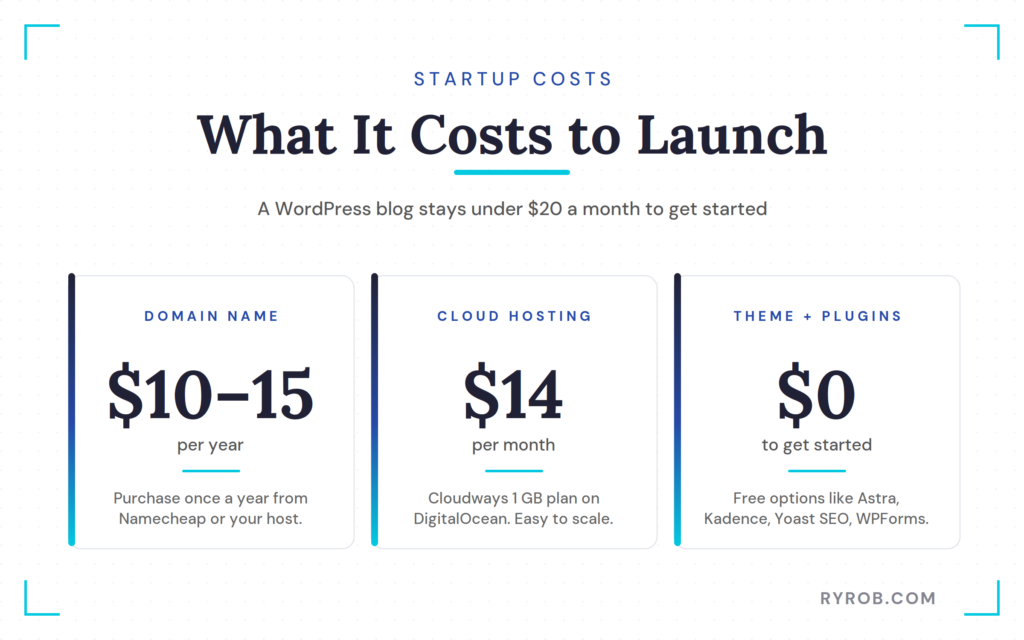
Before diving in, here is a quick cost breakdown to help you budget:
- Domain name: $10 to $15 per year
- Web hosting: $14 per month
- WordPress themes and WordPress plugins: Free options are available to get you started
Follow these steps to get your site running:
1. Create a WordPress-Optimized Application (Site)
Once you are inside Cloudways, the first step is creating your application. This serves as your new blog inside the platform.
Choose WordPress Optimized so the install is pre-configured, then select the Lightning Stack for a performance-focused setup. Name your application based on your blog name, but do not overthink it since you can change it later.
Plus, Cloudways offers a free trial for my readers, so remember to use the code RYROB30 for 30% off your first three months.
2. Choose the Right Cloud Provider, Server Size, and Location
For most new bloggers, keep it simple and choose DigitalOcean. It is the most affordable option for a new site and provides solid performance without enterprise-level pricing.
For server size, the 1 GB plan is the sweet spot for a new blog. It is around $14 per month before discounts, and that is plenty for those getting started. Scaling up is easy if your traffic grows.
Finally, choose a server location close to your audience. If your readers are in the US, New York is a smart pick. If they are in Europe, London or Frankfurt work well.
Geography matters because being closer to your readers means faster content delivery.
3. Launch Your Server and Access WordPress
Once you hit launch, Cloudways spins up the server, installs the database, and handles the caching layer. After the server is ready, click into your application to find the admin credentials and use them to log into your WordPress dashboard.
That is the moment it stops being theory. You now have a functional, self-hosted blog ready for your first post.
How to Migrate an Existing WordPress Blog to Faster Hosting
This is the path most people need, and almost nobody talks about it enough.
If you have already created a WordPress blog somewhere else and have been putting off moving because it sounds annoying, the Cloudways concierge migration service is the easiest way to get unstuck. They handle the technical work, and you check the finished site before it goes live.
When Starting Fresh Makes Sense
Starting fresh is the right move if your current site is half-built, abandoned, or on a platform you do not want to untangle.
If you signed up for a website builder a year ago, published nothing, and hate the setup, do not drag the baggage with you. Start clean. You will move faster.
The same goes for projects that never got beyond a homepage and a logo. Sometimes the fastest path is the one without cleanup.
When Migrating an Existing Blog Makes Sense
Starting fresh is the right move if your current site is half-built, abandoned, or on a platform you do not want to untangle.
If you signed up for a website builder a year ago, published nothing, and hate the setup, do not drag the baggage with you. Start clean and move faster.
The same goes for projects that never got beyond a homepage and a logo. Sometimes the fastest path is the one without cleanup.
What Cloudways Concierge Migration Includes
Inside Cloudways, you can create an application and request a concierge migration instead of building from scratch. You will fill out a form with your current platform, your URL, your site login, and the domain name you want to use after the move.
After that, it is mostly in their hands.
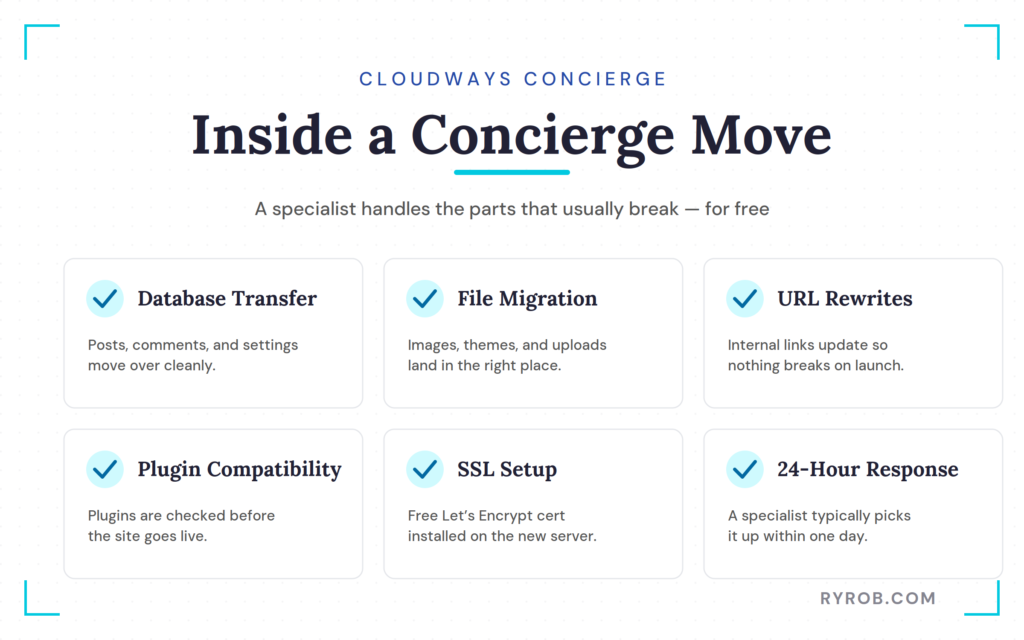
A migration specialist typically picks it up within about 24 hours. Then they handle the stuff that normally sends people into a six-hour Google spiral, including:
- Database transfer
- File migration
- URL rewrites
- Plugin compatibility checks
- SSL setup on the new server
One important detail: you will need to move off the free trial and onto a paid plan before Cloudways completes the migration. That is the tradeoff for having a real human team do it for you.
And yes, the migration itself is free.
If you have been delaying a host move because the process sounds messy, this is probably the lowest-friction way to do it.
How to Review Your Site Before Going Live
When the migration is finished, Cloudways puts the site on a temporary staging URL so you can review everything before the DNS switch.
Take that step seriously. Before approving the migration, make sure to:
- Open blog posts
- Check images
- Test forms
- Confirm menus work properly
- Make sure pages load correctly
If something looks off, tell them and they will fix it before launch.
Once you approve it, point your domain name to the new server and the site goes live on Cloudways. In most cases, the whole process wraps up within one to three business days.
Essential WordPress Setup Tasks After Installation
Once WordPress is installed, do not get distracted by twenty settings screens and random plugin ideas. There are only a few things you need to do first to get your site ready for traffic.
Choose and Register Your Domain Name
Inside your Cloudways application settings, go to Domain Management and add the domain name you want to use. You can purchase your domain through a registrar like Namecheap or often during your initial hosting setup process.
If you bought the domain somewhere else, Cloudways will provide the server IP address you need. Update the DNS records at your registrar so the domain points to that specific server, then give it a little time to propagate. That is it.
Enable Your Free SSL Certificate
Next, turn on SSL. Cloudways includes free Let’s Encrypt SSL, so inside your application, go to the SSL section and install the certificate. Once that is done, your site loads over HTTPS.
This is table stakes now. Nobody wants to click through to a blog and get browser warnings, and you do not want search engines or AI tools seeing a site that still looks half-finished.
Choose a Fast WordPress Theme
For themes, keep it lightweight and functional. Astra, Kadence, Elementor, and GeneratePress are all solid options because they are beginner-friendly, widely used, and not overloaded with junk.
A page builder like Elementor or Astra is excellent for beginners who want to customize their layout without touching code. Pick one that feels close to the site you want, then move on.
If the theme offers free starter templates, use them. That is one of the easiest shortcuts to getting a clean-looking site live fast. Pick a template that roughly matches your direction, then swap the text, images, colors, and layout pieces until it feels like yours.
You can always change your theme later. What matters now is getting out of setup mode.
Install the Essential Plugins
This is where a lot of new bloggers lose the plot.
You do not need 15 plugins on day one. You only need a few essentials to get moving:
While you are working within the WordPress dashboard, take a moment to organize your content strategy by setting up categories and tags. This helps readers navigate your site and keeps your archives tidy.
When you are ready to start writing, get comfortable using the block editor to structure your posts. Finally, check your permalinks under the settings menu, as clean and descriptive URLs help search engines understand your content.
Resist the urge to bolt extra stuff onto your site before you have even published your first post. Every plugin adds weight, complexity, and another thing that can break. Keep it lean, publish your content, and focus on growth.
Your First Week After Launch
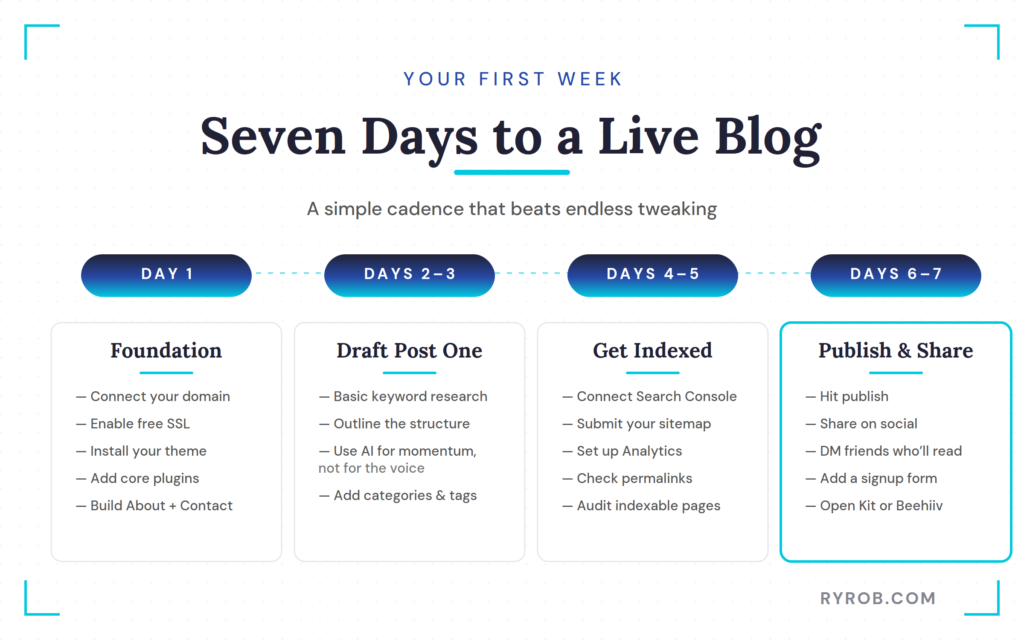
The first week matters because it is when most people either publish something or disappear into endless tweaking. Be the person who publishes.
Set Up Your Core Pages
On day one, get the technical basics done: domain connected, SSL enabled, theme active, and the core plugins installed.
Then build the simple pages every blog needs:
- About page
- Contact page
- Homepage that clearly reflects your blog name
A first-time visitor should immediately understand what your site is about.
Do not try to write a masterpiece here. Write something honest and useful. You can always improve the content later.
Connect Search Console and Analytics
By days four and five, connect Google Search Console and submit your sitemap.
This is unglamorous work, but it matters for your long-term growth. Google Search Console helps you see how your site is getting crawled and what queries are driving impressions.
Setting up Google Analytics gives you visibility into traffic sources and user behavior, which is essential for ongoing search engine optimization.
This is also a good moment to make sure your site structure is clean, your pages are indexable, and nothing obvious is broken.
Publish Your First Post
Days two and three are a great time to draft your first article. Start by performing some basic keyword research to ensure you are writing about topics your target audience is actually searching for.
If the blank page is staring you down, use an AI writing tool to get momentum. That is fine. Just do not publish robotic filler and call it a day. Use AI for a shove, not for your whole personality.
By days six and seven, hit publish. Then share the post where your audience already spends time, such as social media platforms, niche communities, or via direct messages to friends who will read it.
Done beats perfect here, every single time.
Start Building an Email List
If you do one thing in your first week besides publishing, make it this.
Add a newsletter signup form to your site and open a free account with Kit or Beehiiv so you can start collecting subscribers. Even if only a handful of people join at first, you are building a direct line to readers you own.
That is a much better long-term asset than relying only on algorithms.
If you want more help beyond setup, these essential blogging tips for beginners will help you build momentum once your site is live.
What to Do After Your Blog Goes Live
Getting the site online is not the hard part. Keeping it moving is.
Create Content Consistently
Your blog becomes a sustainable project once you establish a reliable content strategy. This framework helps you publish regularly, which is vital for long-term growth.
Consistency does not mean daily posting. It means maintaining a schedule that signals to readers and search engines that your site is active and authoritative.
One great post per week beats a burst of five posts followed by a six-month disappearance. As you grow, use relevant categories and tags to maintain a logical site structure, which makes it easier for visitors to navigate your archives.
Focus on writing posts that solve real problems, answer specific questions, and provide value worth bookmarking.
Promote Your Content
A published post with no promotion is like opening a shop in the woods and hoping people wander in. You need to actively get your work in front of an audience.
Focus your efforts on the two most important promotion channels: social media and your email list. Share your content where your audience already gathers, whether that is X, LinkedIn, or niche community forums.
While social media is excellent for discovery, building an email list allows you to own your audience relationship and drive repeat traffic to your site. Beyond external promotion, internal linking and refreshing old posts are essential to build topical depth and keep your content relevant over time.
Start Monetizing Your Blog
Monetization comes after you gain traction, but it should still be in your line of sight early. When you are ready to make money blogging, focus on building trust with your readers first.
Affiliate marketing is a primary way to generate revenue, as it allows you to earn commissions by recommending products that genuinely help your audience. Beyond affiliate offers, a blog can make money through digital products, courses, services, sponsorships, or a paid newsletter.
I have used several of these paths over the years, and the numbers have not always moved in a straight line. That is normal. Some months are stronger, and some dip when rankings shift, but your business becomes more durable when you build it on solid infrastructure and useful content.
The win-win version of monetization is simple: recommend things that provide value, create offers that solve real problems, and always keep your audience trust intact.
FAQs About Starting a WordPress Blog in 2026
Below are additional questions that might help you.
Is WordPress Still Worth It in 2026?
Yes, WordPress is still worth it in 2026, especially if you care about ownership.
Website builders can be fine for simple sites, but choosing to start a WordPress blog gives you more control over your design, plugins, content structure, monetization, and long-term growth. If you want a blog that can turn into a business, WordPress remains the strongest choice.
Is Cloudways Too Advanced for Beginners?
No, Cloudways is not too advanced for beginners because it simplifies most of the technical work for you.
The cloud infrastructure underneath Cloudways is powerful, but the dashboard smooths out most of the complexity. When you compare this to standard web hosting, you will find that you do not need to know server administration to get a fast site live.
Should I Start Fresh or Migrate My Existing Blog?
Start fresh if your old site is barely built and not worth preserving, and migrate if you have already published content, built links, or have a domain with history.
In that case, moving the site cleanly is almost always smarter than rebuilding from zero because it preserves the work you have already done.
How Many Plugins Should a New Blog Have?
Fewer than you think. An SEO tool and a contact form are enough to get rolling. Only install additional WordPress plugins when you have a clear reason to do so.
Most plugin piles start with good intentions but eventually lead to a slower site.
Final Thoughts on How to Start A WordPress Blog
The best blog setup in 2026 is the one that gives you speed, ownership, and room to grow without turning you into a full-time tech support person.
If you are learning how to start a WordPress blog from scratch, keep it simple and get your site live as quickly as possible. If you already have a site hosted elsewhere, remember that migration is likely much easier than you have been telling yourself.
A solid host, a lightweight theme, and a lean plugin stack are all you need to get started. Once your site is live, focus on what matters most: publishing useful content, building relationships with your audience, and showing up consistently.
By following this guide on how to start a WordPress blog, you have built a professional foundation that can grow alongside your goals. Now it is time to hit publish and get to work.
Build Your WordPress Blog on Cloudways
Launch your blog on a fast, scalable hosting platform built to grow with you. Enjoy a free trial and use code RYROB30 to get 30% off your first 3 months!👇
