
That vague rejection email from Google can feel like a punch in the gut, especially when it lands for the third or fourth time. The good part is that Google AdSense approval usually comes down to fixable signals, not luck.
You built the site, wrote the posts, and hit submit, only to get back almost nothing you could act on… but here’s the thing, your trust pages, content, design, and policy compliance all feed that decision, and so do quieter factors like your traffic sources and your timing.
The biggest issue is almost always content that doesn’t give readers a reason to stick around. Genuine readership matters far more than inflated numbers, so real organic traffic beats a padded dashboard every single time. Here’s my full video breaking down the most common Google AdSense rejection reasons:
Key Takeaways for Google AdSense Approval
Google doesn’t need thousands of visitors a day. Five real people who arrive through organic traffic and find something useful will always beat 5,000 sketchy clicks.
- Build your trust pages first. An About page, a Contact page, and a Privacy Policy are the baseline for looking like a real, credible site.
- Aim for roughly 15 to 20 useful posts. Reach for genuinely helpful articles before you apply, not a pile of short filler pieces.
- Make your site feel finished on desktop and mobile. Fix broken links and delete any leftover sample pages before Google ever sees them.
- Keep your traffic and content clean. Avoid prohibited content, copied work, bought traffic, bots, and fake engagement, and focus on organic traffic from real readers.
- Don’t reapply the second you change something. Give Google about 2 to 4 weeks to re-crawl meaningful updates, and use Google Search Console to confirm your changes can be found.
- Put yourself into your posts. Your experience, opinions, examples, and proof are what separate you from generic content, which is the real approval killer.
6 Reasons Why Google AdSense Rejects Websites
Before you start changing random things across your site, take a breath. Look at the whole experience through the eyes of a first-time reader.
Does your site look like a place run by a real person? Can someone find useful answers, move around without hitting dead ends, and understand who’s behind the content? Is the website structure clear? That’s the bar for Google AdSense approval, not a guaranteed formula.
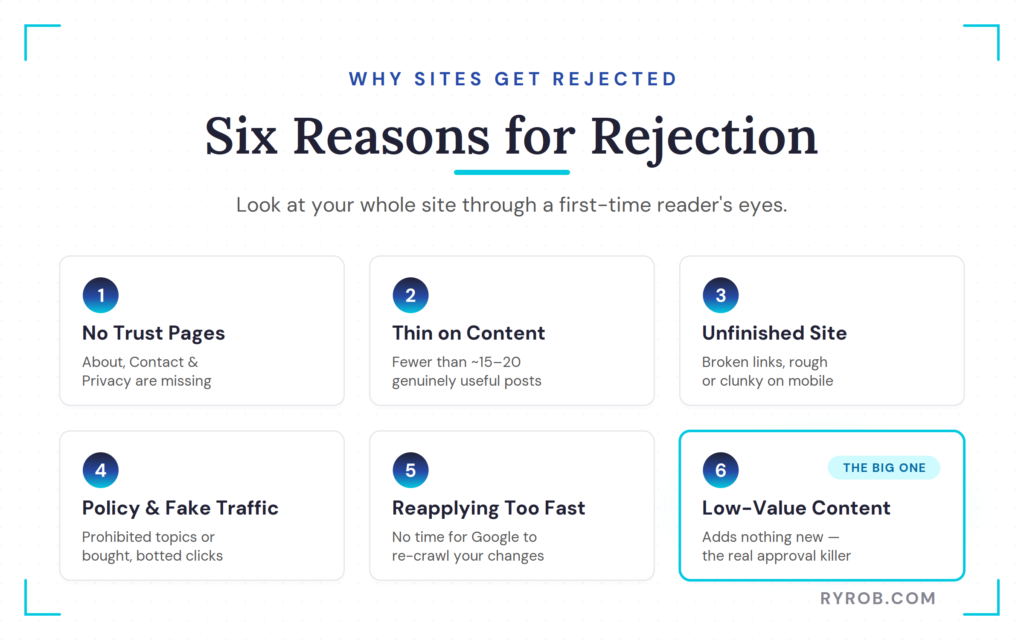
1. Missing About, Contact, and Privacy Policy Pages
An About page, Contact page, and Privacy Policy are essential pages. They aren’t glamorous, but they aren’t optional if you want your site to look credible.
- Your About page should explain who you are, what the site is about, and why you’re qualified to write on the topic. That doesn’t mean you need to pretend you’re the world’s leading authority. It means you should be honest about what you’ve done, what you’ve learned, and why you care about the subject.
- Your Contact page needs a real way to get in touch. An email address or contact form is enough, as long as it works.
- Your Privacy Policy page should explain how your site handles visitor data, cookies, analytics, and advertising. If you’re using tools like Google Analytics or planning to run ads, that policy needs to reflect it.
You can use AI to get a first draft moving, but don’t publish a bland template and call it a day. Add your business details. Write like a human being is behind the website, because one is.
2. Applying Before You Have Enough Useful Content
There isn’t an official rule that says you need exactly 15, 20, or 50 blog posts for approval. Anyone claiming otherwise is selling certainty they don’t have.
That said, 15 to 20 useful articles is a practical starting point for a new blog. It gives Google and readers enough material to understand what your site covers and whether your content has depth.
“Useful” matters more than a number when you’re judging the content requirements for approval. A 300-word post padded with stock advice isn’t useful because it has a headline and a featured image. Neither is an AI draft you generated, barely read, and published 90 seconds later.
A helpful post answers a real question. It gets to the point, and it gives examples, context, and a clear next step when the topic calls for one.
If you’re still building out the foundation, focus on publishing work worth bookmarking instead of chasing a post count.
That’s also the better long-term play if you’re trying to make money blogging. Ad revenue is one income stream, not a reason to rush a half-built site into the world.
3. An Unfinished Site or Broken Mobile Experience
You don’t need a $10,000 custom design to get approved. You do need a website that doesn’t look abandoned halfway through setup.
Open your site on your phone, read a few posts, open the menu, click your main navigation links, and try your contact form. You’ll spot a surprising number of problems this way.
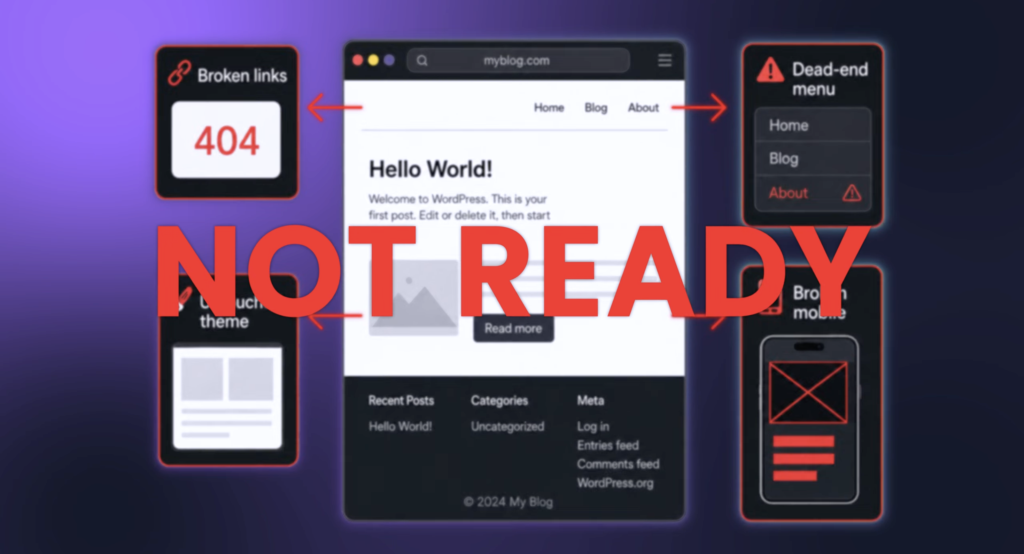
Here are the common issues to look for.
- Website navigation items that lead nowhere or point to empty category pages.
- Broken internal or external links.
- Default theme text, placeholder images, and old “Hello World” posts.
- Pages with unreadable text, overlapping buttons, or awkward spacing on mobile.
- A cluttered layout that makes it hard to find your actual content.
A clean, simple site wins here. Don’t make readers hunt for your posts or wonder whether anyone is maintaining the place.
4. Policy Violations and Fake or Purchased Traffic
Google won’t place ads beside every kind of content. Adult material, copied copyrighted work, misleading pages, and other prohibited topics can stop an application cold. Poor ad placement beside prohibited or misleading material can create problems, too.
Don’t guess on this stuff.
Review Google’s current AdSense Program policies and terms and conditions before you reapply, especially if your site covers a sensitive topic or includes user-generated content. Policy violations can affect your Google AdSense account beyond the initial rejection.
Traffic shortcuts are another easy way to cause problems. Legitimate organic traffic is very different from bought visits, bots, click exchanges, and fake engagement. Those tactics can create concerns about invalid clicks and impressions, especially when activity is self-generated.
These shortcuts can make your analytics look bigger for a minute. They won’t build a real audience, and they can threaten your account rather than help it.
Don’t treat it as a reason to hunt for a gimmick. Treat it as a reason to check whether your site gives real readers a reason to return.
5. Reapplying Too Fast After Small Tweaks
This one isn’t a flaw in your site. It’s a process mistake.
You make one small edit, request another review five minutes later, and then get rejected again. The issue may be that Google hasn’t even found or processed your changes yet.
Make meaningful updates first. Fix the trust pages, clean up broken navigation, rewrite weak articles, and remove pages that have no purpose. Then wait around 2 to 4 weeks before applying again.
That time frame isn’t an official guarantee from Google. It’s practical breathing room for your changes to be discovered and re-crawled. Reapplying again and again without giving the site time to update is like repainting a house while the inspector is still standing in the driveway.
6. Low-Value Content That Adds Nothing New
This is the big one.
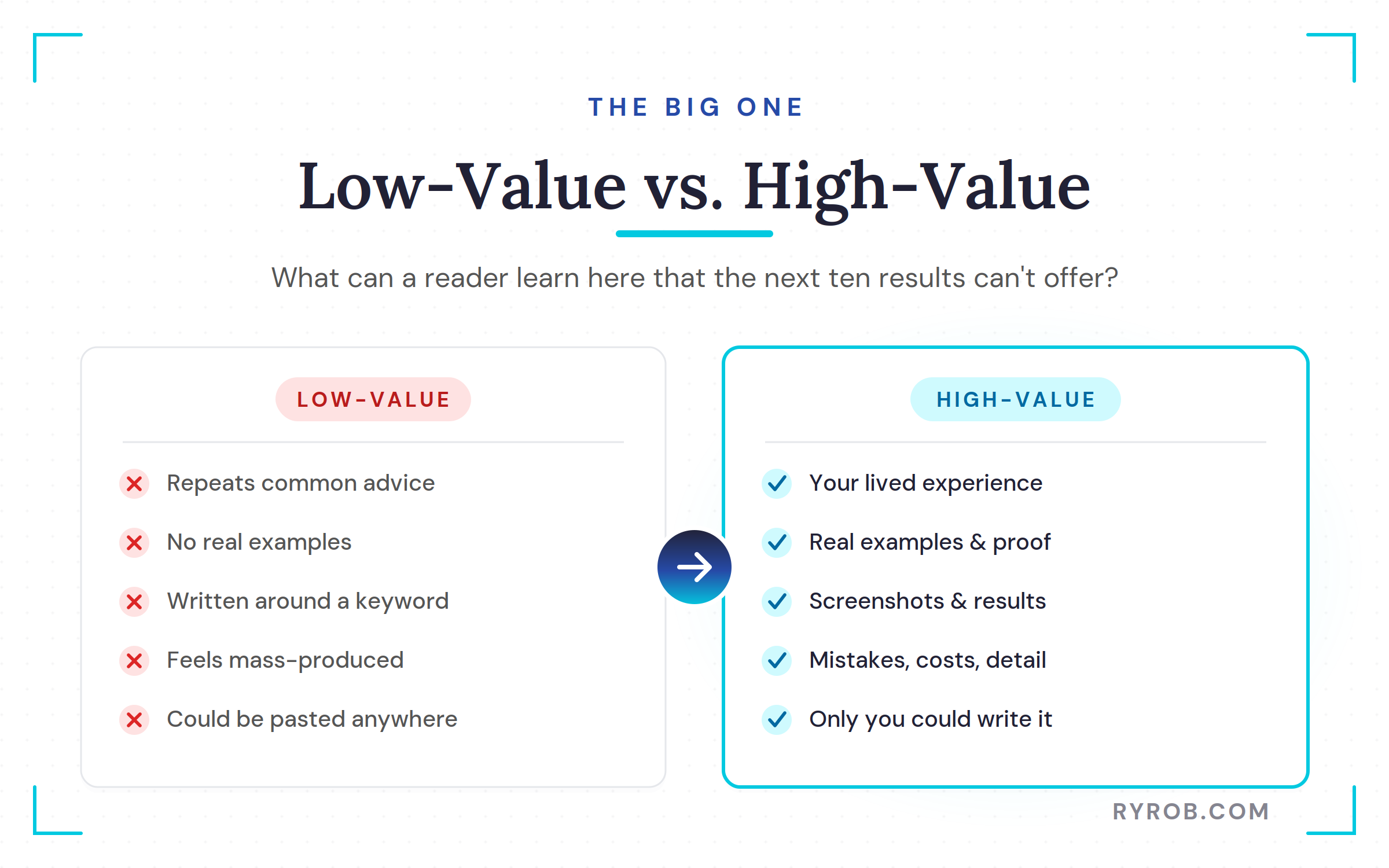
Low-value publisher content doesn’t always mean short content. It doesn’t mean you need to write 4,000-word articles about every topic, either. It means your pages don’t offer much that a reader can’t get from the next ten Google results.
Maybe the post repeats common advice without examples. Perhaps it answers a question in broad, empty language. Sometimes it was written around a keyword and never developed into a useful article. Often, it feels mass-produced because it is.
A site can have dozens of posts and still run into this issue. More content doesn’t fix weak content. It only gives you more weak pages to clean up later.
Weak pages also struggle to earn sustainable organic traffic. Search visibility follows useful content, not a large publishing volume by itself.
For Google’s own take on this, its guide to creating helpful, people-first content focuses on improving the site itself instead of chasing a fast approval trick.
How to Fix Low-Value Content Before Reapplying
The fix isn’t “publish 30 more articles this month.” The fix is turning weak pages into high-quality and original content that’s harder to replace.
Ask yourself one blunt question as you review every post. What can someone learn here that they can’t get from the next search result?
If the answer is “not much,” you’ve found work to do.
Add Your Experience, Examples, and Proof
Put yourself back into your writing.
If you’re teaching people how to start a freelance business, share the pitch that got a client response, the mistake that cost you time, or the exact process you used to find leads. If you’re reviewing software, explain what you tested, what annoyed you, and who should skip it.
Don’t fake expertise. You don’t need to.
Your lived experience might be small but still useful. A beginner who documents what happened after publishing their first 20 posts can offer details that a generic “how to start a blog” article never will.
A food blogger can explain what failed in a recipe test. A travel writer can tell readers which part of a trip wasn’t worth the money.
Go through your existing posts and look for pages that are too thin, repetitive, or broad. Combine articles that overlap, cut pages that don’t help anyone, and expand your best topics with original screenshots, results, comparisons, costs, mistakes, and practical detail. These details can make a page more useful to readers and more discoverable through organic traffic.
One thoughtful post per week beats a burst of five posts followed by six months of silence. Your readers can tell when you’re doing the work. Google has more signals than any of us can see, but readers are still the point.
Turn AI Drafts Into Something Only You Could Write
AI writing tools can help with outlines, rough drafts, headline ideas, and getting past a blank page. It can’t replace your judgment.
Create Automated SEO Blog Posts in Minutes with RightBlogger
Join 45,417+ bloggers, marketers, writers & business owners in using RightBlogger, my very own Autoblogging solution with a built-in automated Content Schedule, and a kit of 80+ powerful tools for blogging, SEO, and marketing. You’ll create AI SEO-optimized content faster & get more traffic from Google and ChatGPT today. Plus, you’ll access online courses, a community, and more.
The problem isn’t that a tool helped you write. The problem is publishing generic, unchecked material as publisher content when it could have come from anyone, anywhere.
Read every draft, fact-check claims, delete vague filler, and add examples from your own work. Link to reliable sources when you’re making a claim that needs support, which helps you address Google’s content requirements, though no checklist can replace sound judgment. Then rewrite enough that the finished article sounds like you.
If your post could be pasted onto ten competing blogs without anyone noticing, it isn’t ready.
A good content audit may feel like slow work. It is. But this is the work that makes a site more useful, more trustworthy, and more likely to earn organic traffic over time without resorting to cheap tricks.
The reminder worth holding onto is simple. Approval problems are usually fixed by improving the reader experience, not by trying to outsmart the review process.
Your Google AdSense Reapplication Plan
Don’t panic-submit another application after reading one blog post. Make the changes count first.
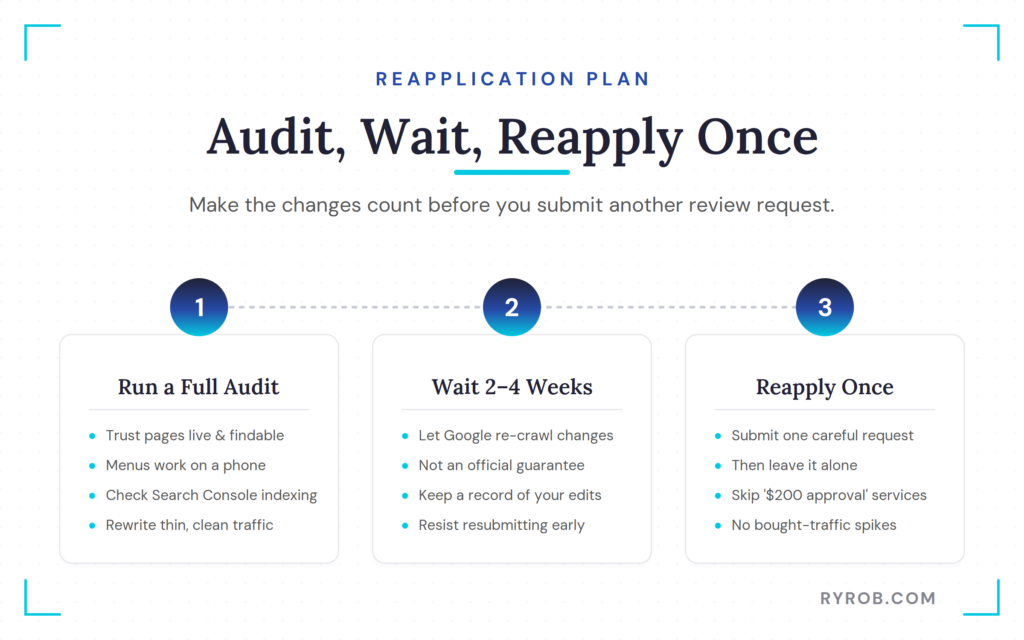
Run a Full Pre-Application Site Audit
Review the site like you’re a skeptical visitor who landed there for the first time.
Start with your website structure. Review the hierarchy, templates, categories, and connections between important pages. Make sure your About, Contact, and Privacy Policy page are live and easy to find.
Check your website navigation. Test the menus, sidebar, footer, and most important article links. Make sure everything works well on a phone.
Use Google Search Console to inspect indexing and coverage. Confirm that important pages are visible to search engines and that obvious crawl problems are resolved.
Read the current AdSense Program policies before applying again. Check for prohibited material, misleading claims, unsafe user-generated content, and other policy violations.
Then review your content. Remove duplicate or useless pages. Rewrite posts that are thin or generic. Check your claims and sources.
Review your traffic sources, too. Separate genuine organic traffic from purchased visits, traffic exchanges, or sudden spikes from questionable services. Avoid bots, click exchanges, self-clicking, and any activity that could create invalid clicks and impressions.
If your site already displays ads, review each ad placement. Make sure ads don’t interfere with usability or create policy concerns. Don’t configure Auto ads until your site is approved, and never use automated advertising to compensate for weak content.
Keep a simple record of what you changed. That stops you from making emotional, random edits after a rejection. It also shows whether you fixed the actual issue or only rearranged the furniture.
Before beginning the application process, review your Google AdSense account and account setup. Confirm that your legal name, country, and payments information are accurate. Check your payments information again before submitting, since these details support payment processing rather than content approval.
If ads aren’t the right fit for your site yet, there are other blog advertising networks and monetization tools to consider later. They may eventually help you earn ad revenue, but they aren’t shortcuts around building a useful site. The foundation comes first.
Reapply Once and Then Leave It Alone
After you’ve made substantial updates, wait 2 to 4 weeks. Then submit one careful review request for Google AdSense approval.
Don’t use sketchy “$200 AdSense approval” services. Don’t buy traffic to make your site look popular. Sustainable organic traffic is more valuable than a sudden spike, so don’t keep hammering the review button every few days.
Approval isn’t guaranteed, and review timelines can vary. Keep improving your site either way. The same changes that make approval more likely also make your content more likely to earn readers, links, email subscribers, and revenue over time.
FAQs About Google AdSense Approval
Here are quick answers to the questions I hear most about Google AdSense approval.
How Much Traffic Do You Need for AdSense Approval?
There is no published minimum traffic threshold. A small amount of organic traffic is fine.
What matters is that your site is useful, complete, policy-safe, and built for real readers. Never inflate traffic with bots or paid click schemes.
Do You Need a Privacy Policy for Google AdSense?
Yes, you should have one before applying. Your policy should explain relevant data collection, cookies, analytics, and advertising practices on your site.
It’s also a basic trust signal for readers. A blog asking people to spend time on its pages should be clear about how it handles visitor data.
When Should You Enter payments information?
Entering payments information is separate from proving your site’s value and policy compliance. Follow Google’s instructions when payment setup becomes available for your account.
What Are Auto ads, and Do They Affect Approval?
Auto ads are a post-approval monetization feature. They don’t replace the need for useful content, clear site design, and policy compliance.
What Should You Do If Google Doesn’t Give a Clear Rejection Reason?
Audit the AdSense eligibility requirements first. Review your content quality, trust pages, site design, mobile experience, policy compliance, and traffic sources.
Most of the time, a vague rejection isn’t asking for a magic workaround. It’s asking you to build a better site.
Final Thoughts on Google AdSense Approval
Not receiving Google AdSense approval yet isn’t a personal judgment. It’s feedback, even when the message feels frustratingly vague.
Fix the obvious issues, give Google time to see your changes, and build for organic traffic. Focus most of your effort on high-quality and original content.
The goal isn’t to make a site that barely gets approved for ads. It’s to create the kind of site people trust before the first ad ever appears.
Create Automated SEO Blog Posts in Minutes with RightBlogger
Join 45,417+ bloggers, marketers, writers & business owners in using RightBlogger, my very own Autoblogging solution with a built-in automated Content Schedule, and a kit of 80+ powerful tools for blogging, SEO, and marketing. You’ll create AI SEO-optimized content faster & get more traffic from Google and ChatGPT today. Plus, you’ll access online courses, a community, and more.

Really helpful article! The reasons you’ve shared explain some of the most common mistakes website owners make when applying for Google AdSense. I especially agree that original, useful content and a good user experience should come before focusing on monetization. Following these fundamentals can make a website much stronger and more trustworthy. Thanks for sharing these practical tips!
I’m still struggling to get my first AdSense approval. If my site already has original content and the basic pages in place, what’s the one thing you’d recommend checking before applying again?
Really useful guide, especially the point that AdSense approval isn’t just about having a certain number of posts or traffic. I liked the emphasis on original, helpful content, clear trust pages, a clean mobile experience, and genuine organic traffic. The advice to focus on improving the overall reader experience rather than seeking shortcuts is particularly practical.
Really helpful breakdown! I especially liked the focus on improving content quality, user experience, and trust pages instead of chasing quick AdSense approval. The practical reapplication tips are definitely useful for bloggers dealing with repeated rejections.