
The most useful tool for your business is often the one that doesn’t yet exist. For years, I forced my work into spreadsheets, Google Docs, and productivity tools that almost fit my needs. Now, I build custom tools with AI instead, without writing a line of code. And the best part? They’re purpose-built for my specific needs.
Today, purpose-built AI-powered web apps handle real work across my blog, YouTube channel, agency, partnerships, and team operations. In this video & guide, I’ll show you three custom tools I’ve built, and the simple describe-refine-publish loop behind all of them.
👋 The tool I’m using for this build is Sticklight and it rules. You just describe what you want, refine it, and publish in minutes. If you want to try it along with me, can use my code RYANROB30 for 30% off on all plans.
Key Takeaways for Building Custom Tools With AI
The big idea here is simple. You don’t need to be a developer to build a useful tool for your business anymore. With AI-powered no-code platforms, all you really need is a clear problem and a good description of what should happen.
Here are the three lessons I’ve found most useful for building custom tools with AI:
- Start with a real annoyance, not a vague app idea. The best tools replace a messy process that’s scattered across documents, inboxes, and stale spreadsheets.
- Give people value before asking for something in return. A lead magnet that solves a small problem upfront earns more signups than another PDF collecting dust in someone’s Downloads folder.
- Build the first version fast, then refine what matters. Sticklight and similar AI agents use large language models to process your request and revisions, turning a generic app into something your team will actually use.
Build Custom Tools Without Code Using Sticklight
Every tool I built in this post came out of Sticklight, from the lead magnet to my agency’s content board. You just describe what you want, refine it, and publish in minutes. Use my code RYANROB30 for 30% off a plan👇
Why I Build Custom Tools Instead of Buying Another Subscription
Most businesses don’t need more software. They need fewer tools that fit better.
You know how this usually goes. You buy a tool for one feature, then you add a spreadsheet to cover what it can’t do. Someone creates a Google Doc to explain the spreadsheet, and a few weeks later nobody knows which version is current.
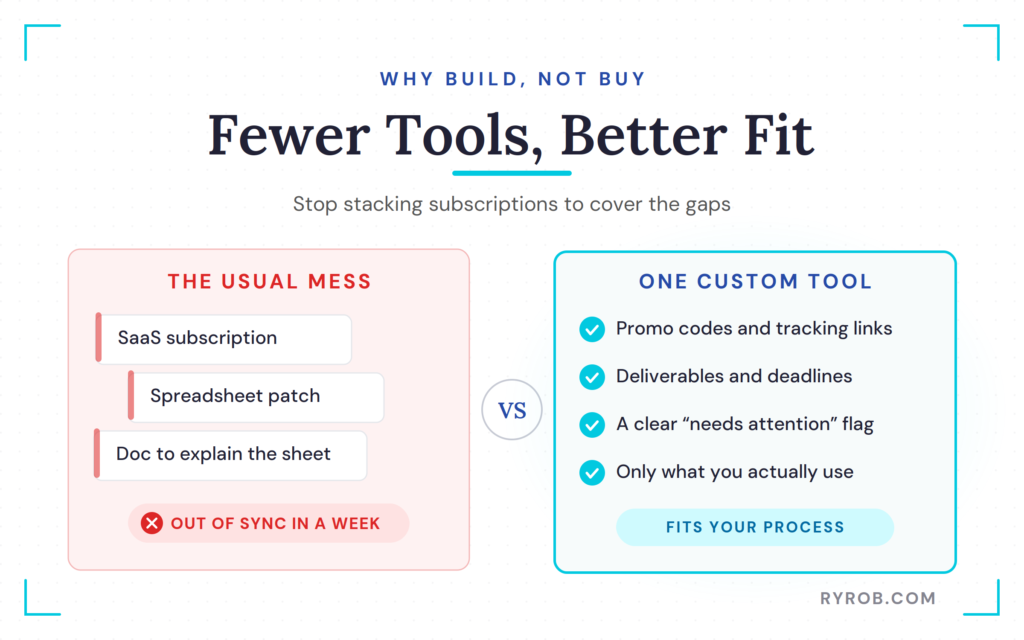
That kind of mess isn’t always a software problem. It’s usually a process problem, and custom software development can help you build around the way your business actually operates instead of adding another bloated subscription.
A custom tool lets you decide what matters. If your partnership workflow needs promo codes, tracking links, deliverable dates, payment details, and a clear “this needs attention” warning, then that’s what the tool should show. No bloated dashboard, no irrelevant features hiding the one thing you need to see.
There’s still a place for existing software, of course. If you need workflow automation or API integrations between apps, tools like Zapier, Make, and n8n can make a lot of sense.
But there are plenty of workflows where the real issue isn’t connecting apps. It’s that no off-the-shelf productivity tool works the way your business works.
A spreadsheet is fine until it becomes the operating system for something important. At that point it needs clear inputs, ownership, and a place where everyone sees the same current information. That’s the moment when building something custom starts to make a lot more sense.
If you’d rather see which of these I actually rely on, I break them down in my roundup of the best blog automation tools.
The Describe, Refine, Publish Workflow
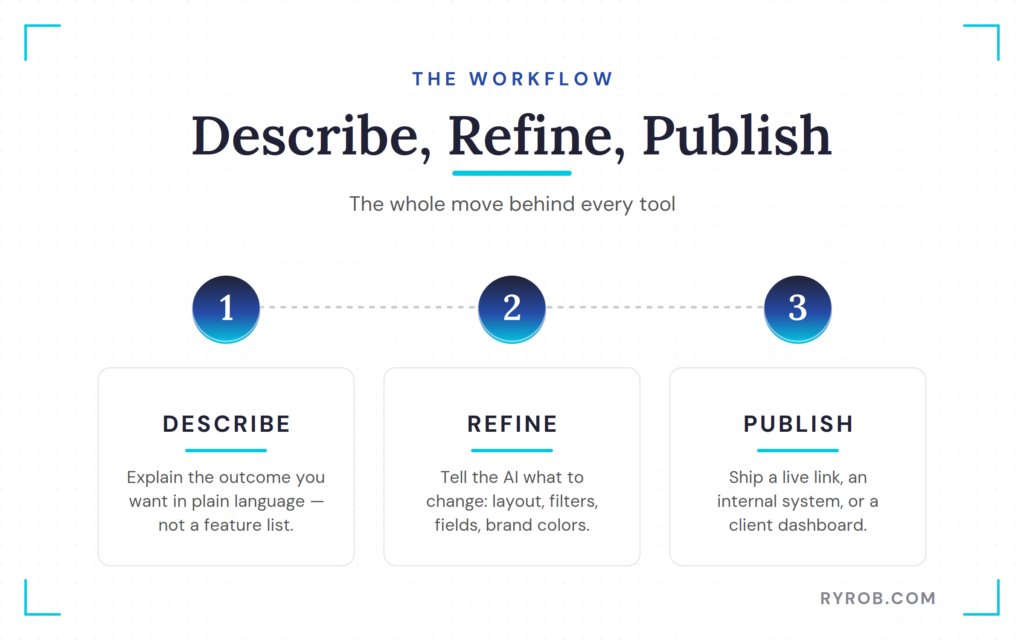
The process I use with Sticklight is almost comically straightforward. I describe the tool I want, answer a couple of questions, review the first version, and tell the AI what to change. There’s no blank canvas, no database schema to stare at, and no hunting for the one spreadsheet that has the latest version of a deal.
This is the same no-code, describe-what-you-want approach I used to build a website with AI, just pointed at tools instead of a full site.
Describe the Outcome, Not Just the Feature List
A decent prompt doesn’t need to sound technical. It needs to explain what someone should be able to do with the finished tool. This is practical prompt engineering, where you give the system enough context to understand the desired outcome, not just a list of features.
Natural language processing helps translate those plain-language instructions into the structure the tool needs. Behind the scenes, large language models can turn that description into code generation for functional components, forms, filters, and workflows.
For example, instead of asking for “a partnership dashboard,” I described the actual job:
“Build me an internal tracker for all my partnership deals. Include promo codes, tracking links, deliverables, deadlines, and a running list of what’s still open. Let me filter by status and show what needs attention.”
That gives the AI enough context to build toward the outcome, not merely stack random fields on a page.
It can also ask follow-up questions before building. AI agents can guide that conversation by identifying missing details and clarifying how the tool should work.
For a tool that needs shared access, a cloud database and user login make sense. For a one-off calculator or public lead magnet, the setup can be much simpler.
Refine the Parts Your First Version Misses
The first pass is rarely perfect. That isn’t a problem, it’s the whole point of building this way.
You can request a clearer layout, different filters, stronger visual warnings, new fields, brand colors, and a better order for the steps. AI agents can help handle those iterative design changes while you type requests, use voice input, or make inline edits by clicking an element on the page.
For someone more technical than me, Sticklight also exposes the underlying code for direct edits. I don’t touch that part. I stick with plain-language requests and visual changes.
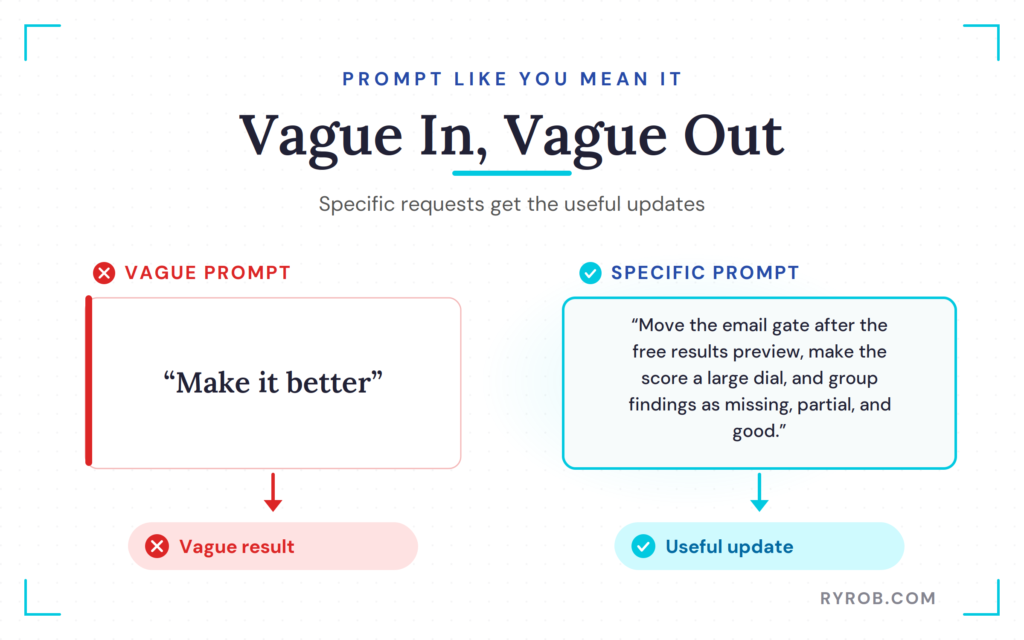
The best improvement I can make to an AI-built tool is being specific. For example:
- “Make it better” gets you a vague result.
- “Move the email gate after the free results preview, make the score a large dial, and group findings as missing, partial, and good” gets you a useful update.
Publish a Working Tool, Then Put It to Work
Once the tool is ready, you can publish it to a live link, test it privately, or connect it to your own domain.
That last step matters. These aren’t throwaway prototypes sitting in a design file. They can become a public lead magnet, an internal system for your team, or a client-facing dashboard.
When experimenting with AI for your content work, my roundup of the best AI tools has more options for research, writing, optimization, and promotion.
Building a custom app is a different use case, but it follows the same principle. Let AI handle the repetitive setup so you can put your energy into the work that needs your judgment.
👋 Want to build one of these yourself? You can start free with Sticklight and use code RYANROB30 for 30% off if you upgrade!
Three Custom AI Tools I Built for My Business
Here are the three tools I built using this exact workflow. Each one solved a problem that had been annoying me for far too long.
1. An AI Search-Readiness Lead Magnet for My Blog
Most lead magnets are PDFs. And, let’s be honest, most people never open them.
I wanted something more useful for readers on ryrob.com. Instead of asking someone to hand over their email address for a generic guide, I wanted to give them a quick, practical answer first.
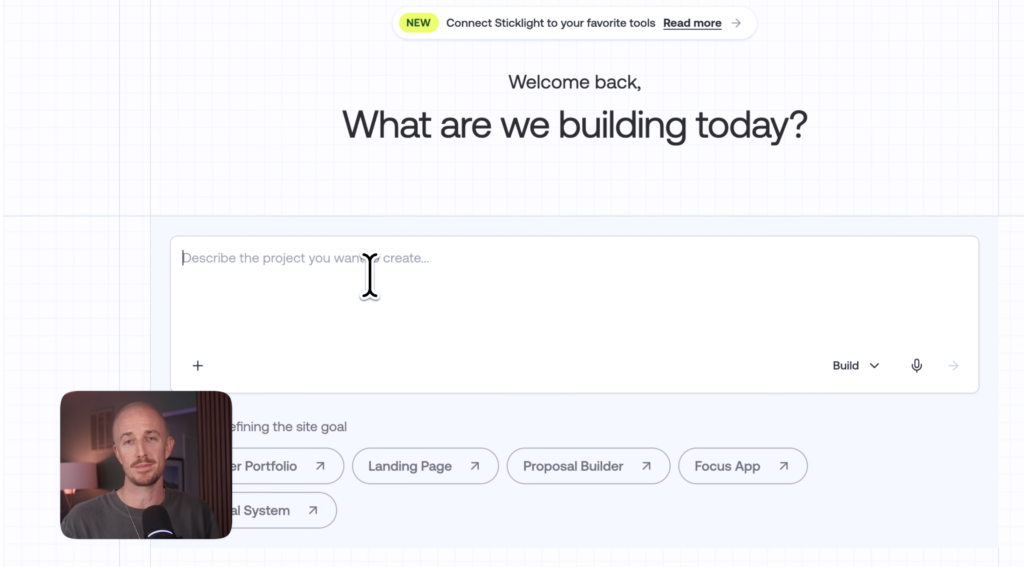
So I built an AI-powered web app that checks search readiness.
A visitor enters their website URL. The tool uses data analysis to review the site, assign a readiness score, and surface what appears to be working, what looks incomplete, and what may be missing. The results are grouped into categories like good, partial, and missing.
During the demo, I tested it on ryrob.com. The tool returned a score of 90 out of 100 and flagged a title that was a little too long. It also showed more positive findings than issues, which is always nice to see when you’re testing your own site on camera.
Then I tested another site with more problems. The report surfaced recommendations such as:
- Add a stronger meta description, along with a copy-and-paste prompt to get started.
- Add FAQ content with schema markup.
- Fix the heading structure and expand thin content where needed.
If you want to go deeper on why that matters, Search Engine Land has a clear breakdown of how schema markup fits into AI search.
The initial score and findings are free. The detailed action plan comes after the visitor enters their email address.
That’s the order I care about: value first, email second.
Your email list is one of the few audience assets you actually own. Search rankings move around. Social platforms change the rules whenever they feel like it. But when someone signs up because you’ve already helped them, you’re starting the relationship with trust instead of a bait-and-switch.
The same principle is why other interactive lead magnets outperform PDFs, like when I tested how to host a webinar to grow my list.
To start building your own resource library, you’ll find plenty of free blogging tools that can help with content, keyword research, and SEO tasks too.
2. A Partnership Deal Tracker for My Team
Partnerships have a lot of moving pieces. Promo codes, tracking links, payment terms, deliverables, deadlines, and approvals all need to live somewhere.
Mine used to live in a spreadsheet. It worked, technically. It also became stale within about a week.
The custom partnership tracker changed that.
Each deal includes the partner name, promo code, tracking link, deliverables, timeline, and status. The dashboard shows what needs attention, and the team can filter deals by active, paused, completed, or canceled.
For this tool, the follow-up questions from Sticklight were useful. I chose a cloud database with user logins so multiple people on my team could use the same system, while keeping database management organized behind the scenes. Then I defined exactly what should trigger a “needs attention” status:
- A deliverable is past its due date.
- A promo code is missing.
- A tracking link is missing.
The tracker uses AI agents to monitor those conditions and workflow automation to highlight deals that need attention. That sounds small, but it changes how the tool feels day to day. Instead of opening a giant spreadsheet and hunting for the broken part, the dashboard points at the issues that are blocking progress.
In the demo, I updated a deal that needed an article review. Once the review task was checked off and saved, the AI agents moved it out of the “needs attention” view. That’s the kind of boring, useful behavior I want from an internal tool.
A workflow doesn’t need to be flashy. It needs to keep small details from slipping through the cracks.
3. A Content Production Board for My Agency
The third tool is for my agency, Refresh, where we help SaaS companies and small businesses grow through content and organic traffic.
Running content for multiple clients gets messy fast. Every assignment has an owner, a deadline, a stage of production, and a client who wants to know where things stand. If you don’t have a clear view across all of that, you’re going to spend way too much time asking, “Hey, where are we on this?“
So I built a content production board with five stages:
- Brief
- Draft
- Review
- Approved
- Live
Each piece of content is a card. The card shows the client, due date, and current stage. Cards are color-coded by client, and a click moves the content forward to the next stage.
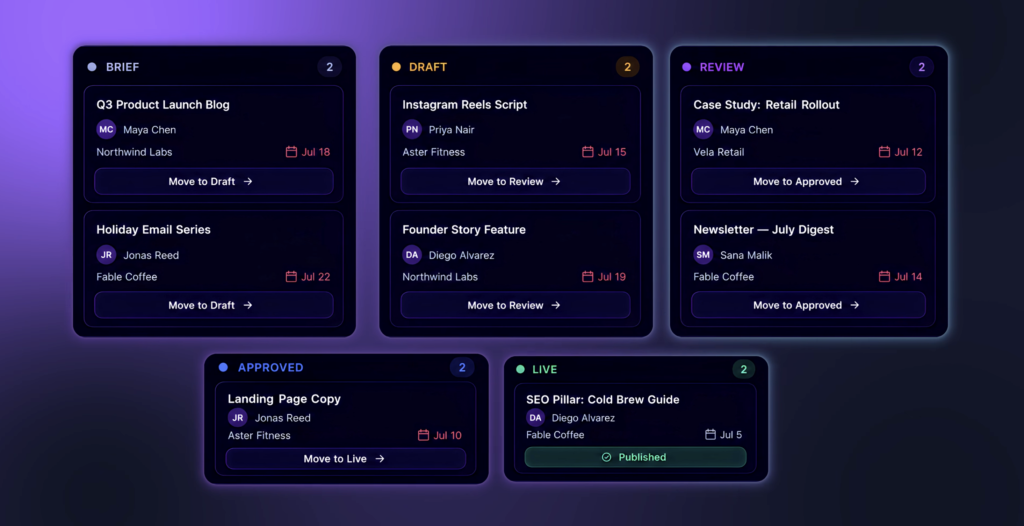
The dashboard also updates the count in each column, so everyone can see the production picture at a glance. No need to ask whether there are twelve drafts waiting for review when the board shows it right in front of you.
I can also use AI agents as digital employees for parts of the workflow, such as checking whether a draft is ready for review, nudging the right person when a deadline is approaching, or helping manage stage handoffs.
A second AI agent could handle routine status updates, reducing the manual project management overhead that usually comes with coordinating multiple clients.
This is where a custom tool can be better than trying to force a generic project management app into your process. I don’t need hundreds of project features. I need the agency workflow my team uses every week, with workflow automation built around the way we already work.
If you’re comparing options before building your own system, this overview of no-code automation tools is a helpful look at the broader category. No-code platforms are often better for connecting systems or creating a focused app that solves one specific business problem.
What Makes an AI-Built Tool Worth Keeping
The point isn’t to build an app because AI makes it possible. It’s to get rid of friction that keeps showing up in your work, whether the solution is a simple dashboard or one of your AI agents handling a repetitive step.
Before I build something, I ask a few simple questions. Is this problem happening every week? Are people copying the same details between tools? Does important work rely on somebody remembering to update a spreadsheet? Would a clear dashboard or a well-designed AI agent prevent missed deadlines or lost opportunities?
If the answer is yes, there’s probably a useful tool hiding in there.
The three examples above all have one thing in common. They make a recurring process visible:
- The AI search checker gives readers a fast assessment and turns useful advice into a lead magnet.
- The partnership tracker gives my team one current place to manage deals.
- The content board shows what every client deliverable needs next.
Don’t overbuild on day one. Start with the smallest version that does the job. A good first version might only need a form, a dashboard, two filters, and a status field. You probably don’t need large language models, vector databases, or complex Python scripts until the simple connections are already working.
Then use it. The stuff that annoys you after a week is what should drive the next round of changes.
That approach also keeps you from collecting software subscriptions like they’re Pokemon cards. You don’t need a dozen tools if one custom system can handle the exact process your business repeats all the time.
FAQs About Building Custom Tools With AI
A few of the questions I hear most often when people start building their own tools.
Do I Need to Know How to Code?
No. I don’t write code, and I built all three of these tools with plain-language prompts, follow-up requests, and visual edits.
You don’t need experience with browser extensions, command line tools, or automated testing to get started. If you do know how to code, you can inspect and modify the code behind the tool, but that’s optional, not required.
How Long Does It Take to Build a Custom AI Tool?
The first working version can come together in a few minutes. The tools in this walkthrough took roughly 10 minutes each to build and refine.
The bigger question is how clear you are about the problem. If you know what information the tool needs, who will use it, and what should happen next, you’ll get to a useful version much faster.
Can I Use a Custom Tool as a Lead Magnet?
Yep, and I think it’s often better than a static PDF.
Give visitors a useful result upfront, then offer a deeper action plan, report, template, or follow-up resource in exchange for their email address. The reader gets immediate value, and you get a subscriber who has a real reason to hear from you again.
Can My Team Use an AI-Built Internal Tool?
They can, as long as you build it with the right access and data protection setup. For the partnership tracker, I chose a cloud database with user authentication and enterprise security so the team could access the same live information safely.
That’s a lot better than emailing spreadsheets around and hoping nobody edits the wrong version. You can also define which machine learning models handle sensitive information and what each team member is allowed to see.
Final Thoughts About Building Custom Tools With AI
The best part of building with AI isn’t that it replaces every piece of software you use. It doesn’t, really. Instead of relying on complex engineering, code generation, Python scripts, or command line tools, you can use conversational AI to turn a clear description into a practical starting point.
It’s that the gap between “I wish I had a tool for this” and “my team is using it” is now a lot smaller. You can turn a messy recurring workflow into a working tool, whether that means browser extensions, API integrations, data analysis, or workflow automation, without waiting on a developer, a two-week sprint, or a bigger budget.
Start with the process that’s currently held together by tabs, reminders, and crossed fingers. Describe the outcome you want, refine the parts that matter, and publish something your business can actually use. That might be a focused internal tool or one of the AI agents that handles a repetitive task for your team.
Describe, refine, publish. That’s the whole move, and it’s how AI agents can remove friction from everyday business operations.
Build Custom Tools Without Code Using Sticklight
Every tool I built in this post came out of Sticklight, from the lead magnet to my agency’s content board. You just describe what you want, refine it, and publish in minutes. Use my code RYANROB30 for 30% off a plan👇

Ryan I found your video helpful. I looked but find no info regarding security when using Sticklight. General AI leaves your data public, what about Sticklight? Is it cloud based so only your company has access? I am not a coder but I could use this tool.