

Most web hosting comparisons tell you what to buy. Very few show you what actually happens after you launch a real website. So, I challenged myself to build three brand new websites for a complete Cloudways vs Bluehost vs SiteGround comparison. I spent my own money and used the same hands-on testing methods I apply in my own business.
This hosting test compares traditional entry-level (budget-friendly) shared hosting against a managed hosting alternative. Throughout the process, I analyzed how each of these hosting platforms balance ease-of-use with the reliability promised by its uptime guarantee policies.
The goal of this challenge is simple: See which web hosting provider gets you online fastest, which one gives you the best-looking starter website with the help of AI, and which one delivers the best speed, performance, ownership, and long-term value in 2026.
If you’re trying to choose a hosting plan without wasting time or getting surprised by massive renewal pricing later… this is where the differences become ultra clear. Be sure to watch my full review video above for the conclusion.
Disclosure: Please note that some of the links below are affiliate links and at no additional cost to you, I’ll earn a commission. Know that I only recommend products and services I’ve personally used and stand behind. When you use one of my affiliate links, the company compensates me, which helps me run this blog and keep my in-depth content free of charge for readers (like you).
Key Takeaways for Cloudways vs Bluehost vs SiteGround Hosting
If you want to get straight to the point, here are all the key takeaways:
- Cloudways won on website speed, with a 98% GTmetrix performance score. As a leader in managed WordPress hosting, they deliver a level of speed that isn’t matched by the shared hosting alternatives.
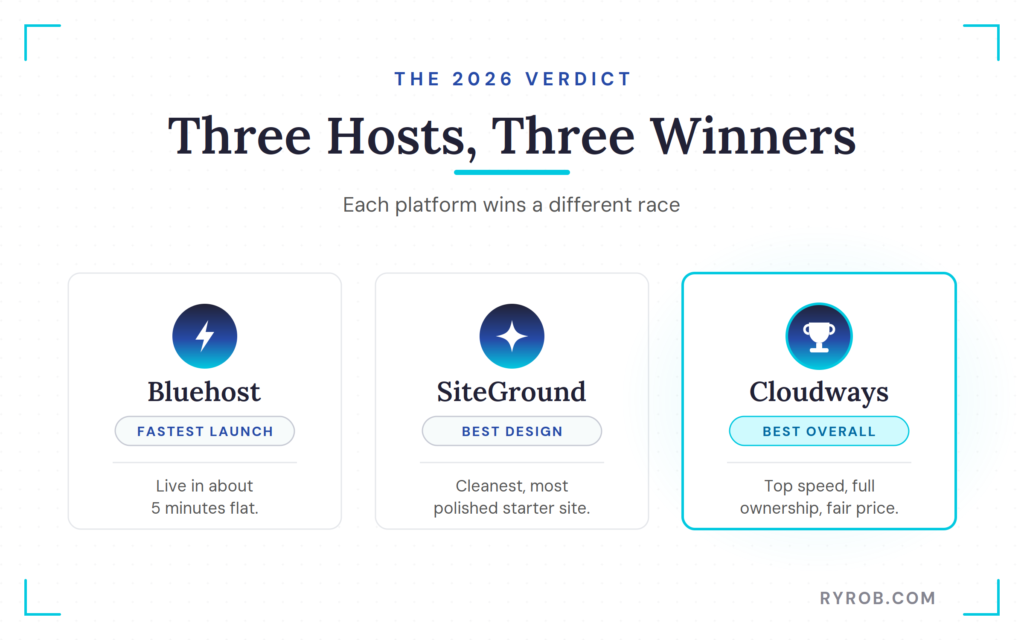
- Bluehost was the fastest to launch a website, getting a basic site live in about 5 minutes with its AI website builder.
- SiteGround produced the best-looking starter site, with cleaner design and more polished default layouts than Bluehost.
- Pricing: Over 3 years, Bluehost came in cheapest at about $155 pre-paid (though renewals climb steeply), SiteGround is the most expensive at around $778 after renewals, and Cloudways is in the middle at about $369 while still being the fastest of the three.
The quick verdict is simple. If you want the easiest launch, choose Bluehost. If you care most about starter design, choose SiteGround. If you want the strongest overall mix of speed, portability, and room to grow, choose Cloudways. My pick for serious website owners that want to rank & maximize traffic potential? Cloudways by a mile.
👋 Quick heads-up! I secured you 30% off your first 3 months with the winner of our hosting comparison challenge, Cloudways. Use the promo code RYROB30 to enjoy your discount on any Cloudways plan today.
Get the Fastest Web Hosting for Your Site: Cloudways
Get your website hosted with Cloudways, the lightning fast, performance-optimized web hosting company for small business sites, today.
How My Hosting Speed Test Comparison Was Designed
This speed test stayed simple on purpose. Each host got the same kind of starter site: a home page, an about page, and a contact page. No giant content library, no pile of plugins, and no elaborate optimization work after the fact.
That matters, because most people choosing a host are starting from zero. You are not moving a 500-post content site on day one. You are trying to get something online, make it look decent, and avoid boxing yourself into a bad choice.
Why a Real Build Test Is More Useful Than Marketing Claims
Every hosting company claims to be fast and promises an easy setup. That’s not helpful.
What’s helpful is building three sites side-by-side and seeing what the experience feels like in real life.
- How many steps are there?
- How much friction shows up?
- Does the AI builder give you something usable or something that still needs a weekend of cleanup?
I also wanted the comparison to reflect how web hosting actually looks today, not how it looked when I first started my blog. In 2026, AI website builders are everywhere, expectations for performance are higher, and it is easy to get seduced by a slick setup flow without considering what happens six months later.
That’s where ownership matters. A host can make the first 10 minutes feel great and still leave you with a site that’s harder to move, harder to control, and slower than it should be… especially in a world where GEO is the new SEO.
Performance Data and Measurements
To provide a comprehensive review, I evaluated each host across seven key performance data points and operational requirements:
- Setup speed. I measured how quickly a beginner can go from checkout to a live site.
- Starter site quality. I assessed whether the initial output is professional enough to publish, or if it feels like a rough draft with generic stock photos.
- Web performance. I used GTmetrix for the headline numbers, with PageSpeed Insights as part of the testing stack. If you have ever wondered why these tools can tell slightly different stories, this comparison of PageSpeed Insights and GTmetrix is a solid breakdown for understanding your site metrics.
- Pricing over time. Intro deals are attractive, but I focused on the total cost of ownership once the renewal rates kick in.
- Control and portability. I checked how easy it is to perform a site migration if you eventually decide to move your content to a different provider.
- Development tools. I tested whether each host includes website staging by default, which is essential for testing changes before pushing them to your live audience.
- Security basics. I verified that each provider includes a free SSL certificate as a standard baseline, which is a non-negotiable requirement for any website in 2026.
Building a Website with Bluehost’s AI Builder
To give credit where it’s due, Bluehost was the quickest of the three hosts to get me from zero to live website. I used the Starter plan, which began at $3.99 per month for the first three years and renews at about $9.99 per month after the intro pricing.
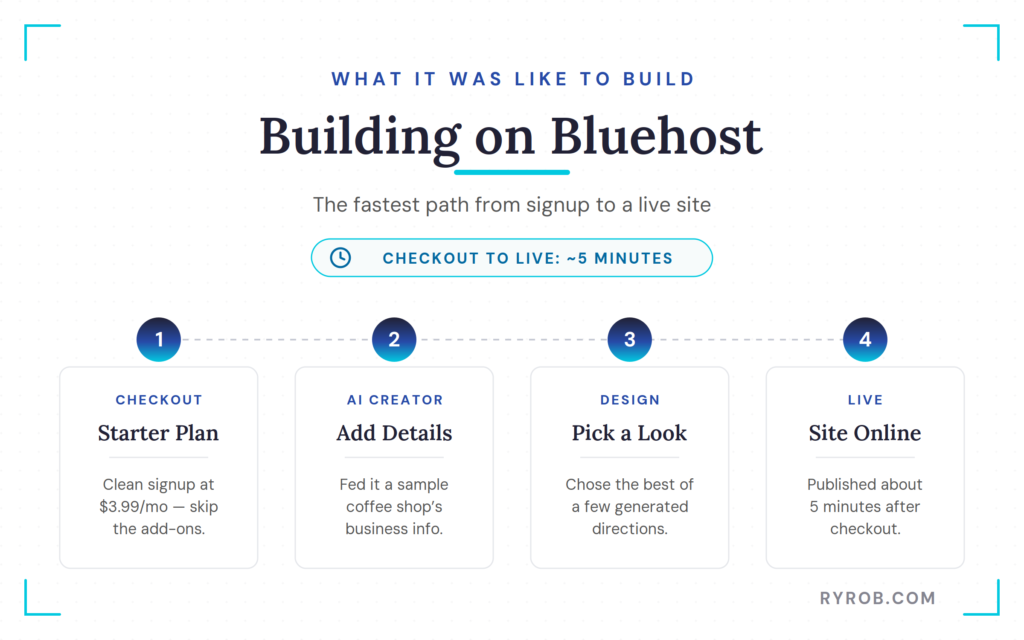
The checkout flow was clean, and this is worth saying out loud: most of the add-ons offered during signup were not necessary for this test. If you are building a simple WordPress site, you can usually skip those extras and handle the basics later with WordPress tools.
Once inside the account, I clicked into the AI site creator and gave it the business details for a sample coffee shop. After a short wait, it generated a few different design directions. The middle option looked the best, so that became the starter site.
About 5 minutes after buying hosting, the site was up. That is fast. For a beginner who feels overwhelmed by WordPress, Bluehost makes the first mile easy.
Bluehost: Best Shared Hosting for Beginners
This is where Bluehost still makes sense. As a well-known entity in the world of EIG hosting, they’ve refined the process of removing too many decisions for new website owners.
You don’t have to think much, which is very helpful when doing something new. There’s value to that. The AI builder asks for a few details, gives you a few options, and gets a site online fast. The copy sounded a bit generic, which is pretty normal for AI-generated website text, but the overall structure worked. The stock imagery was also better than I expected for a quick first pass.
If you are testing an idea, building a first site, or want the kind of setup that does not fight you, Bluehost is still one of the best shared hosting plans for beginners. Shared hosting has limits, but it also keeps the barrier to entry low.
When you run into trouble, their client support is available 24/7. However, be aware that their responses can often feel scripted, which may lead to back-and-forth communication if you have a more complex or technical issue.
Where Bluehost Starts to Feel Limited
The trade-off showed up in the performance results. Bluehost landed a B grade with a 75% GTmetrix performance score.
That’s not bad. It is a perfectly acceptable place to start. The TTFB, or time to first byte, looked solid enough for a starter site. However, it wasn’t the kind of result that makes you think the site is ready for serious growth.
The other catch is the AI website builder itself. The Bluehost AI builder is fast, but that convenience comes with some platform lock-in.
If you want to move away later, you may not carry over the same experience cleanly. And while the intro pricing is attractive, the low first price is only part of the story if you are building something you want to keep around for the long term.
Building a Website with SiteGround’s AI Builder
SiteGround felt like the middle lane in this comparison, at least at first. I used the GrowBig plan, which started at $4.99 per month on the intro offer (for 1 year), then jumps up to about $29.99 per month after that. Pretty steep price hike, keep an eye on that.
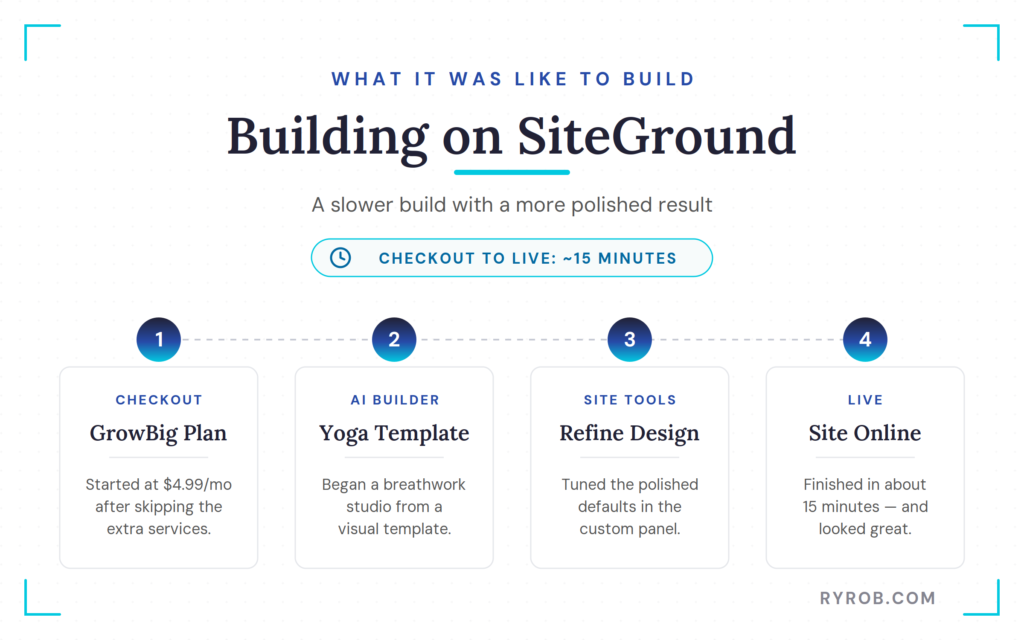
Setup was straightforward. After skipping the usual extra services at checkout, I went into the site creation flow and used SiteGround’s AI website builder.
One thing I liked was the option to build in WordPress directly if you want to. However, the focus of this test was the fastest path each host offers, so I chose their AI website builder option. Once inside, you manage everything through Site Tools, which is their proprietary and very user-friendly custom control panel.
For the sample site, I built a breathwork studio and started from a yoga studio visual template. The builder felt more polished than Bluehost’s right away. It offered more visual direction, more design control, and better defaults.
The whole process took about 15 minutes. Slower than Bluehost, yes, but the finished site looked better out of the box.
SiteGround: Better Design and Site Tools
If the only thing you cared about was, “Which one looks nicest with the least effort?” SiteGround probably wins.
The layout looked cleaner, and the color choices felt more intentional. The overall site had a more finished feel to it, even before swapping in custom brand assets.
It did not have that slightly generic AI builder look that Bluehost had in places.
Beyond aesthetics, SiteGround offers solid infrastructure, as they host on Google Cloud. They also include their proprietary SuperCacher technology to help with performance, though it requires some configuration.
It is also worth noting that SiteGround is known for high-quality client support. However, access to their most experienced agents can be restricted on lower-tier plans.
The Big Catch With SiteGround Pricing
The hiccup I ran into with Siteground is what happened when the speed test and long-term pricing entered the chat.
SiteGround came back with a C grade and a 62% GTmetrix performance score. That was lower than expected, especially given how polished the front-end output looked.
A prettier starter site is nice, but not if the underlying performance trails both of the other options.
Then there’s the issue of renewal prices. The intro offer looks reasonable, but the 3-year math gets painful, fast.
At roughly $59 for year one and around $360 per year for years two and three, the total hit about $778 over three years in this comparison.
So yes, SiteGround gave the nicest-looking AI-built site. But it was also the most expensive option over time and the slowest performer of the three.
Building a Fast WordPress Site with Cloudways
Cloudways is different from the moment you start. It is not shared hosting like Bluehost and SiteGround. It is managed cloud hosting, which means you choose the cloud infrastructure underneath and set up WordPress on top of that.
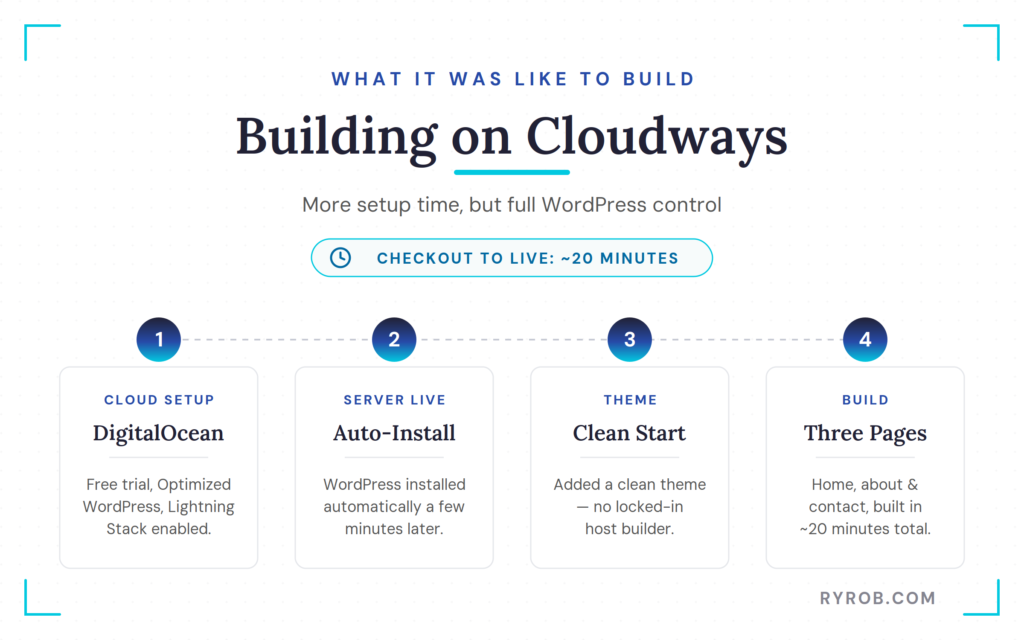
For this build, I used the free trial, selected the flexible option, and chose Optimized WordPress. While I picked DigitalOcean as the provider for this test, users also have the flexibility to choose Vultr High Frequency for even more performance. I turned on the Lightning Stack, left the database settings alone, and selected a basic server configuration.
A major differentiator here is the pay-as-you-go billing model, which ensures you only pay for the resources you actually use.
A few minutes later, the server was live and WordPress was auto-installed. Cloudways doesn’t have its own AI website builder live yet, though I know one is coming soon.
So instead of using a proprietary builder, I installed a clean WordPress theme and built the three sample pages manually. Total build time was about 20 minutes.
Cloudways: Managed Cloud Hosting Performance
This is where the comparison swung hard in the direction of Cloudways becoming my top pick for serious website owners.
The GTmetrix report for the Cloudways site came back with an A grade and a 98% performance score. That was miles ahead of SiteGround and well ahead of Bluehost, too.
A key factor in this performance is the inclusion of Cloudflare Enterprise integration, which provides advanced edge caching to keep your site running at peak efficiency. Faster load speeds do not magically rank your site by themselves, but they reduce friction for readers, improve technical health, and provide a stronger foundation when you are trying to get pages indexed, ranked, and surfaced in AI-driven results.
If your site is growing past the beginner stage, this is the point where when to switch to managed WordPress hosting becomes a really smart move. In order to handle more traffic, you need a web host that’s set up for growing with you.
Beyond that, if you run into any technical hurdles, the quality of customer support here is excellent, with 24/7 live chat and optional premium support tiers for those who need even more assistance.
Why Full WordPress Ownership Matters
This is the part a lot of people skip, and I think it’s one of the biggest differences in this entire comparison test.
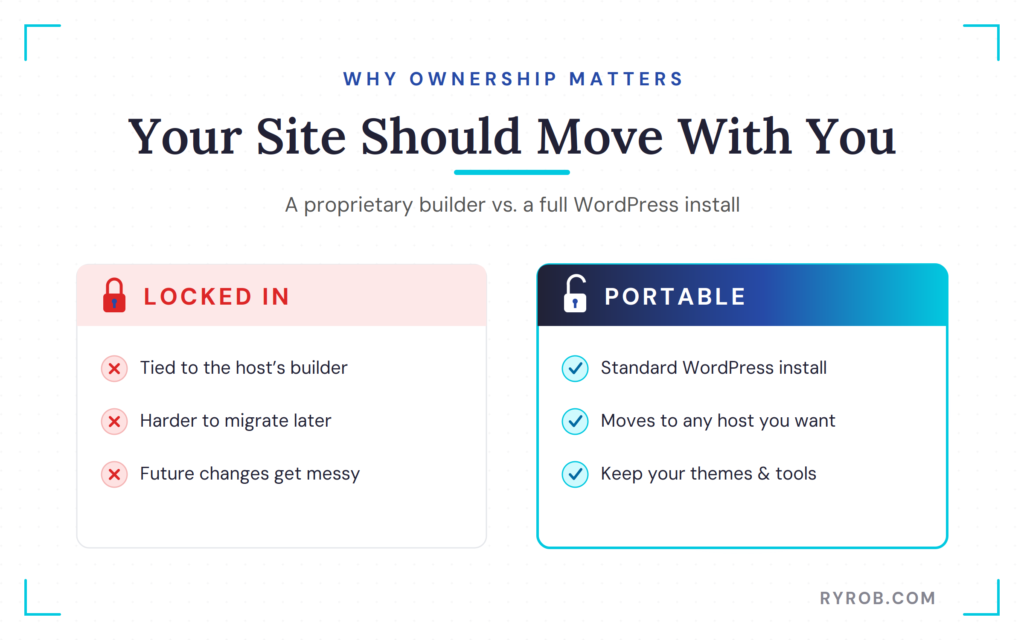
With Bluehost and SiteGround, the fastest setup path relies on their AI website builder experience. With Cloudways, you get a real WordPress install from the start. That means your site is portable.
If you move hosts later, your site moves with you. You can change themes, use your own AI website builder, or pair WordPress with outside tools on your terms.
The pairing often suggested here is Elementor with Angie AI, and that makes a lot of sense if you want AI help without giving up WordPress ownership. That extra 15 minutes up front buys a lot more freedom later.
The Real Differences Between These Web Hosts
This is where the differences between these hosts become much easier to see. Once the sites were built and tested, the strengths and trade-offs of each platform started to stand out.
AI Website Builder Results: Fastest, Prettiest, and Most Flexible
The AI builder story here is more interesting than it looks at first glance.
Bluehost won the speed round of our AI builder options. SiteGround won the design round. Cloudways, even without an in-house AI builder live yet, won the flexibility round because it provided full WordPress ownership instead of wrapping the entire experience inside a host-controlled interface.
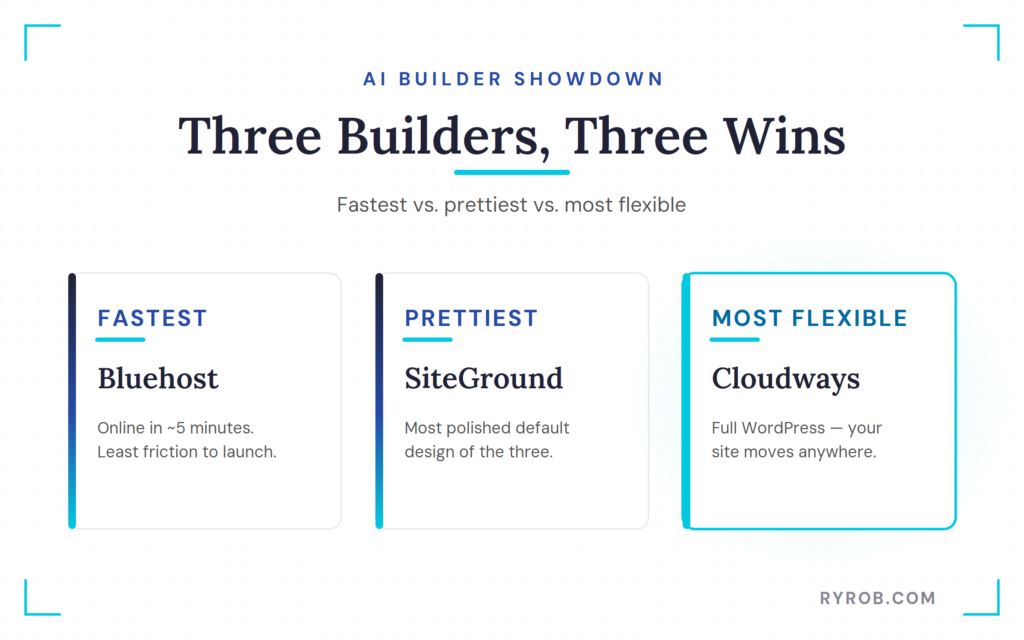
While traditional cPanel management often felt technical and overwhelming, these modern AI-driven tools have transformed the onboarding experience for new users.
The host that wins the AI builder demo is not always the host you will want to live with for the next three years.
Best for Speed to Launch
Bluehost is the clear winner if your goal is to get online in minutes.
You buy hosting, answer a few prompts, pick a design direction, and publish. That is the appeal.
If you have been putting off starting because WordPress feels intimidating, Bluehost lowers that first hurdle in a big way. By automating the setup process, it provides a much faster alternative to the manual configuration required by traditional cPanel hosting setups.
Best for Out-of-the-Box Design
SiteGround had the best-looking output of the three.
Its builder felt more polished, gave better defaults, and produced a site that looked more intentional from the start.
If design is the first thing you care about, and you are okay with the cost and the builder limitations, that is the lane SiteGround fits best. It strikes a balance between ease of use and professional aesthetic quality, moving far beyond the clunky interface of a standard cPanel environment.
Best for Long-Term Growth, Website Speed & Performance
Cloudways wins here without much argument.
It didn’t take the AI builder shortcut, but the result was a clean WordPress site that can move anywhere, in just a few more minutes of build time than the AI builders on our other two hosts.
Cloudways provides advanced WordPress features and developer-friendly controls that the automated builders simply cannot match. That is a better long-term position to be in for scaling your business.
Plus, once Cloudways rolls out its own AI builder, they’ll have both options available. That makes this even more interesting for users who want the power of a professional panel without sacrificing modern convenience.
Speed and Pricing Results That Actually Change the Decision
Let’s get to the part that changes what most people should pick.
On performance, Bluehost scored 75%, SiteGround scored 62%, and Cloudways scored 98% in GTmetrix. These results highlight a significant variance in Time to First Byte and Server Response Time, which are critical for site responsiveness.
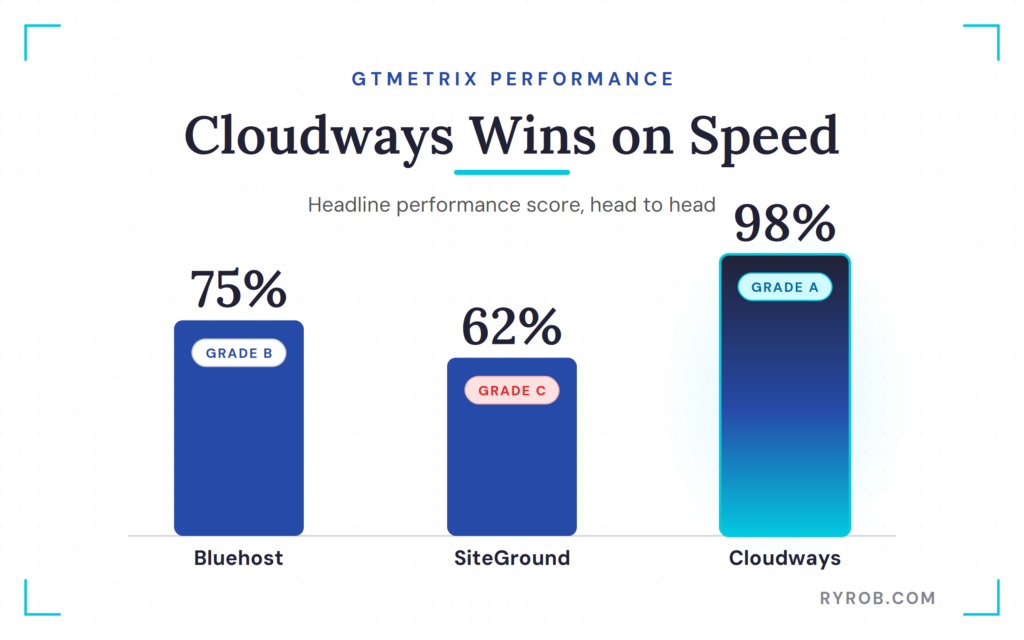
When you use traditional shared hosting, you often have to watch out for CPU limits that can throttle your site during traffic spikes. Cloudways differentiates itself by providing dedicated resources and high-performance SSD storage, which prevents the systemic slowdowns often seen with the other two providers.
These aren’t tiny differences you can shrug off. They are big enough to change how your site feels and how much technical cleanup work you may need later.
Speed scores are not just vanity metrics. Faster sites create a better user experience, reduce bounce-inducing friction, and provide a stronger technical foundation for your content. That is worth paying attention to if organic search matters to you.
On cost, the story changes once the promo pricing wears off. Bluehost came in around $155 total for the first 3 years, because that deal was prepaid upfront. After that, it renews at about $120 per year.
SiteGround totaled about $778 over 3 years. Cloudways landed at about $369 over 3 years on the setup I used here, with no pricing spike hiding in year two or three.
The cheapest checkout page is not always the cheapest host.
If you’ve ever tried to figure out how much should you pay for WordPress hosting, this is exactly why the answer depends on more than the sticker price on day one.
What the Performance Scores Mean for Real Websites
A faster starter site gives you breathing room.
It means less immediate pressure to fight with caching plugins, image compression, and technical fixes before you have even written your first 10 posts. It also means your site is better positioned when Google and AI answer engines evaluate the experience your pages deliver.
No, a 98% score does not guarantee top rankings. But starting from a stronger technical base is a lot better than starting from a weaker one and trying to patch your way back up.
Why the Cheapest Host is Not Always the Best Deal
Bluehost had the lowest 3-year entry price, and that matters for beginners on a tight budget.
But if you are comparing value instead of only the first bill, Cloudways ended up being the stronger buy. It cost more than Bluehost, but not by a wild amount over three years, and the speed difference was massive. SiteGround, meanwhile, looked fine on the first invoice and then became the most expensive option of the group.
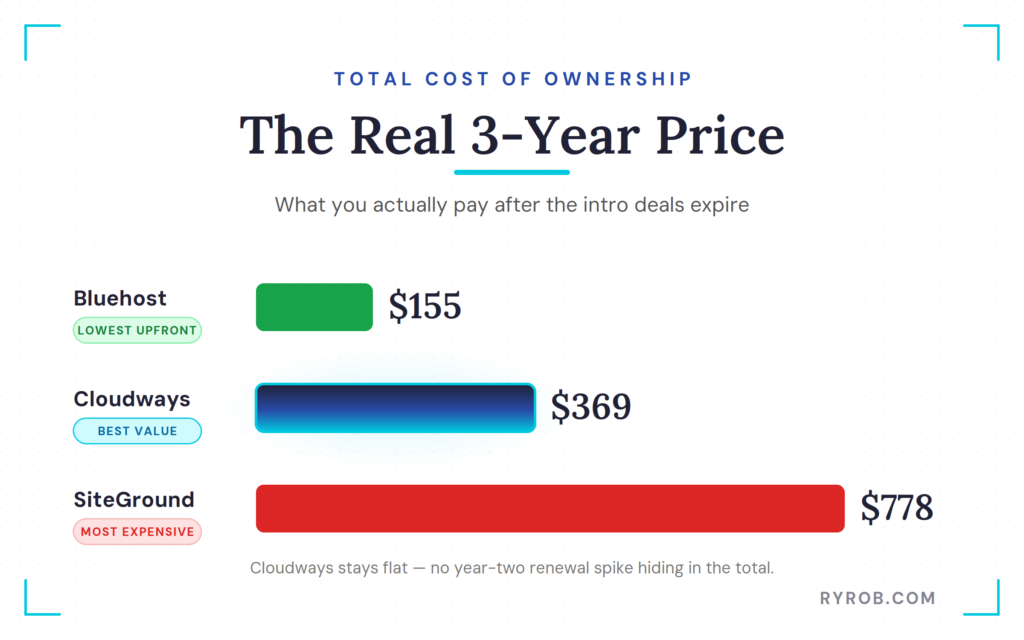
That is why I always care more about the full picture than the headline promo.
Which Web Host Should You Choose in 2026?
These are different picks for different people & use cases. That’s the honest answer.
If you’re a true beginner, the easiest launch might be the right call. If you are more serious about performance and portability, the answer changes. And if design polish matters more than long-term flexibility, there is a clear option for that too.
Choose Bluehost If You Want the Quickest First Launch
Bluehost is the easy on-ramp to getting a budget-friendly site live as quickly as possible.
If you’re testing an idea, building a first business site, or finally launching the project you have been putting off, Bluehost gets you online with very little stress. The AI builder is fast, the setup is simple, and the pricing is beginner-friendly for that first three-year term.
Choose SiteGround If You Want a Better-Looking Starter Site
SiteGround is the design-first pick, because I liked the options & design flexibility with their AI builder.
Its AI builder produced the nicest starter site in this test, and if that matters more to you than long-term portability or value, that can be enough reason to choose it.
Just go in with your eyes open about the renewal pricing and the fact that the performance did not back up the prettier front-end.
Choose Cloudways If You Want the Strongest Overall Value
Cloudways is the best overall option in this comparison, from my perspective.
It wasn’t the fastest setup, and it didn’t have the built-in AI website maker shortcut yet. However, Cloudways gave me the fastest site by far, I kept the most control, and have a site with the best long-term growth path, and a three-year price that stays reasonable.
If you’re serious about building something you want to keep, grow, and fully own, Cloudways is the host I recommend most.
What’s the Best Host for e-Commerce & High-Traffic Sites?
If you’re planning to launch a professional online store or expect significant spikes in visitors, you need more than a standard entry-level hosting plan. There’s not much room for negotiation here. If you’re selling something, you need a fast website that doesn’t delay checkout—otherwise, your customers will leave before they buy.
Cloudways is the superior managed WordPress hosting choice for scaling stores because its infrastructure is built for reliability. By providing access to high-performance managed cloud hosting, it gives you the flexibility to handle heavy traffic loads and helps ensure your database remains responsive when it matters most.
For any site owner who expects to grow beyond a simple blog, this platform provides the power and stability needed to maintain a fast, professional user experience.
FAQs About Cloudways vs Bluehost vs SiteGround
Here are a few of the most frequently asked questions I get about these web hosting providers:
Is Cloudways Better Than Bluehost for WordPress?
Yes, if you are measuring speed, flexibility, and long-term ownership.
If you are measuring the fastest setup for a beginner on day one, Bluehost is easier to launch with initially. Cloudways is better once you prioritize high-level performance and control over the simplicity of the initial setup.
Do These Hosts Provide Automated Backups?
Yes, all three providers include automated backups.
The frequency and accessibility vary. Cloudways offers excellent flexibility, allowing you to trigger backups manually or set a custom schedule. Both Bluehost and SiteGround offer robust automated backup solutions, which are essential for protecting your site data without needing to perform manual exports constantly.
Is a CDN Add-on Included for Free?
Yes, each of these hosts includes a content delivery network.
SiteGround integrates its own service directly, while Bluehost and Cloudways rely on Cloudflare. Utilizing these services is vital because a faster Time to First Byte directly impacts your search engine rankings and overall user experience.
Can You Move a Site Built With Bluehost or SiteGround Later?
Yes, you can move WordPress sites built with Bluehost or SiteGround later.
However, the smoothness of that migration depends on how much of your setup is tied to the host’s specific builder experience. A proprietary builder can make the early setup easier while also making future changes messier.
Cloudways offers the cleanest portability because it allows for a standard WordPress environment from the beginning.
Which Host Is Cheapest Over Three Years?
Bluehost was the cheapest option in this test at about 155 dollars for the first three years when prepaid.
Cloudways followed at about 369 dollars over three years, and SiteGround was the most expensive at about 778 dollars over the same period.
Final Thoughts on Cloudways vs Bluehost vs Siteground
This comparison made the trade-offs a lot clearer than any hosting sales page ever will. Bluehost wins on speed to launch, SiteGround excels at providing a polished AI starter site experience, and Cloudways offers the strongest balance of speed, site ownership, long-term growth potential, and overall value for performance.
Ultimately, the best decision depends on your goals and your technical comfort level. While our performance data highlights the technical differences between these providers, your preferred level of client support should be a major deciding factor based on your expertise.
Before you choose, think about the kind of site you are building and where you want it to be a year from now. The best host is not always the one with the lowest intro price. It is the one that best supports where you want your website to go.
Get the Fastest Web Hosting for Your Site: Cloudways
Get your website hosted with Cloudways, the lightning fast, performance-optimized web hosting company for small business sites, today.

Excellent comparison and a refreshing approach to hosting reviews. We appreciate that you tested each platform by building real websites instead of relying solely on marketing claims and benchmark data.
As a growing electrical services company, website performance and reliability are critical factors for us. Fast loading times not only improve user experience but also help potential customers quickly find the information they need when searching for electrical services online.
Great comparison, Ryan! I really appreciate that you built real websites and shared actual performance results instead of relying on marketing claims. The breakdown of speed, long-term pricing, and ease of setup makes it much easier for business owners and bloggers to choose the right hosting solution. As a growing wellness and Ayurvedic brand at Bhumi Blend, website performance and user experience are incredibly important for building trust with customers. Your findings about Cloudways’ scalability and speed were especially insightful. Thanks for providing such a transparent and practical review that goes beyond the usual hosting recommendations.