

Not long ago, getting a business website online meant one of two things… you either paid a developer thousands of dollars, or you lost your weekends fighting with themes and quietly crying into your coffee. Thankfully, the WordPress AI website builder now flips all of that on its head.
If you don’t have coding experience, this builder wipes out most of the technical hurdles that used to make building a website such a pain. Now, you can describe your business, and the AI builds the site for you.
But I’ll be the first to tell you that AI website builders rarely live up to the promise, so I put this one to a real test. I built a full website for a cafe using one simple description. Then I pushed past the pretty demo to find out what WordPress AI gets right, and what still needs a real human behind the keyboard. Watch my full breakdown here:
Key Takeaways From My WordPress AI Website Builder Review
- It’s fast. The WordPress AI website builder takes you from a blank page to a solid first draft in minutes, with layouts, navigation, menu sections, and starter images built for you.
- It kills the blank-page problem. Instead of staring at 200 templates, you describe your business and react to something real. That removes most of the early friction.
- The first draft is scaffolding, not truth. It can invent a founder story, business hours, menu items, reviews, and addresses. Publishing those without a careful edit is a fast way to lose customer trust.
- The design holds up. The final site looked good, worked well on mobile, and had room to grow because it’s built on WordPress.
- Looking good isn’t getting found. A polished site won’t automatically rank in Google, Maps, or AI search. That part still needs your oversight.
Launch a Full Site in Minutes: WordPress
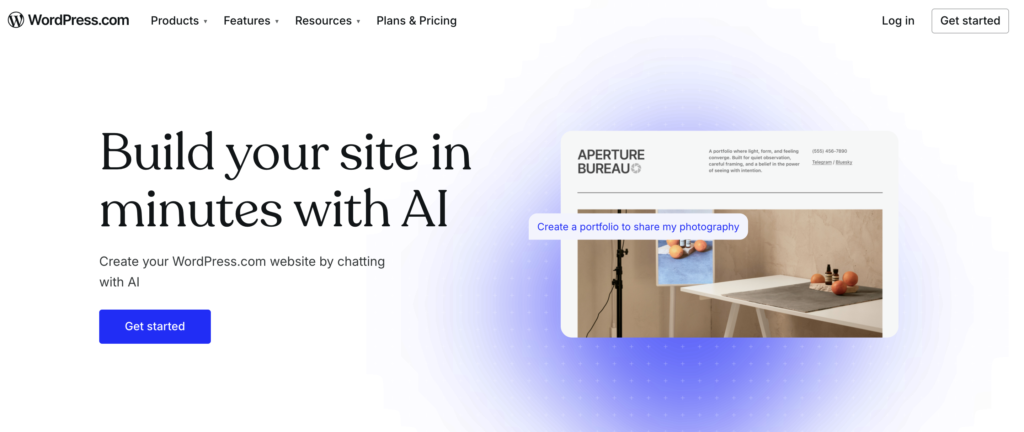
I’ve tried a lot of ways to get a site up fast, and this is the one I’d hand a non-technical friend without a second thought. You describe your business, it gives you a real first draft, and you take it from there. Free to try, no card needed!👇
How to Build a Small Business Website With WordPress AI
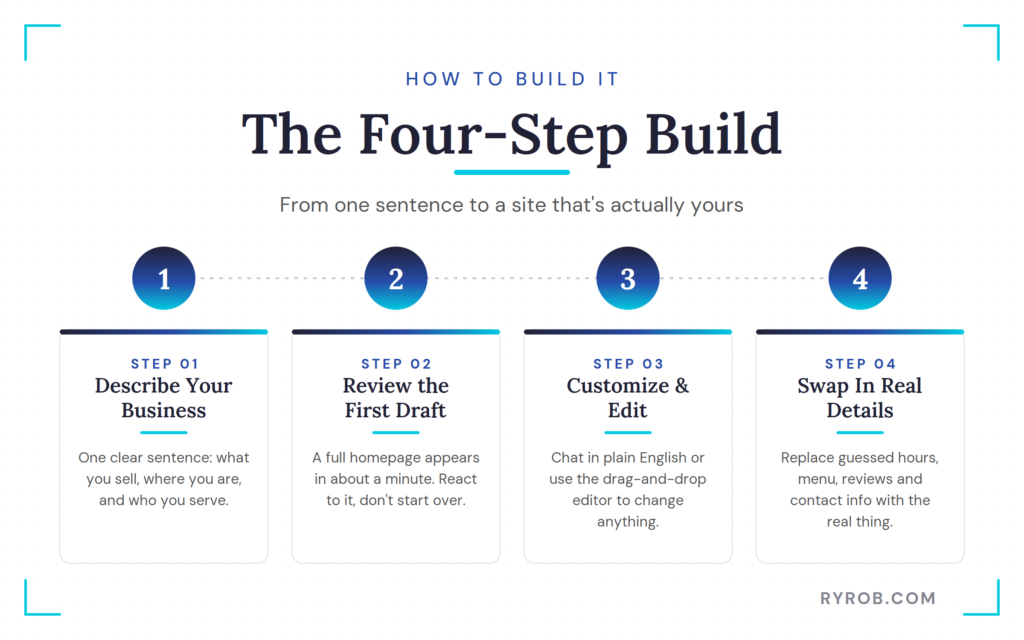
The process starts with a simple, conversational prompt. From there it moves into review, editing, and replacing the AI’s guesses with the details only you know.
The test used WordPress’ AI website builder, which is free to start and doesn’t require a credit card before you begin. That makes it easy to pressure-test the experience before committing to a paid plan for a custom domain and managed hosting, or before moving your existing site.
1. Start With One Clear Business Description
For this test, the business was Ridgeline Breakfast Burritos, a takeout breakfast spot with a small shop, wholesale accounts, and online ordering.
That one sentence gave the AI enough context to start making smart choices. It understood that a food business needed a menu, so it included ordering prompts and added a wholesale inquiry section because wholesale was part of the prompt. It even used mountain imagery that fit the “Ridgeline” name.
You don’t need to write a giant brand brief. But your first description should include the facts that shape the website:
- Your business name and what you sell
- Your location or service area
- Who you serve
- Whether customers can order, book, visit, or contact you online
- Any important detail about your model, like wholesale, catering, local delivery, or consulting
For example, a local photographer could write something like: “I run a wedding photography studio in Denver for outdoorsy couples, with custom packages, online inquiries, and galleries for past clients.”
That gives AI a much better starting point than “Make me a photography website.” The more honest context you give it upfront, the less cleanup you’ll have later.
2. Review the AI-Generated Layout First
After entering the business description and confirming a few details, the first draft appeared in about a minute. The homepage came back with a full set of sections already in place:
- A hero section with the business name
- A food image and mountain scenery
- A short description and an ordering callout
- A menu area
- A wholesale inquiry section
- Reviews
- A location block with a map
That’s a lot of the annoying setup work handled in one shot. You’re not staring at a blank white screen wondering where your About page should go. You have a working structure to react to. It helps to know what a strong page layout looks like, so you can tell whether the AI’s version guides visitors the way you want.
Still, don’t confuse a complete-looking draft with a complete website. The generated menu was a sample, the reviews weren’t real, and the opening hours were guesses. The business story sounded warm and polished, but it wasn’t based on an actual founder.
That’s normal for AI. Its job is to hand you a usable first draft instead of an empty page. Your job is to take that draft apart, verify every claim, and rebuild it around what’s true.
3. Customize Colors, Pages, and Images
There are two ways to make changes inside the WordPress AI website builder.
First, you can talk to the AI in plain English. It can suggest changes to colors, fonts, page layouts, and content. In this test, the initial orange palette was switched to a more subtle green that fit the feel of a mountain-town breakfast shop.
The AI suggested palettes, then applied the selected one across the site. One bright green section didn’t fit the rest of the page, but it was easy to click the color control and cycle through other colors from the same palette.
No digging around a hidden theme settings panel. No guessing which hex code belongs to which block.
You can also ask for content changes in the chat. A request to make the hero copy funnier produced a version with more personality. Think of it as having a designer beside you who’ll take revision number 17 without sighing.
The second editing path is the regular site editor. It’s worth getting comfortable in WordPress, since that’s where you’ll do your finer edits.
For example, the Shop page could be moved closer to the front of the navigation if online ordering matters more than the About page. That’s a small choice, but it can make a big difference. Your website should guide visitors toward the action you most want them to take.
Images work the same way. You can replace AI-generated photos with real ones by uploading them to your media library, or use image generation features to refine visuals. For Ridgeline, real food shots, real shop photos, and real people beat placeholders every single time.
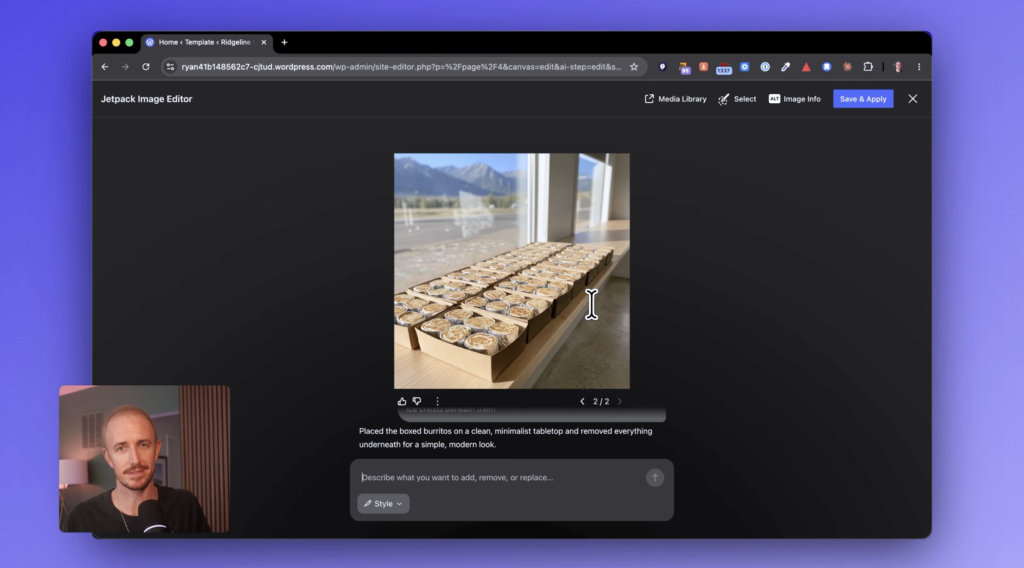
The builder also includes an AI image editor through Jetpack. In the test, a photo had distracting ice chests under a table, and a simple text prompt removed them to fit a cleaner, more minimal shop.
That’s useful for small visual cleanup. Still, use common sense and don’t edit your business into something it isn’t. Customers can spot the difference between a real cozy breakfast counter and an AI-polished fantasy version of it.
4. Swap In Your Real Business Details
This is the part you can’t skip.
The draft had guessed business hours, a sample menu, placeholder reviews, and generic contact info. Each one had to be replaced before the site could be treated like a real business asset.
For Ridgeline, that meant:
- Changing the hours to 6:00 a.m. to 3:00 p.m.
- Pasting in the real menu
- Adding the correct address
- Uploading a logo
- Replacing the text site title in the navigation
The menu update was especially simple. Select the existing menu section, paste in the real menu through the AI chat, and let the builder update the content block. You can then edit it further in the regular editor for more control over spacing, descriptions, or categories.
Uploading a logo worked through the chat too. After adding the logo file and giving the builder a clear instruction, the text title was replaced, and the logo size could then be adjusted manually.
Your business details aren’t small finishing touches. They’re the things customers use to decide whether to visit, call, order, book, or leave your site.
Wrong hours can cost you a sale. A fake review can kill trust. An incorrect address can send someone to the wrong place, and a sample menu is useless if the customer can’t order what they see. Before publishing, read every line as if you’re a customer with five minutes to spare and a real need to solve.
What the WordPress AI Website Builder Gets Right and Wrong
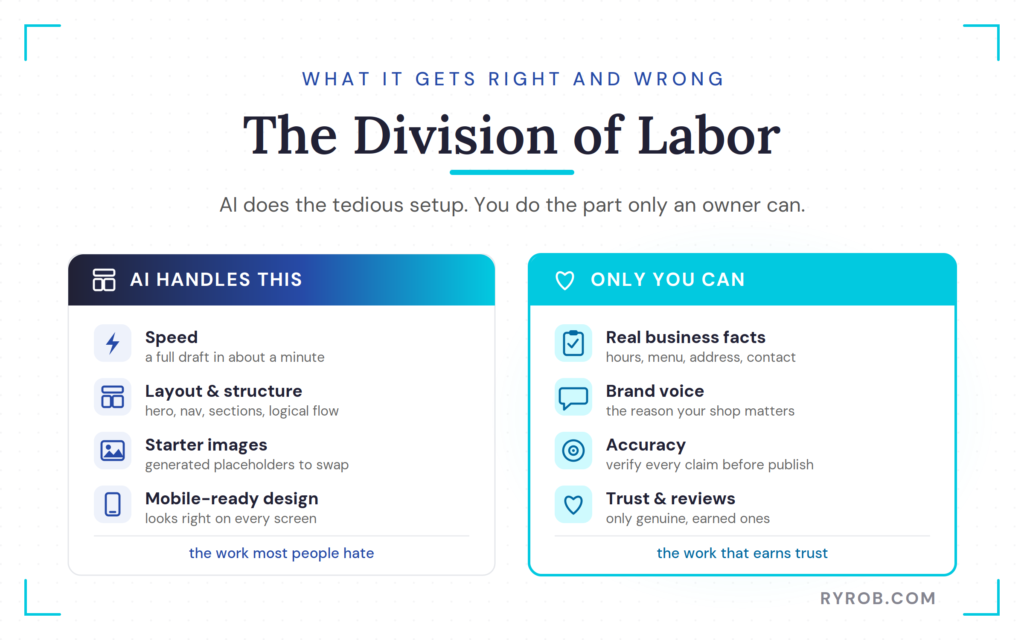
The honest answer is that this tool is good at the work most people hate. It’s not good at the work only a business owner can do. That division of labor makes a lot of sense.
The Biggest Wins: Speed and Ease of Use
The biggest win is speed. The initial draft took about a minute, not a weekend.
You don’t have to browse a giant template library or learn every possible design setting before you can make progress. You describe the business, answer a few questions, and start with something real. The underlying WordPress themes give the AI a visual foundation, so your site begins with a professional structure.
The layout was sensible too. It had a clear hero section, a logical flow, starter pages, mobile-friendly design, calls to action, and image placements that made sense for a small local business.
This is a strong fit for:
- Local shops and restaurants
- Freelancers and consultants
- Service businesses
- Creator websites
- Personal portfolios
- Early-stage business ideas that need a credible online home
If you’ve been wondering how to start a blog or build a broader online presence, WordPress gives you room to keep growing after the first version goes live. Unlike a Wix or Squarespace AI website builder, which often traps you in a closed ecosystem, WordPress offers total ownership and real flexibility.
You’re not building inside a one-purpose tool you might outgrow in six months. WordPress supports pages, blog content, a huge library of plugins and AI-powered tools, ecommerce features, and future improvements as your needs change.
Where AI Invents False Details
AI content generation can produce smooth, believable copy that has one major problem: it might not be true.
The draft included a founder story, sample testimonials, opening hours, a menu, and business details that had never been provided. This is common with AI-generated content, since these models often fill gaps with generic placeholders. That’s not malicious, it’s simply what generative AI does when it has empty space to fill.
But you should never publish fictional customer reviews as though they came from real people. Don’t publish made-up claims about ingredients, services, awards, locations, staff, or business history either.
A good rule is simple: treat every AI-generated business fact as unverified until you personally approve it.
That includes small facts too. A local business website needs the right phone number, the right address, updated hours, clear contact options, and accurate service details. Those are the basics that help customers and search engines understand what you offer.
Google’s own guidance for local business profiles reinforces how important it is to keep location, contact info, hours, and other customer-facing details accurate. AI can help you write a draft. But it can’t check whether your shop closes early on Sundays or whether your catering menu changed last week.
The 30-Second AI Copy Fix
The most obvious weakness in the test was the AI-written business copy. It sounded fine at first glance: “Ridgeline Breakfast Burritos serves locals and visitors fast, satisfying mountain town breakfast with quality ingredients and easy ordering online or in shop.”
Nothing in that sentence is offensive. Nothing is broken. But it could belong to almost any breakfast burrito business on Earth.
The fix took about 30 seconds. The generic copy was replaced with something more specific: “We cook with locally sourced, farm-fresh ingredients in small batches on Main Street. Buy a burrito that is wrapped with love right in front of you.”
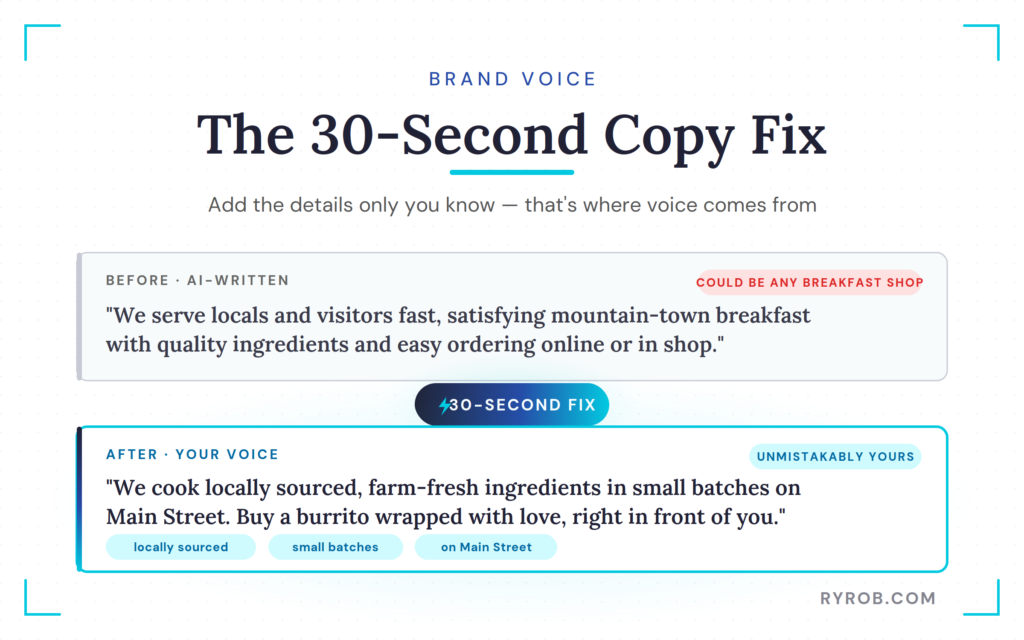
Now we’re getting somewhere. The second version has details. It has a place, it has a process, and it sounds like someone who has stood in the shop, watched the food being made, and cared enough to say why it matters.
Your best copy won’t come from asking AI to make it better twelve times. It comes from adding the things AI can’t know unless you tell it:
- The local source you buy from
- The part of town where customers find you
- The weirdly popular menu item people ask for
- The reason you started the business
- The small promise you make to every customer
That’s brand voice. It isn’t a fancy slogan. It’s the part that makes people feel like there are actual humans behind the business.
Is the WordPress AI Website Builder Worth It for a Real Business?
For many small business owners, yes.
If your main problem is that you need a website and don’t want to become a part-time web developer, the WordPress AI website builder gets you past the hardest point: starting.
You can build and review a site before deciding whether to pay for a WordPress personal plan. When you’re ready to use a custom domain and access the plan features that fit your business, you’ll need to choose a paid option based on your needs. That’s a much better position to be in than paying someone upfront while hoping the finished site matches your vision.
Because this is built on real, open-source WordPress, your site starts on WordPress and stays on WordPress. There’s no closed builder to escape and no replatforming down the road. If you outgrow your initial setup, you can expand into a full WooCommerce store or move to a self-hosted environment whenever you’re ready.
Where the WordPress AI Website Builder Works Best
This builder works best when your website needs are straightforward. A local restaurant, cleaning company, personal trainer, photographer, or consultant can get a strong starting point quickly. The draft handles the basic building blocks most customers expect to see: what you do, who you help, where you are, how to contact you, and how to buy or book.
It also makes sense for someone testing a new business idea. You can create a simple web presence, share it with potential customers, and see what questions they ask before spending heavily on custom landing pages or a professional build.
Complex sites are different. If you need advanced ecommerce, custom booking flows, detailed memberships, or unusual integrations, you may still need a developer. AI can speed up the first draft, but it can’t replace custom strategy. For more involved sites, it helps to understand how web hosting works before deciding what parts of the setup you want to manage yourself.
Looking Good vs. Getting Found
A website can look great and still get no traffic. The WordPress AI website builder creates pages, but it doesn’t automatically ensure you show up when someone searches for local services.
Getting found requires persistent SEO optimization. You need accurate business information, clear service pages, and a site that answers the questions people are already asking.
For a local business, that could mean pages around catering, wholesale orders, or ingredients. It also means keeping a Google Business Profile current and earning real reviews. If you plan to publish content to bring in search traffic, start with keyword research before writing pages nobody is looking for. A good website gives people a place to land; smart content gives them a reason to find you.
The Final Scorecard for Speed, Design, Accuracy, and Growth
For speed, this builder gets high marks. A complete site draft in minutes is not a small thing. For ease of use, it also performs well, since the chat-based editing removes the frustration that comes with complex theme settings.
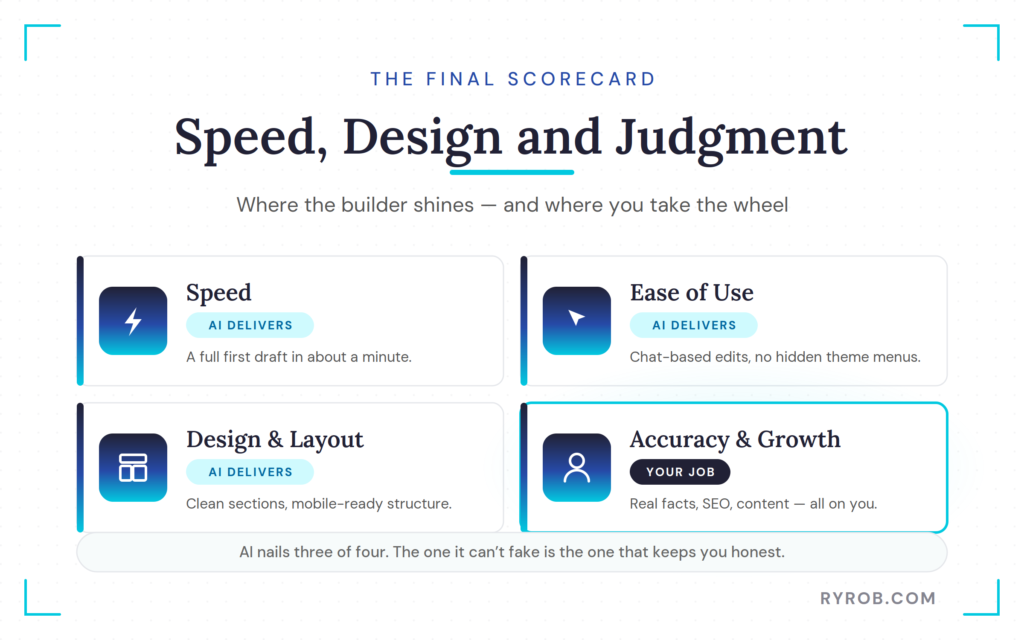
The design and layout are genuinely useful. You get a mobile-ready structure, clear sections, and pages that make sense for a small business.
Accuracy is where the owner has to take over. AI doesn’t know your real hours, menu, or voice. That’s not a flaw you can prompt away; it requires your judgment.
Growth is also on you. The site provides a foundation, but search visibility, helpful content, and steady traffic come from the work you do after publishing. By choosing this path, you gain the benefit of a professional start with the long-term freedom that only the open-source WordPress ecosystem can provide.
FAQs About the WordPress AI Website Builder
Here are a few more questions that tend to come up:
Can I Build a WordPress Website With AI Without Coding?
Yes. You can describe your business in plain English, let the AI suggest a layout from its extensive template library, and make significant design changes without writing a single line of code.
You’ll still need to review the content, replace placeholders with your own text, and upload real images to create a professional website. But the process removes the technical barriers to getting a high-quality first version online.
Is the WordPress AI Website Builder Free to Use?
You can start the build process without a credit card and review your finished draft before committing to a paid plan.
While the initial build is accessible, you’ll eventually need a paid WordPress plan to publish your site using a custom domain. Many of these plans include a free domain name for the first year, which makes the transition from a draft to a live site much more affordable. Always check the current pricing and feature inclusions before finalizing your purchase, as these can change periodically.
Does AI Write Accurate Website Content?
No, not by default.
AI can generate convincing copy, but it may also create invented business stories, generic customer reviews, or placeholder product details. You must replace any fictional or inaccurate information with verified facts about your specific business before you publish your site.
Can an AI-Built Website Rank in Google and AI Search?
An AI-built website provides a solid technical foundation, but the fact that AI assisted in the build doesn’t improve search rankings on its own.
True visibility depends on high-quality content, accurate local information, and user experience. Comprehensive SEO optimization is a manual process that goes beyond the initial build. To ensure your professional website gains traction, you must invest time in keyword research, meta descriptions, and ongoing content updates rather than relying solely on the automated starting point.
Final Thoughts On Building with the WordPress AI Website Builder
The Ridgeline Breakfast Burritos test made the biggest lesson clear: AI-powered tools can solve the blank-page problem quickly.
The WordPress AI website builder created a functional, mobile-friendly business site in one sitting. It handled essential design elements that usually turn a quick website project into three weekends of scrolling through templates and mild regret.
The most important parts still come from the business owner, though. While the AI handles the structure, a truly professional website only comes together through your own content, factual updates, and the addition of real photos and customer testimonials. Use the builder to create your draft, test the user experience, and only decide on a paid plan once you’ve seen the potential of your site.
Launch a Full Site in Minutes: WordPress
I’ve tried a lot of ways to get a site up fast, and this is the one I’d hand a non-technical friend without a second thought. You describe your business, it gives you a real first draft, and you take it from there. Free to try, no card needed!👇

Great article! The way AI website builders are simplifying the website creation process is really impressive. I agree that AI can help with the initial structure, layout, and content ideas, but human input is still essential for adding authenticity, accurate business details, and a unique brand voice. The point about treating AI-generated information as a draft rather than final content is very important. Looking forward to seeing how WordPress AI tools continue to evolve for small businesses and creators.