
This week I woke up to a finished newsletter draft sitting in my drafts, ready to review and send. I didn’t write a word of it. While I was asleep, a no-code AI agent found my new blog posts, picked the strongest hook, and used workflow automation to write the email in my voice & style, add the links, and save the email newsletter as a draft.
That’s a task I used to dread, and now it just happens without me. Most creators and business owners I know lose hours every week to repetitive manual work that keeps them away from the projects that actually move the needle. An AI agent like this hands that time back to you, no computer science degree required.
If you’re a creator, business owner, or part of a small team buried in repeat work, this is exactly the kind of job you can finally offload to AI, and it is one example of how I build custom tools with AI to run my business. The catch is that you still have to give your AI agent a clear job, smart permissions, and a human review step before anything goes live. Watch my full breakdown:
Disclosure: Please note that some of the links below are affiliate links and at no additional cost to you, I’ll earn a commission. Know that I only recommend products and services I’ve personally used and stand behind. When you use one of my affiliate links, the company compensates me, which helps me run this blog and keep my in-depth content free of charge for readers (like you).
Key Takeaways for Building a No-Code AI Agent
- AI agents handle repeat work. By deploying specialist agents, you can automate tasks like drafting newsletters, summarizing metrics, preparing meeting briefs, and writing comment replies without providing a new prompt every time.
- A server keeps the agent online. If the agent ran on your personal laptop, it would stop the second you shut the lid, so a VPS keeps your systems active around the clock.
- No-code setup is possible. With tools like GatorClaw, you can describe the workflow you want in plain English, connect your favorite apps, and set a recurring schedule without writing a single line of code.
- Permissions matter. Restricted access keeps your tools from taking risky or consequential actions without asking for your approval first.
- Context makes the output better. Giving the agent past newsletters, clear operating rules, and real examples of your writing style helps it produce drafts that sound exactly like you.
- Draft first, send later. For anything public-facing, it’s best to have the agent prepare the work for your review rather than letting it publish on its own.
Put Your Repetitive Work on Autopilot With GatorClaw
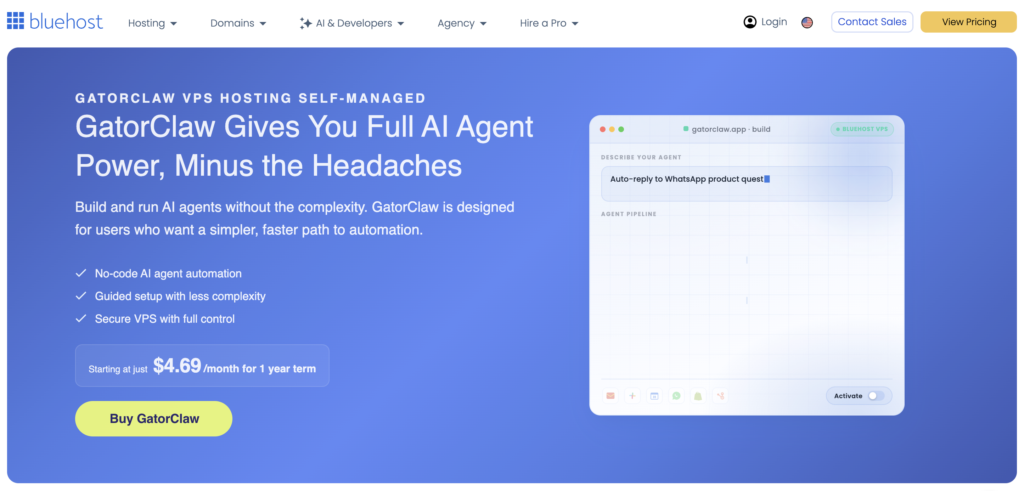
I’ve tested a lot of automation tools that promised to save me time and quietly got abandoned a week later. Bluehost’s GatorClaw stuck, because building an agent really is just describing what you want, connecting your apps, and turning it on. It’s the first one that felt doable for someone like me who’d rather not touch code.
What Makes an AI Agent Different From a Chatbot?
A chatbot waits for you to ask it something. You type a prompt, it gives you an answer, and then the interaction is over.
An AI agent is built to carry out a job. These autonomous agents can follow a schedule or respond to a trigger, gather information from connected tools, create or analyze something, and take an approved action.
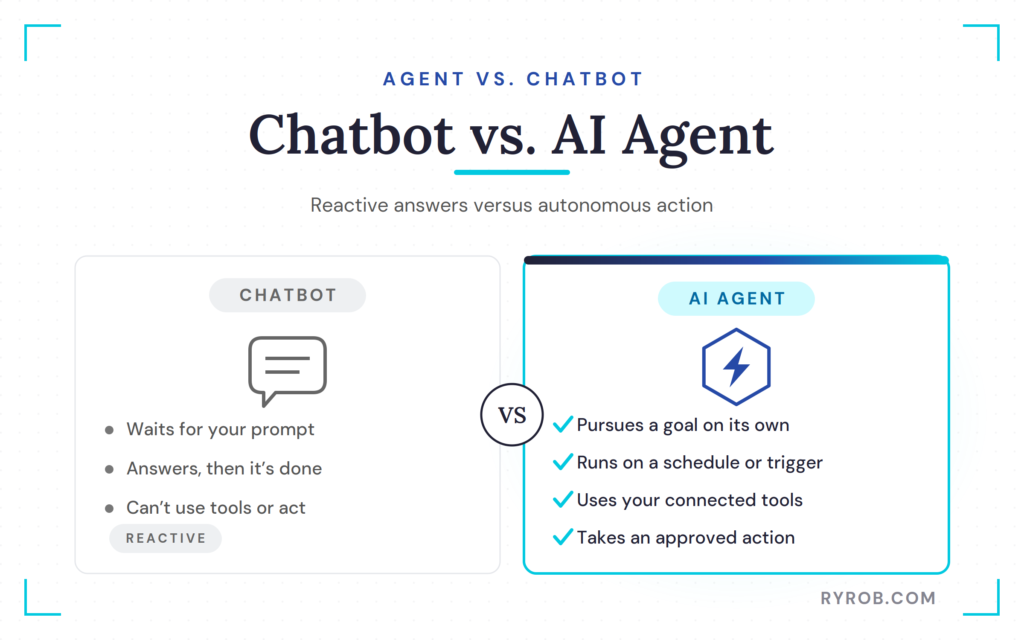
An agent can use available tools to work toward a goal on its own. That capability for tool use marks the jump from “write me an email” to “every Tuesday, find my unpromoted posts from last week, write a newsletter in my voice, and save it to Gmail for my approval.”
My newsletter setup uses agentic workflows to handle several moving parts.
- The weekly schedule starts the task every Tuesday at 6:00 a.m.
- The agent checks my blog for recently published posts.
- It identifies posts that haven’t been promoted in the newsletter yet.
- It chooses the strongest lead story for my audience.
- It writes the email based on the example newsletter I gave it.
- It adds links to the relevant posts.
- It saves the finished email as a Gmail draft.
That’s a real workflow. It isn’t magic, and it isn’t a replacement for thinking. It’s a form of business automation that handles a repeatable process that used to eat into my week. The best first job for an AI agent is boring, recurring, and easy for you to review before it goes out.
My agent led with a post about AI visibility, then placed two other recent posts in the PS section. That was a smart editorial call based on the content it found and the writing example I gave it. Still, I review the draft before sending it to my list. Always.
For more ideas on where AI fits into a blogging business, check out my full guide to AI blogging.
Why an AI Agent Needs to Run on a Server
The whole point of a no-code AI agent is that it works when you are not sitting at your desk.
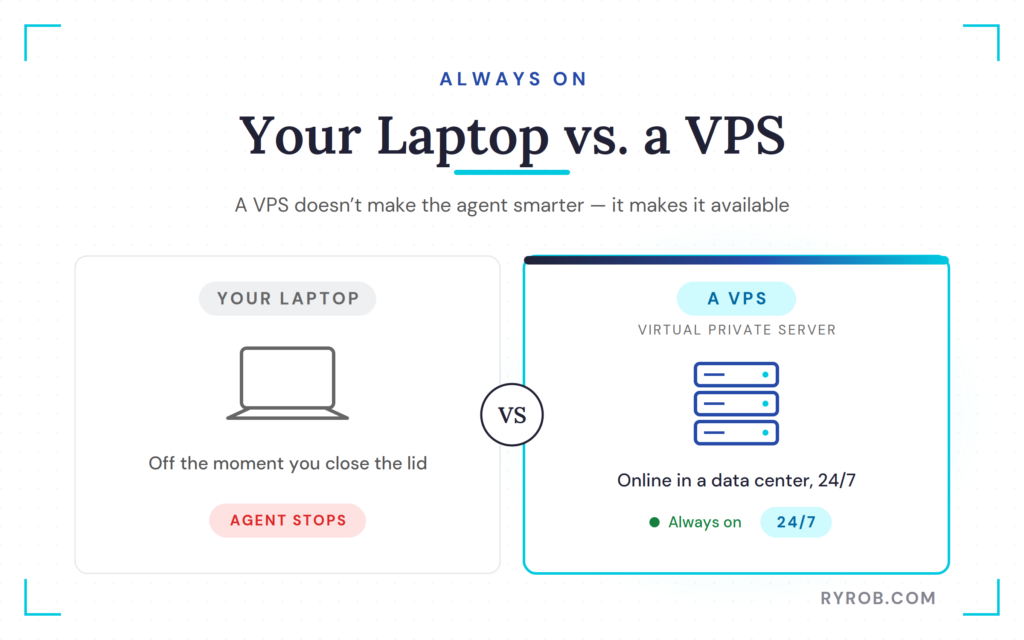
A sponsor might send an email at midnight. Blog comments can come in on a Saturday. Your Monday metrics report needs to be ready before you open your laptop. If the agent only works when your computer is turned on, it is not much of an agent at all.
That is why this setup runs on a VPS, which stands for virtual private server. Think of a VPS as a small computer in a data center that stays online all the time. Your agent lives there, rather than on your personal laptop. Because the server is model-agnostic, you have the flexibility to run different types of AI models without being locked into a single interface.
I used Bluehost’s GatorClaw for this setup. GatorClaw comes preinstalled on a Bluehost VPS and gives you a guided way to create AI agents without getting lost in the technical stuff. Under the hood, the platform provides seamless LLM integration, allowing your agent to connect to the underlying large language model with minimal configuration.
GatorClaw is built on Bluehost’s OpenClaw environment, which is the more technical version for people who want more control later on. For me, the guided setup is the point. I want to set up useful automations, not spend my afternoon debugging a server.
A VPS does not make an agent smarter; it makes the agent available. That is the difference between an assistant who only works when you are online and one who can prepare work overnight.
How I Built My First AI Agent With No Code
My first no-code AI agent had one simple job. Every week, it finds the new posts on my blog and drafts a newsletter about them in my voice.
The result is an email waiting in Gmail for me to approve. I don’t have to remember the task, hunt down links, or start at a blank page.
Choose a Bluehost VPS and Launch GatorClaw
I started on Bluehost’s GatorClaw page and chose the NVMe 4 server option. That’s the plan Bluehost recommends for most people starting out, because it gives you enough storage and power without immediately running into limits.
A few minutes after checkout, the VPS was ready with GatorClaw preinstalled. From there, I hit the manage button to open the GatorClaw dashboard inside my server.
That first screen is less intimidating than it sounds, because it works as a visual builder that guides you through the process. I gave my new agent a name and moved into the setup flow.
The platform has AI model options already connected, so I selected Claude for this agent. In my walkthrough, I chose the Opus 4.6 model and used API connectivity to link my Claude account.
You don’t need to keep a separate consumer AI subscription just to use the platform setup flow. Still, pay attention to how your selected model and API account are billed. The server has its own cost, and model usage may carry costs through the AI provider you connect.
Connect Claude, Gmail, and the Tools Your Agent Needs
Agents are only useful when they can reach the tools where your work actually happens.
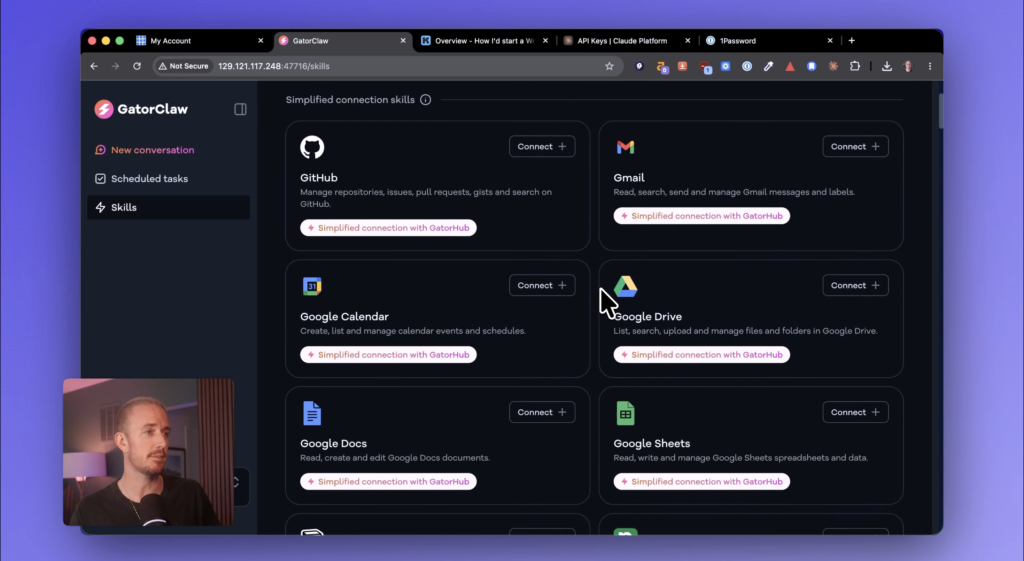
GatorClaw supports connections for Gmail, Google Drive, Google Calendar, Google Docs, GitHub, and more. The right setup depends on the task you want to automate, and the drag-and-drop interface makes linking these tools incredibly intuitive.
Since my agent’s job was to create newsletter drafts, Gmail was the first connection I made. That gave it a place to save the finished work.
In my setup, GatorClaw recognized that my site was ryrob.com, which runs on WordPress. It then asked for the details it needed to build the workflow, including my blog URL, a past email newsletter, and the day and time I wanted the task to run.
Don’t connect every app under the sun just because you can. Start with the minimum access needed for one useful job.
If you’re trying to build a better email system beyond drafting weekly broadcasts, check out my guide on how to automate your email newsletter. An AI agent can handle content prep, while your email platform handles subscriber actions, welcome sequences, and scheduled campaigns.
Set Restricted Access Before the Agent Runs
Before I turned the agent on, I chose restricted access mode.
This is the setting I recommend for most people, especially when you’re starting out. Restricted access means the agent can’t go wild with actions that could have real consequences. It asks for approval before doing something risky.
This approach creates a vital human-in-the-loop workflow, which keeps you in the oversight seat. That matters when an agent can reach email, calendars, documents, or customer data. You don’t want an automation sending messages, deleting files, or making changes you didn’t intend.
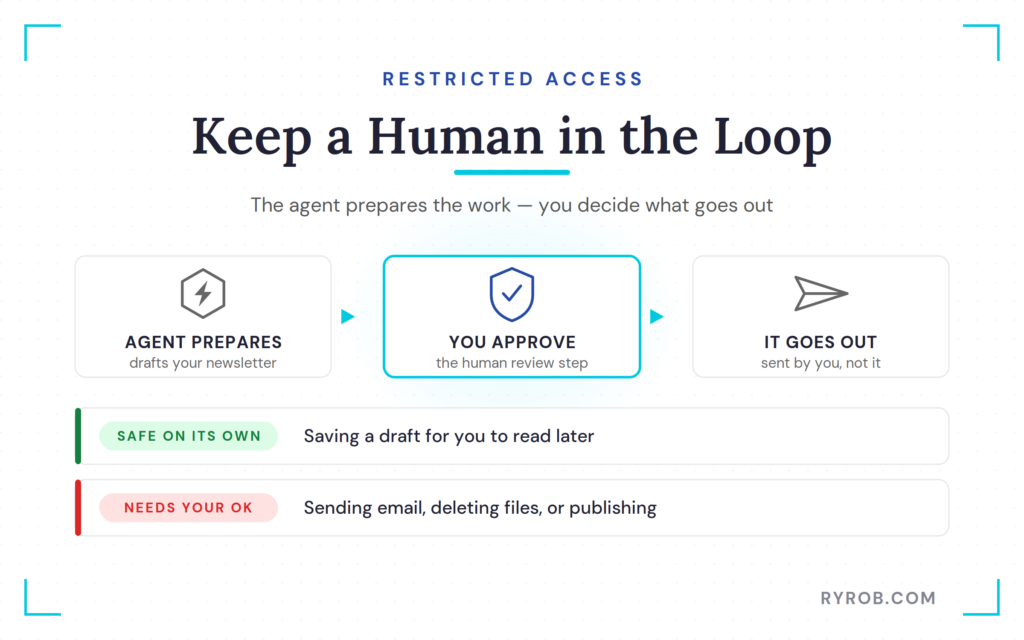
My newsletter agent saves drafts rather than sending emails. That’s the exact level of control I want. It handles the tedious part, but I still make the final call.
This isn’t only about avoiding embarrassing emails. It’s about protecting your voice and your relationship with your audience. A newsletter is personal, so if an AI draft feels off, I want to catch it before it lands in thousands of inboxes.
Give the Agent Clear Instructions and a Writing Sample
Here’s where most people either get great results or end up disappointed.
I gave the assistant a simple set of natural language instructions. “Every week take my new blog posts and draft a newsletter in my style, then save it as a draft in my email.”
That was the starting point. Then I gave it the context needed to do the job well.
I added my blog URL so it knew where to look for new content. I set the weekly schedule. Most importantly, I copied in a recent newsletter I had written myself.
The more context you give an agent, the better it performs. A writing sample teaches it the tone, pacing, structure, and types of hooks I use. Clear instructions tell it what success looks like.
If you want a stronger first draft, here are the kinds of things worth spelling out for the agent.
- Which posts it should include or exclude
- Whether it should lead with one story or summarize several
- How long the newsletter should be
- Whether it should write a subject line and preview text
- How you use sections like PS or personal notes
- What the agent should never do
I don’t want my emails to sound like a generic AI newsletter. Neither do my readers. Giving the agent my own writing is how I keep the work grounded in my voice.
The same idea applies to every content task. If you’re using AI for blog content, email, social posts, or SEO briefs, generic instructions give you generic results. My email marketing tips for bloggers can help you keep the audience relationship at the center of the process.
Schedule and Test Your Newsletter Workflow
Once I had the instructions, example newsletter, connected Gmail account, and schedule in place, GatorClaw created the automation in about 30 seconds.
I scheduled mine to run every Tuesday at 6:00 a.m. The agent’s job is to find posts that went live recently and haven’t been shared with my audience yet.
During setup, GatorClaw flagged an issue with my Gmail connection. I fixed that before relying on the automation. Little setup issues like this are exactly why you should test every no-code AI agent before you let it run on a schedule.
So I told it to test the workflow.
The agent found my three most recent posts from the previous week, saw that they hadn’t been promoted yet, and drafted an email in Gmail. It included the links, selected the strongest story as the opening hook, and used the other posts in the PS section.
Then I opened Gmail and reviewed the draft.
That’s the moment that matters. Don’t stop at test complete. Open the email, read the subject line, and check every link. Make sure the writing sounds like you, and look for weird claims, wrong dates, broken formatting, or posts it shouldn’t have included.
Once it’s working, you can check the status under the GatorClaw scheduled tasks area. You can turn a workflow on or off there, inspect it, or create another task when you’re ready.
Three More AI Agents I Want in My Business
After you see one useful agent work, your brain starts spotting repeat tasks everywhere. That can get dangerous fast, because not every job should be automated.
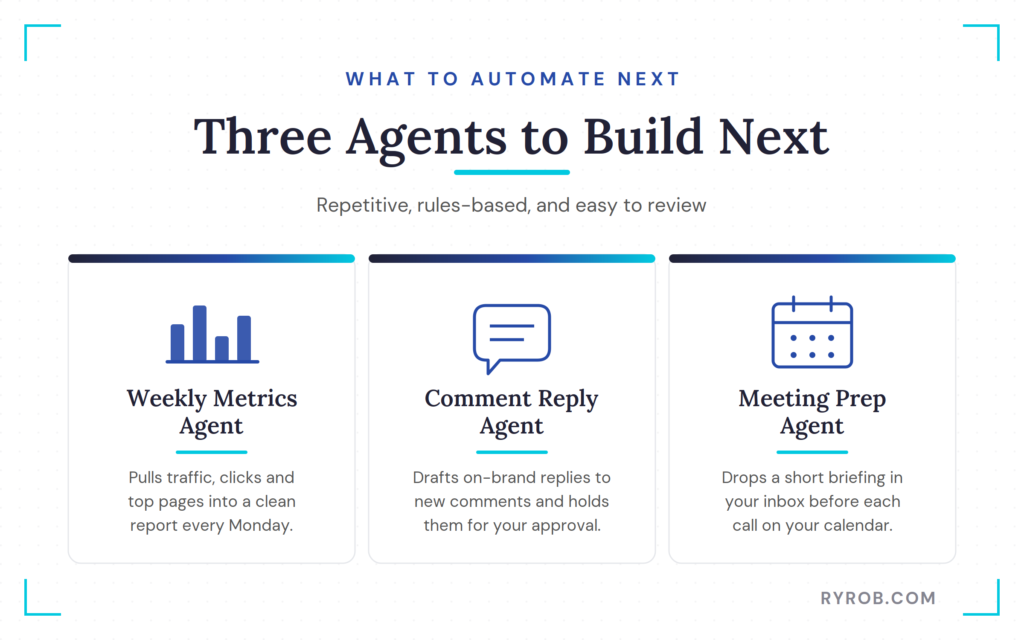
I look for work that is repetitive, rules-based, and easy to approve. These three are great next projects.
A Weekly Metrics Agent for Traffic and SEO Reports
A weekly metrics agent can pull together the numbers you already care about and send a clean report every Monday morning.
By utilizing Retrieval-Augmented Generation, the agent can query your analytics platforms to synthesize complex data into a readable summary.
For a blog, that could include recent traffic, clicks, impressions, top-performing pages, and pages that are losing visibility. That last part is especially useful. If a post’s impressions or clicks are slipping, I want to know before it turns into a bigger traffic problem.
The agent doesn’t need to make SEO decisions for me. It needs to surface the data so I can spend my update time where it will count most.
BCG’s look at AI agents in business also highlights the practical role agents can play in handling tasks and working alongside people. That is the mindset I like. Let the agent prepare the information. Keep the strategy in human hands.
A Comment Reply Agent That Keeps Your Voice Consistent
Comments are one of the best signs that your content is helping people. They are also easy to let pile up when you are busy.
A comment reply agent can draft responses to new comments in your voice, then hold them for your approval. Unlike standard customer support bots that often sound robotic, this agent uses a custom knowledge base to learn your specific tone, style, and facts.
The process of knowledge ingestion allows the agent to read your past content and previous replies to understand the context of your brand. That means you can respond faster without outsourcing the relationship or pasting canned replies everywhere.
I would give this agent a few rules. It should answer straightforward questions already covered in the article. Anything involving legal, financial, or personal advice gets flagged for me. Never argue, and never post without my approval.
I learned years ago that business questions can get messy fast, especially when someone is asking about their employer, a competing side business, or a contract they signed. That is where an agent should draft carefully, then let a human decide whether the response is appropriate.
A Meeting Prep Agent That Briefs You Before Calls
A meeting prep agent can check your calendar before each call and drop a short briefing into your inbox.
That briefing might include the attendee’s company, recent email threads, notes from past meetings, open questions, and the main purpose of the call. Nothing fancy. Just the information you normally scramble to find two minutes before a Zoom starts.
For freelancers, consultants, and small teams, this one can save a surprising amount of mental energy. Walking into a call prepared changes the quality of the conversation.
Start small here, too. Ask the agent to summarize information from your calendar and email. Review the brief for a few weeks before you trust it with more data sources.
Is GatorClaw Worth It for Creators and Small Teams?
GatorClaw makes the most sense if you have repeat work that already follows a clear process.
Beyond just saving time, these tools open up real business potential. You might eventually explore multi-agent collaboration, where one agent gathers performance metrics and another uses that data to inform your next content strategy.
For creators looking to scale, these automations can even support new avenues for monetization by letting you offer more premium services, and agencies can look into white-labeling these workflows or building client-facing portals to present agent-generated work directly to their clients.
If you write a weekly newsletter, compile the same reports, respond to similar customer questions, or prep for a lot of calls, you probably have at least one task worth turning into an agent.
It’s also a good fit if you aren’t technical and don’t want to write code or manage a pile of disconnected automation tools. I built this workflow by describing what I wanted, connecting Gmail, adding an example, choosing the schedule, and testing it.
What GatorClaw Actually Costs
The base cost is the VPS server where the agents run. Bluehost positions the starter setup as a few dollars per month, with the server being the main thing you’re paying for.
For the AI model, I connected my Claude API key during setup. That means you should understand the pricing tied to the model and account you choose. The cost depends on the provider, the model, and how much work your agent does.
Bluehost also offers an AI All-Access Pack that includes Claude, ChatGPT, Gemini, and Grok in one privacy-first platform. If you’re already paying for several separate AI subscriptions, that may be worth comparing against what you spend now.
Don’t choose based on the promise of saving 10 hours a week. Start with one task you can measure. If the agent saves you 30 minutes every Tuesday and gives you a better newsletter habit, that’s already a win.
When You Might Not Need an AI Agent Yet
You don’t need an agent just because AI agents are the hot new thing.
If you haven’t done a task yourself enough times to understand the process, automate something else. An agent will only magnify a messy workflow if the instructions are messy.
I also wouldn’t begin with anything high-risk. Don’t make your first agent responsible for sending customer emails, changing billing data, publishing posts, or handling sensitive information.
Start with a draft or with a report. Just something you can review in under five minutes.
Build the smallest version of the automation that saves real time, then improve it after you’ve seen how it behaves.
FAQs About Building a No-Code AI Agent
Here are the questions I hear most from people setting up their first agent.
Do I Need To Know How To Code To Build an AI Agent?
No. I built my newsletter agent in GatorClaw without writing code. I described the job in plain English, connected Gmail, selected an AI model, added a writing sample, and scheduled the task.
You still need to understand the task you’re automating. No-code doesn’t mean no thinking.
What’s the Difference Between an AI Agent and an Automation?
Traditional automation follows fixed rules. If this happens, do that.
An AI agent can work through a more open-ended task. It can review a group of new blog posts, decide which one is the strongest lead story, write an email based on your past examples, and save the draft.
Both have their place. I use fixed automations for predictable actions and AI agents for work that benefits from judgment, writing, or summarizing.
Why Does an AI Agent Need a VPS?
A VPS keeps the agent online when your personal computer is off. If your workflow needs to run overnight, on weekends, or at a set time every week, it needs a computer that’s always available.
That’s what the virtual private server does in this setup.
How Should I Approach Security and Enterprise Compliance?
When scaling your automation, you should prioritize data security and enterprise compliance. While no-code tools are efficient, larger businesses often require strict SOC 2 compliance to ensure that customer data is handled securely and according to industry standards.
Before deploying an agent that interacts with sensitive information, review your vendor documentation to ensure their infrastructure aligns with your internal security policies.
How Should I Approach Security and Enterprise Compliance?
When scaling your automation, you should prioritize data security and enterprise compliance. While no-code tools are efficient, larger businesses often require strict SOC 2 compliance to ensure that customer data is handled securely and according to industry standards.
Before deploying an agent that interacts with sensitive information, review your vendor documentation to ensure their infrastructure aligns with your internal security policies.
What Should My First AI Agent Do?
Pick one task you already repeat and hate doing.
Drafting a weekly newsletter, compiling a metrics report, preparing for meetings, and writing first-pass comment replies are all good starting points. Make the agent prepare the work for review instead of taking irreversible actions.
Final Thoughts on Building A No-Code AI Agent
I didn’t need to become a developer to build an AI agent that drafts my newsletter every week. I needed a clear job, a writing sample, a connected inbox, safe permissions, and a test run before I trusted it.
The agent does the repeat work. I still own the strategy, the final edit, and the relationship with my audience.
Pick one task that keeps showing up on your calendar. Write down the outcome you want, build the smallest version of that workflow, and let the agent earn more responsibility over time. Done right, a no-code AI agent gives you back hours of your week so you can focus on the creative work only you can do.
Put Your Repetitive Work on Autopilot With GatorClaw
I’ve tested a lot of automation tools that promised to save me time and quietly got abandoned a week later. Bluehost’s GatorClaw stuck, because building an agent really is just describing what you want, connecting your apps, and turning it on. It’s the first one that felt doable for someone like me who’d rather not touch code.
