

Last month I sent one of my overseas contractors $1,500, and she got $1,391 of it. I didn’t take a cut, and nobody made a mistake. That quiet gap is the whole reason I figured out how to pay international contractors without losing money on every transfer.
It turned out simpler than I expected. The same setup pays my writers, video editors, designers, and a few folks who live nowhere near me… all without fees nibbling away at what they actually take home.
Here’s the full walkthrough, where I run an actual pay cycle on camera from start to finish.
Key Takeaways on Paying International Contractors
- Hidden transfer fees usually hit the contractor, not your budget. Your books say you paid in full, but less actually lands on their end.
- One scheduled pay run saves hours every month. Consolidating every payment into a single run beats paying people one at a time all week.
- International contractors can sit in the same queue as domestic ones. No separate wire forms and no SWIFT codes required.
- Paying by card costs 2.9%. That annualizes to roughly 35% if you treat it as borrowing cash for 30 days.
- Bank transfers can be completely fee-free. That’s the default route I run on.
- You can delegate pay runs safely with approval thresholds. Nobody ever needs your bank credentials.
My Go-To for Paying Contractors Without the Fees: Melio
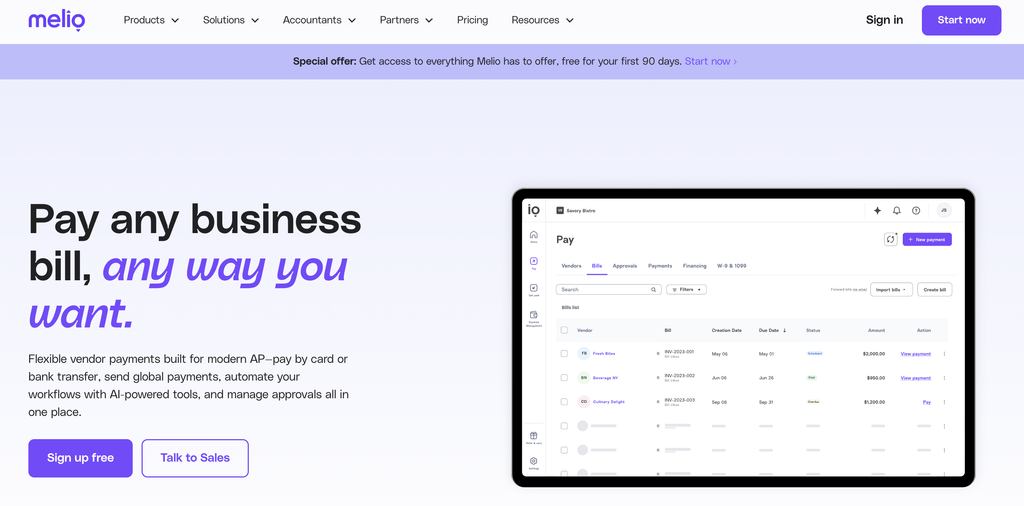
Melio is the platform I actually run my monthly contractor pay cycle through. It keeps my domestic and overseas payments in one queue, and bank transfers cost nothing. My link starts you off with 90 days of full access at no extra cost!
Why Paying a Growing Team Quietly Costs More
Here’s where most of us start, and it’s some of the business advice I keep coming back to. You hire one person and send money through whichever app is already on your phone. Easy, makes sense.
Then you hire a second contractor, and they want something different. The next team member is in another country entirely, and suddenly your bank wants a SWIFT code… whatever that even is. It’s almost 2027.
Before you know it, you’re paying four people in four different ways, and the first of the month becomes the thing you dread. That’s not a tools problem yet. That’s just what growing a business looks like.
But here’s the part that always bugs me. Watch what happens to the same invoice depending on how you pay it.
- Bank wire transfers stack a flat fee on your side, plus whatever the receiving bank quietly shaves off on their end.
- Consumer apps like PayPal, Wise, Revolut, or Western Union look cheap at first, then the FX fees baked into the exchange rate do the real damage where you can’t see it.
The worst part? Your contractor eats that fee, not you. Your books say you paid $1,500, and they didn’t get $1,500, which sucks.
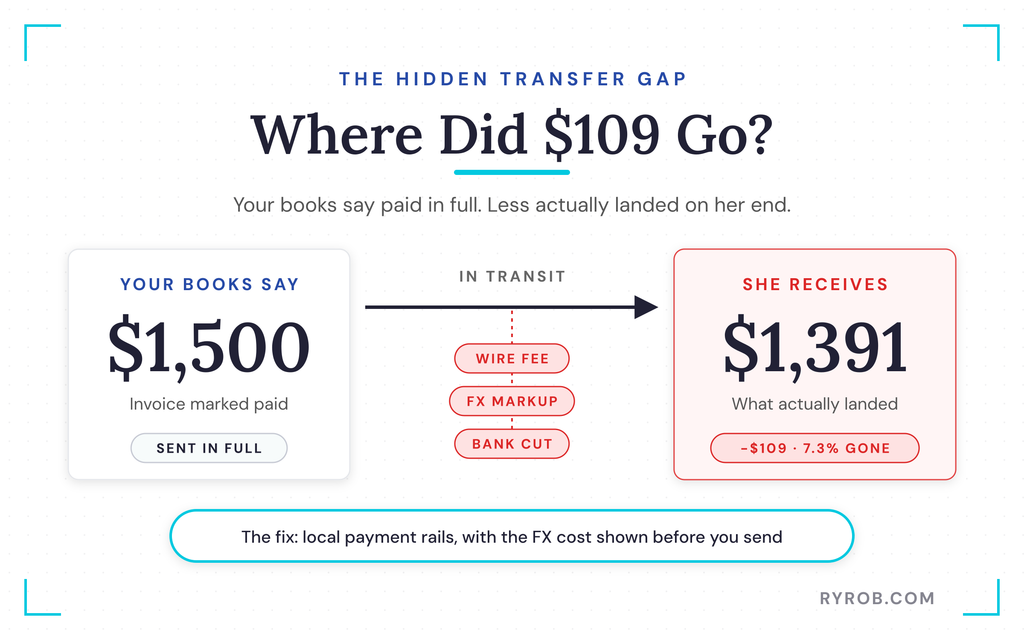
Scale that across a full year and it’s real money coming out of the relationship instead of your budget.
This is why the payment method and the payment terms both matter so much. When I set up a new working relationship, I spell out the money terms in a proper contractor agreement, and what to include in a freelance contract is my checklist. That way nobody’s surprised by how or when money moves.
How to Pay International Contractors: My Step-by-Step Setup
Let’s fix the whole thing, starting with getting bills in, because that’s where I used to lose the most time. This is my actual setup, not a theoretical list, so you can follow along with your own team.
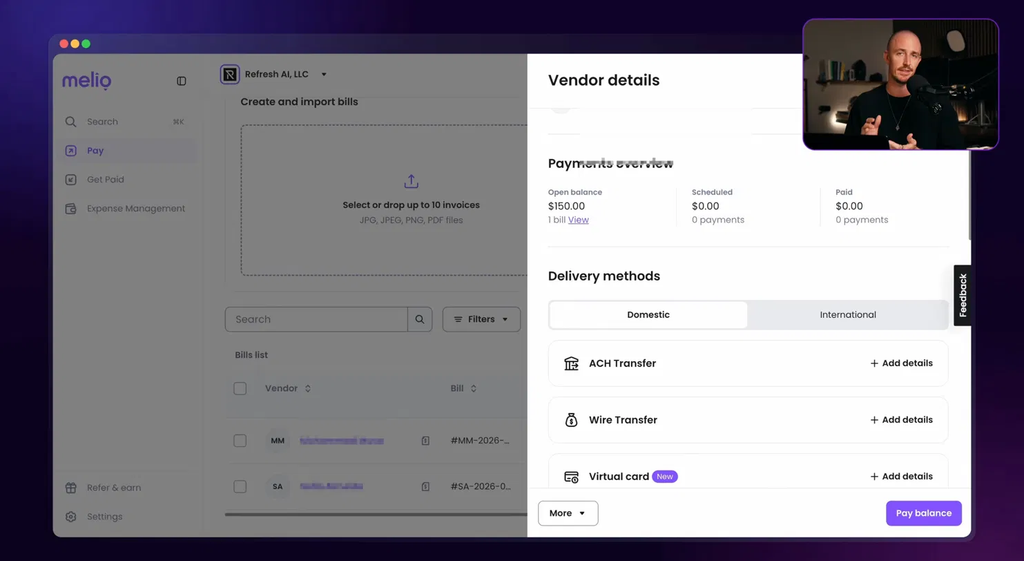
I teamed up with Melio for this walkthrough because it’s the tool I already run these pay cycles through. If you want to build the same thing as you read, you can set it up in your own Melio account with 90 days of full access.
Step 1. Getting Every Invoice Into One Place
My Gmail is connected to Melio, so whenever a contractor emails me an invoice, it shows up in my bills tab automatically. No forwarding, no downloading, no manual entry.
If you don’t use Gmail, you can forward an invoice straight into Melio from your email, and it pulls the vendor, the amount, and the due date off the invoice itself. All automatic.
I had a fresh invoice in front of me while recording, and everything it caught looked right. The amount, the due date, the status, and the action I needed to take were all there. And if I’m on the go, I can snap a screenshot or photo of an invoice from my phone and upload it into the platform.
This step alone kills the manual chase. Instead of hunting through inboxes for invoices, they show up and wait for you.
Step 2. Running One Scheduled Pay Run
Here’s the part that actually gives you hours of your life back. Everything that’s due sits in one queue, so instead of paying people one at a time across a whole week, I select the entire run, set the dates, and schedule the payments.
My favorite part is small but mighty. If somebody invoiced me twice this month, those can go out as a single payment instead of two, depending on the payment terms we’ve agreed on with that vendor. Enterprise accounts payable tools charge real money for what they call mass payments, and here it’s a couple of clicks on a Friday.
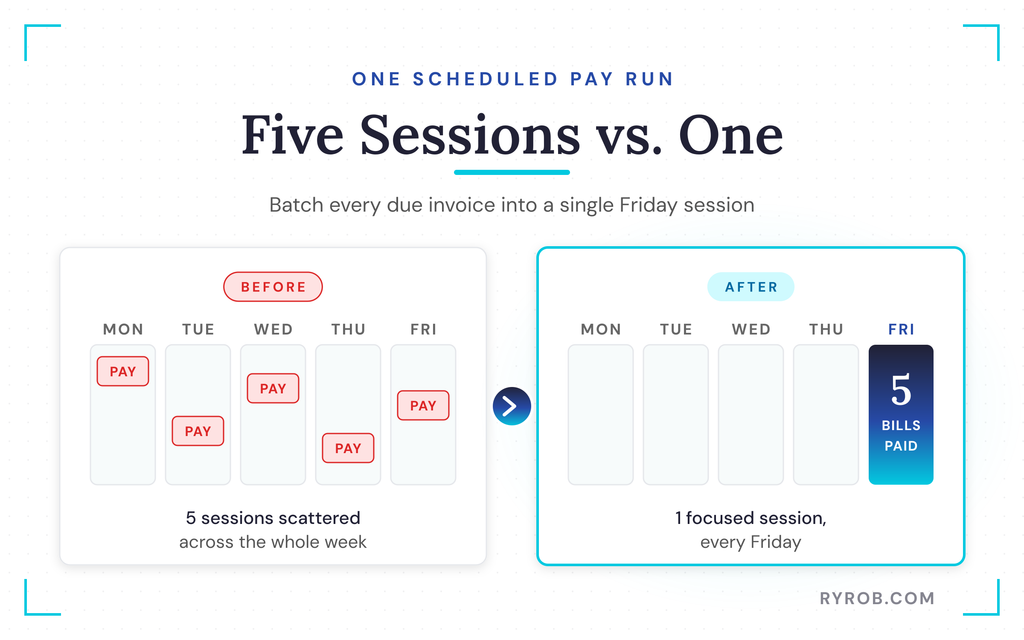
So I’m doing this once on a Friday instead of five separate times whenever an email happens to land, and you can schedule your first pay run the same way. That’s the trade that made this worth it for me.
Step 3. Paying International Contractors Without a SWIFT Code
This is the big reason I switched. One of my contractors doesn’t live in the United States, and I got him set up to be paid on camera. He got an invite link, and self-service onboarding let him enter his own bank details and currency, so I never typed either one.
Watch where he sits in the flow. He’s in the same queue as everybody else we pay. No separate wire forms. No trip to my bank’s international section. No SWIFT code to track down and hope I got right.
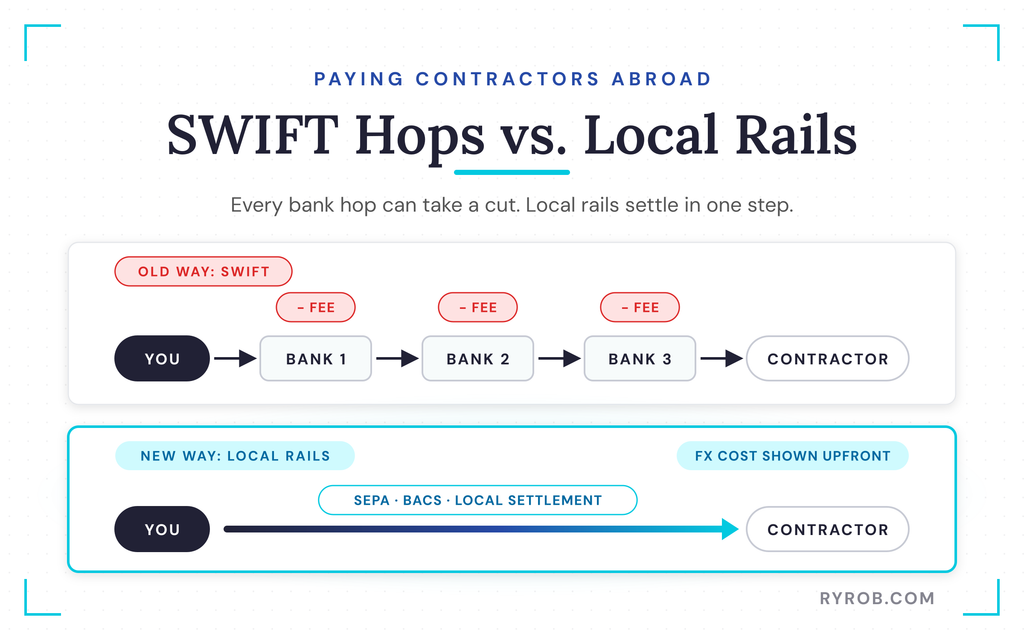
The old way meant routing money through the SWIFT network, where it hops between correspondent banks and picks up a fee at every stop. Modern payment rails like SEPA in Europe and BACS in the UK settle locally instead.
I pick him, I pick his currency, and I can see the currency conversion cost before I confirm anything. He ends up in the same pay run as the contractor listed right below him. If you’ve ever paid somebody overseas the old way, you already know how much easier this is.
One caveat is worth knowing. Melio handles international payments through a partner in a set list of currencies, including AUD, BRL, CAD, EUR, and GBP, so check the currencies for Melio international payments before you count on this for your team.
It covers 15 currencies, and you can pay in U.S. dollars or the vendor’s local currency. If your contractor’s currency isn’t on the list, don’t build your whole workflow around it.
Step 4. What to Know About Taxes and Compliance Abroad
US forms are only half the picture. Paying international contractors comes with its own tax compliance expectations on their side. In the EU, many contractors need to give you a VAT number and local tax identifiers so money moves cleanly on both ends.
The bigger compliance risk is usually classification, not the transfer itself. Several countries penalize companies that treat real employees as contractors, and the UK’s IR35 rules are the famous example.
Know the line before you hire, and brush up on the legal basics worth knowing, because a contractor who signs contracts or negotiates on your behalf can accidentally create Permanent Establishment risk that no payment platform can fix.
The good news is that reputable platforms run sanctions screening against OFAC and equivalent watchlists automatically on every payment. That’s part of the value of not moving money by hand.
Keeping 1099s and Bookkeeping Clean
Two housekeeping wins live inside the vendor details.
- Mark a vendor as a 1099 contractor and even attach a W-9 form, since the IRS Form W-9 is what collects their taxpayer identification number. The platform tracks all your payments through the year, which makes filing those 1099s at tax time much easier.
- Reconcile automatically with your accounting software. Because my Melio account links with Xero, where I manage my books, reconciliation happens cleanly and automatically for my bookkeeper. At scale, that’s an actual lifesaver.
If you’re building out your own system, my guide to bookkeeping basics for freelancers covers how I run the Xero side.
Once the books are clean, it’s worth sorting out how to pay yourself from an LLC for tax purposes too.
The Real Math on Paying by Card vs Bank Transfer
This one sounds too good to be true, so let’s do the actual math. Most business owners I know haven’t run it themselves.
You can pay a bill by card even when your vendor only accepts bank transfers. Melio charges 2.9% in transaction fees for that. Bank transfers, the method I use, carry no fee at all.
The pitch for paying by card is that you keep your cash for another 30 days. Sometimes that’s necessary. But 2.9% for 30 days, annualized, is about 35%, which is right in the range of credit card rates.
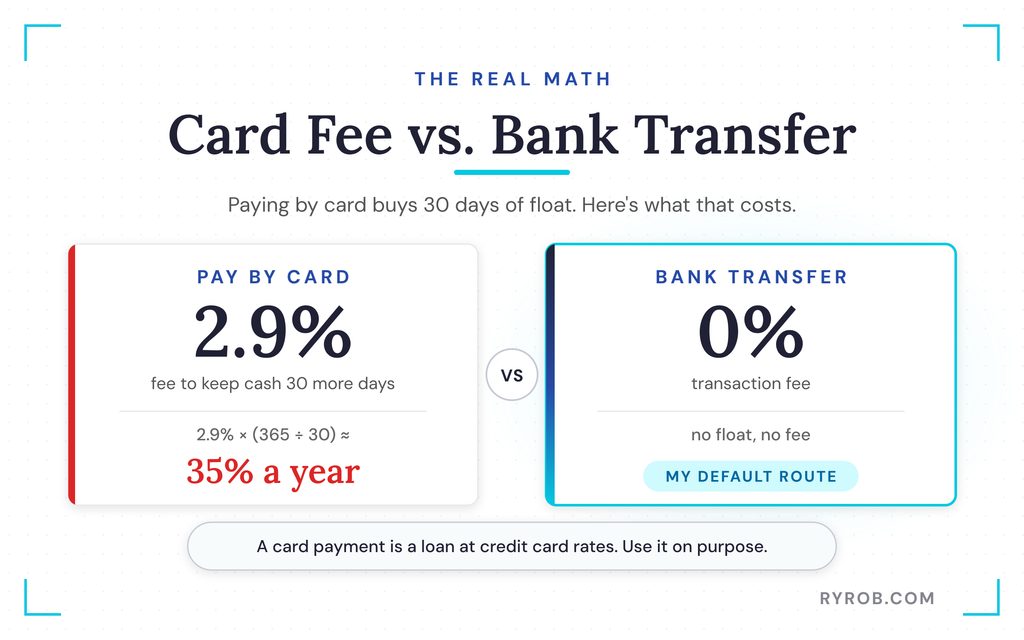
Does that make it a bad move? No. It makes it an option with a price tag.
If you’re earning rewards on that card that offset the fee, or the cash has somewhere better to be that month, take it. If you’re doing it because the button was there, that’s an expensive habit.
Bank transfers are the zero-fee default I run on.
The card option is a tool, not a trap. It only gets expensive when you stop thinking about it as borrowing at credit card rates.
Handing Off Pay Runs Without Sharing Your Bank Login
Last thing, and fair warning, this hands you a tip you didn’t ask for. But it’s a good one.
Most of us never hand off contractor payments, and it isn’t because we love working on accounts payable. Business owners are rightfully protective about giving bank login credentials to someone else. That used to be the only way to outsource your payments.
So here’s the setup I use instead. My bookkeeper queues my future pay runs, with bills collected, details entered, and dates set. Nothing moves until I approve it.
Inside your Melio account, you set a threshold so anything under it goes through, and anything over it waits for your review. That’s the difference between securely delegating a task and giving away your account credentials.
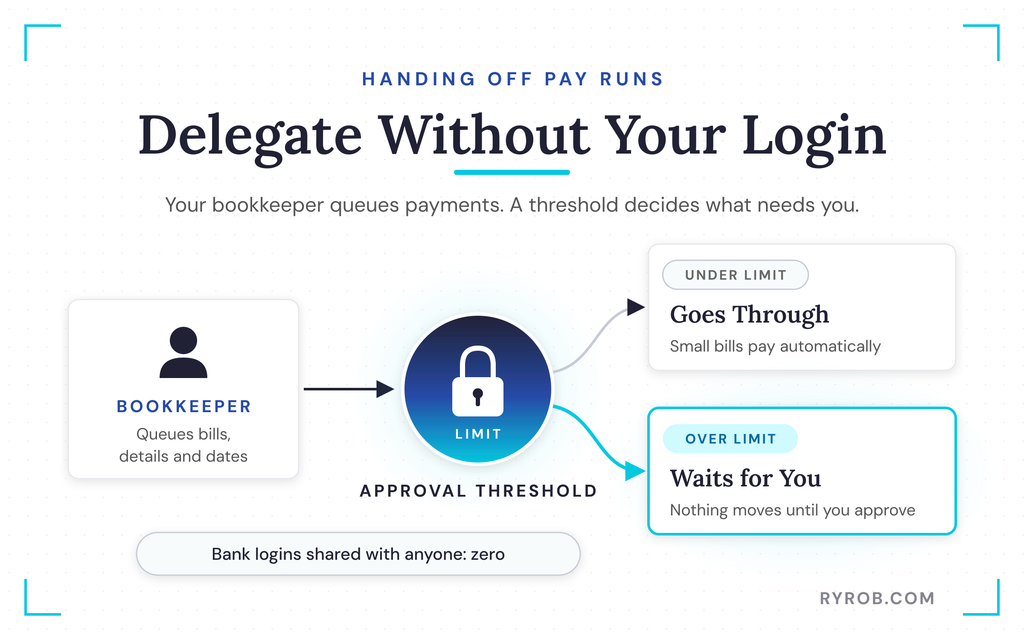
Your bookkeeper does the tedious work, and you keep the keys.
The Honest Limits Worth Knowing First
I kept the tradeoffs in, because there are some.
- The free plan is for testing, not scaling. It’s a place to see whether you like the platform, but if you’re paying a real roster every month, you’ll be on a paid plan.
- International coverage is a set list of currencies, not everywhere on Earth. Check your team against the supported list before you commit.
- The card fee is real money if you use it often for large payments. It’s on par with what dedicated platforms like Payoneer or Tipalti charge, and Melio only applies it when you choose to pay by card.
If what you actually need is to employ someone abroad rather than pay them as a contractor, that’s Employer of Record territory. That’s a different product category worth researching on its own.
FAQs About Paying International Contractors
A few quick answers to the questions I get most about paying a remote team.
What’s the cheapest way to pay an overseas contractor?
A bank transfer through a platform built for it, which is why that’s my default. Traditional wires ride the SWIFT network and stack a flat fee on your side plus whatever the receiving bank takes, while consumer apps hide the real cost in the exchange rate. Platforms that settle over local payment rails, like BACS in the UK, skip those middle hops entirely.
Who actually eats the transfer fee?
Usually the contractor. Your books say you paid the full invoice amount, but less arrives on their end, so the loss comes out of the working relationship rather than your budget.
Is paying a contractor by credit card worth it?
It can be, if the rewards offset the 2.9% fee or you genuinely need the cash elsewhere that month. Just remember the annualized cost is roughly 35%, so it’s a deliberate choice with a price tag, not a default.
Can my bookkeeper run payments without my bank login?
Yes, and this is the whole point of Melio’s approval workflows. Your bookkeeper queues the pay runs, collects bills, and sets dates, while nothing moves until you approve it.
A threshold lets small payments through automatically and holds bigger ones for review, and vendors enter their own bank details through self-service onboarding, so nobody on your team handles raw credentials.
What should my contractor contract say about payment?
Spell out the payment amount, the schedule, and the payment method before work starts. Clear expectations keep budgeting predictable on both sides, and a written contract removes the ambiguity that causes delayed payments. It also helps show the relationship is genuine contractor work if misclassification ever comes up.
Final Thoughts on Paying International Contractors Without the Fees
Here’s the whole setup in one breath. Invoices land in one place, a single scheduled pay run goes out on Fridays, and international contractors sit in the same queue as everyone else. Card payments get used on purpose instead of by accident, and pay runs get handed off without ever sharing bank credentials.
The gap between what your books say and what your contractor receives is fixable. Your writers, editors, and designers should keep what you actually paid them, and your pay cycle should cost you one focused session instead of a week of interruptions.
If you want to try the same setup, Melio’s 90-day full-access trial is linked in the video above too. And if you’ve got payment headaches of your own, drop them in the comments. I read all of them.
My Go-To for Paying Contractors Without the Fees: Melio
Melio is the platform I actually run my monthly contractor pay cycle through. It keeps my domestic and overseas payments in one queue, and bank transfers cost nothing. My link starts you off with 90 days of full access at no extra cost!
