
Last quarter, I tested every lead magnet I could think of. I experimented with PDF guides, free email courses, templates, tools, and even free 30-minute strategy calls. One format outperformed the rest by 3x to 4x. It wasn’t the PDF or the course, it was hosting a free webinar.
Learning how to host a webinar is one of the most effective ways to grow your email list and build your audience. Webinars succeed not because they’re magic, but because they ask for real commitment upfront, and keep working long after the live session ends if you build them right. Watch my full video tutorial here:
Key Takeaways from Hosting A Webinar to Grow Your Email List
- Webinars usually bring in better leads than PDFs or freebies, because signing up asks for real commitment rather than a casual email opt-in.
- The best webinar topics solve one clear problem instead of trying to explain your entire method at once.
- A simple registration page wins every time: a strong headline, the date and time, three benefit bullets, your photo, and nothing more than a name and email.
- Most of the value comes after the live session, only about 40% of registrants show up live, so a strong replay and follow-up sequence does most of the heavy lifting.
- Your webinar hosting platform matters because a raw recording isn’t enough, the right one turns your session into a blog post, replay emails, short clips, and social posts.
Get My Webinar Hosting & Recording Tool of Choice: Riverside
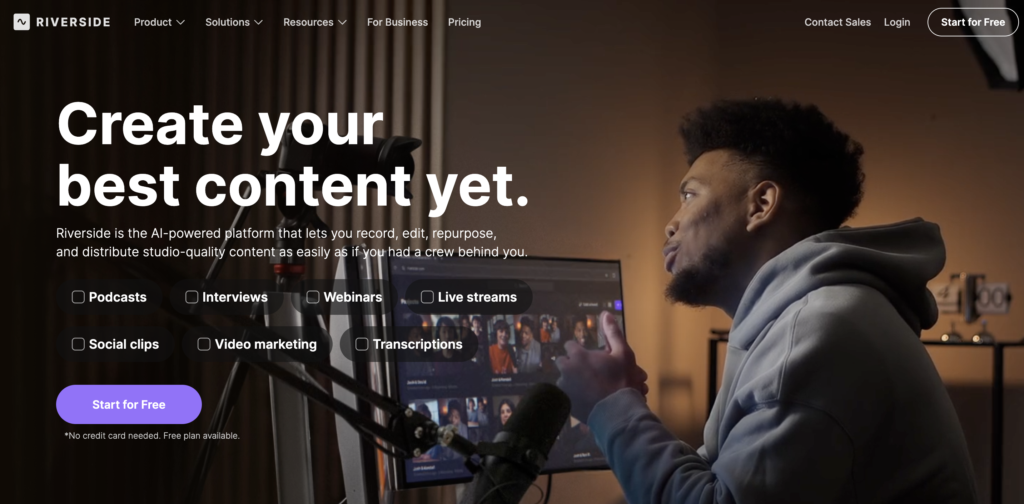
Riverside is my go-to platform for hosting webinars, livestreams, podcast interviews, and meeting with my team. Their studio tools are awesome. If you create video content, I can’t recommend them more highly. Plus, enjoy one month free with my code 👉 RyanR
Why Webinars Convert Better Than PDFs and Free Downloads
A PDF is easy to download and easy to forget. A webinar is an appointment, and that is the big difference.
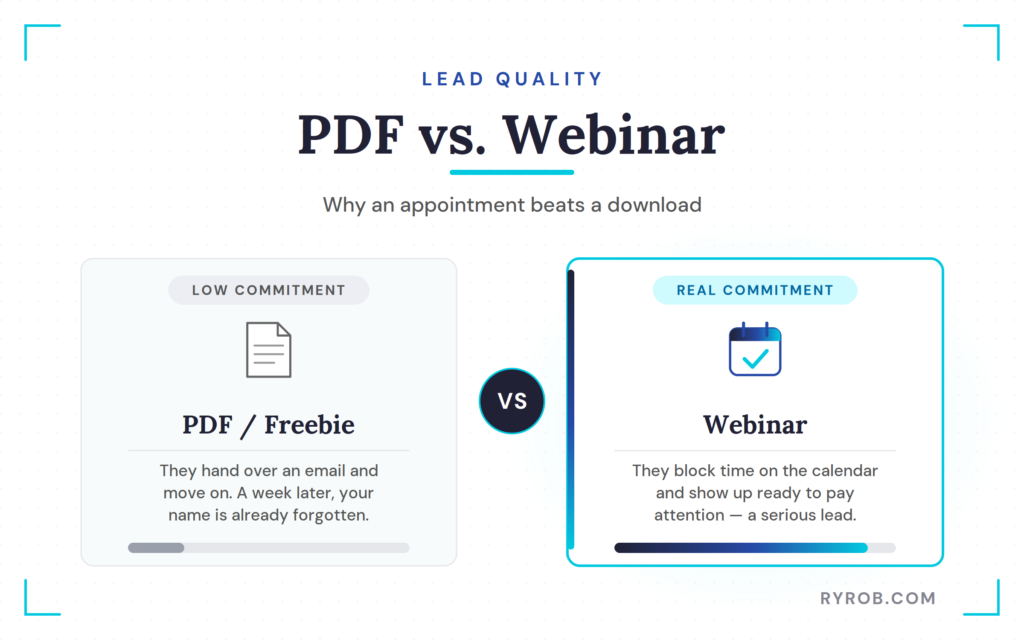
When someone grabs a checklist or a guide, they gave you an email address, and that is it. Low commitment. They might open it, they might skim it, but a week later there is a good chance they will not remember your name.
A webinar signup is different. That person is saying, I will show up on this day, at this time, and pay attention for close to an hour.
Because this virtual event filters your target audience more effectively than static downloads, the leads you collect are usually farther along and more serious.
The Commitment Shift That Changes Lead Quality
This is why webinars tend to outperform a lot of other lead magnets. The signup itself does some of the qualification for you.
You are not collecting random subscribers who wanted a quick freebie. You are attracting people willing to block time on their calendar. That is a different kind of lead, and it usually leads to better follow-through after the event too.
That matters even more when you remember that email lists do not stay flat. They shrink over time as people unsubscribe, switch inboxes, or stop paying attention.
If you are serious about lead generation and building a business with email, you need new subscribers coming in regularly, and you need them to be the right people.
If you are still figuring out what kinds of lead magnets fit your audience, the free AI lead magnet idea generator is a solid way to pressure-test a few options before you spend time building them.
Why No-Shows Are Still Valuable
A lot of people get discouraged when they see how many registrants do not attend live. Do not.
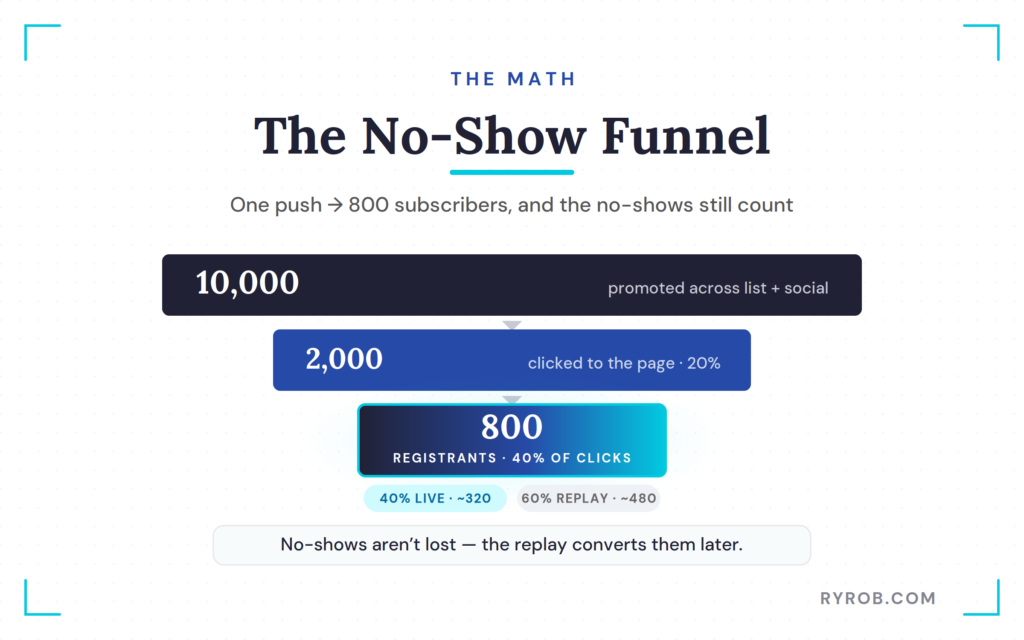
Here is the back-of-the-napkin math. Say you promote your webinar to 10,000 fairly engaged people across your list and social channels. Maybe 20% click through to the registration page, and maybe 40% of those visitors sign up. That is around 800 new subscribers from one push.
Now for the part that surprises people. Maybe 40% of those registrants show up live, and the other 60% do not. That is normal.
The mistake is thinking those no-shows are lost. They are only lost if your webinar ends with a recording file sitting on your hard drive and no follow-up plan attached to it.
If you send a replay, recap the best ideas, and turn the webinar into more content, the no-shows still get value and often convert later.
Step 1: Pick a Topic That Solves One Problem
Topic selection is where a lot of webinars go sideways. Most people try to cram their entire system into 45 minutes.
Trust me, don’t. It sounds generous, but it usually makes the webinar feel rushed, messy, and hard to follow. Your audience leaves with a pile of half-finished ideas instead of one clear win.
Pick one problem, then promise to solve it. This focus is a vital component of your broader marketing strategy, since it keeps your content actionable and highly targeted.
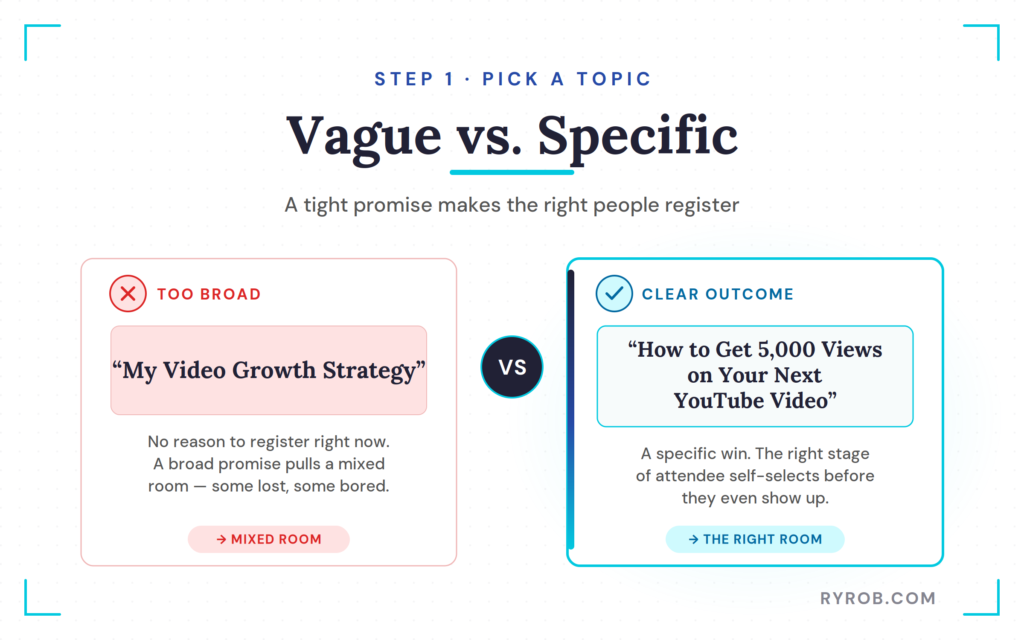
A vague title like “My Video Growth Strategy” sounds broad and polished, but it doesn’t give the reader a reason to register right now. A tighter title like “How to Get 5,000 Views on Your Next YouTube Video” is stronger because it points to a clear outcome.
That kind of specificity also helps the right people self-select into the webinar. If the promise is too broad, you will get a mixed room, where some beginners feel lost and some advanced folks bounce. If the promise is tight, the right stage of attendee signs up.
So before you host a webinar, ask one question: what is the single problem my audience is most ready to fix right now? Start there.
Step 2: Build and Promote Your Registration Page
Your registration page doesn’t need to be fancy. It needs to be clear.
People should understand the problem, the promise, and the next step in about five seconds. If they have to work to figure out what the webinar is about, you have already lost them.
The 5 Elements of a Page That Gets Sign-Ups
A high-converting page is essential, and successful landing pages often rely on extreme simplicity to drive results.
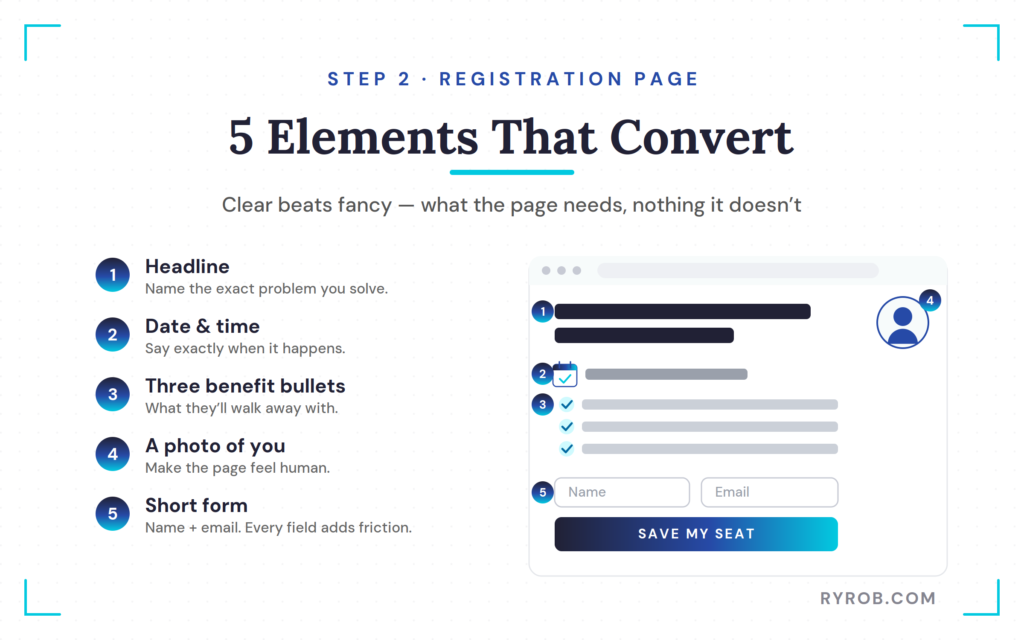
You need a headline that names the problem. You need the date and time. Add three benefit bullets so people know what they will walk away with. Include a photo so the page feels more human. Then, keep the registration form short, usually with just a name and email field.
That is it.
If it is your first webinar, do not get cute and ask for company size, job title, revenue range, or other unnecessary details. Every extra field adds friction. You can get more strategic later, but early on, short forms win.
If you are using Riverside, you can tune up the design inside the registration settings, preview the page before it goes live, and keep tabs on registrants in the audience area. You can also customize the reminder emails there. Their AI will draft the copy for you, which is handy, but I would still give it a quick editing pass so it sounds like you.
How to Promote Your Webinar 7 to 10 Days Before the Event
You do not need a giant launch machine to fill a webinar. A simple promo window of 7 to 10 days is usually enough.
Use email marketing to reach your existing subscribers, and post about the event across your social media channels. If you have a little budget, run light retargeting ads to your newsletter audience, site visitors, and similar audiences who have already shown interest.
If you are hosting the webinar solo, that can be enough. If you bring in a guest or a partner, though, the upside gets bigger fast.
A good guest does not only add expertise. They also bring another audience, another list, and another distribution channel to the event.
Once those registrants start coming in, your follow-up game matters even more than your promo. If you want to tighten that side of the system too, my guide on email list building tips for creators will help you keep those new subscribers warm after the webinar ends.
Step 3: Host the Webinar on the Right Platform
The strategy works no matter what tool you choose, but this is the part of the process where your choice matters a lot more than most people think. That’s exactly why I use Riverside.
If you want your event to pull in better leads and keep paying off later, you need more than just a video. You need the webinar to turn into usable content fast: a blog post draft, a replay email, short clips for social, captions, and assets you can put in front of people who registered but did not attend.
You do not need a studio setup, but using an external microphone and a high-definition webcam significantly improves your audio and video quality.
This technical foundation builds immediate trust with your audience, ensuring they stay focused on your message rather than being distracted by poor production.
A 50-Minute Webinar Run of Show That Keeps People Engaged
My favorite webinar format is simple. It follows a specific run of show that totals 50 minutes.
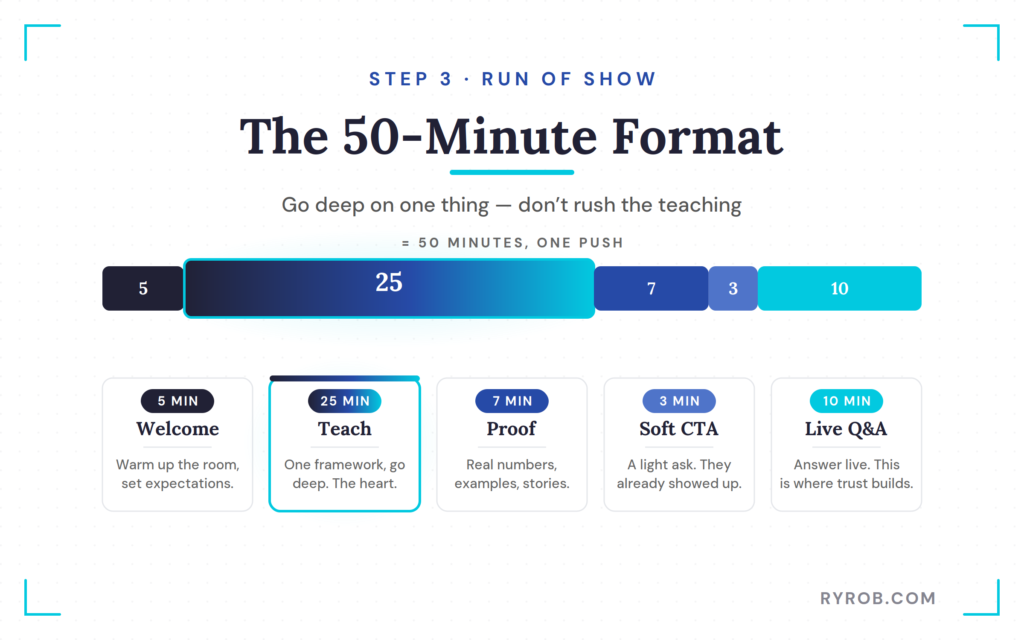
- Use the first 5 minutes to welcome people, set expectations, and warm up the room.
- Spend about 25 minutes on the core teaching. Go deep on one framework or one process. That is the heart of the webinar, so do not rush it.
- Then give about 7 minutes to proof. Show real numbers, real examples, and real stories. This is the part that builds belief because it shows the framework works outside of theory.
- After that, make a quick, soft call to action. Keep it light. People already converted once by giving you their email and showing up. You don’t need a 10-minute pressure pitch.
- Finish with 5 to 10 minutes for a live q&a session. That is where a lot of trust gets built. To boost attendee engagement during the event, you can use live polls to get a pulse on your audience or invite guest speakers to add variety to the conversation.
The live session gets attention. The replay sequence gets you the results you want.
What the Host View Looks Like During the Webinar
Behind the scenes, the host view is where a lot of the polish comes from.
Inside Riverside, you can watch the audience chat, manage the Q&A, and sort questions by likes so the most useful ones rise to the top. You can also run polls during the session and launch them on screen with a click.
There is a private backstage chat for hosts, producers, and invited guests too, which is great when you need to coordinate something without the audience seeing it.
Guest management is straightforward. You can invite remote participants with a link, manage in-person guests, and change layouts so the screen matches the format of the conversation.
The brand kit lets you upload a logo, set colors, choose backgrounds, add overlays, and even brand the waiting room before attendees enter.
If you like using on-screen prompts, you can preload short text snippets and show or hide them during the session. There is also a media board for custom assets and sound effects. Some of that is practical, and some of it is plain fun.
How to Turn One Webinar Into Weeks of Content
This is the part most people skip, and it is why most webinars disappear the second the live session ends.
Once the webinar wraps, the webinar recording is already saved in Riverside. No export dance. No uploads. No extra cleanup step before you can use the content.
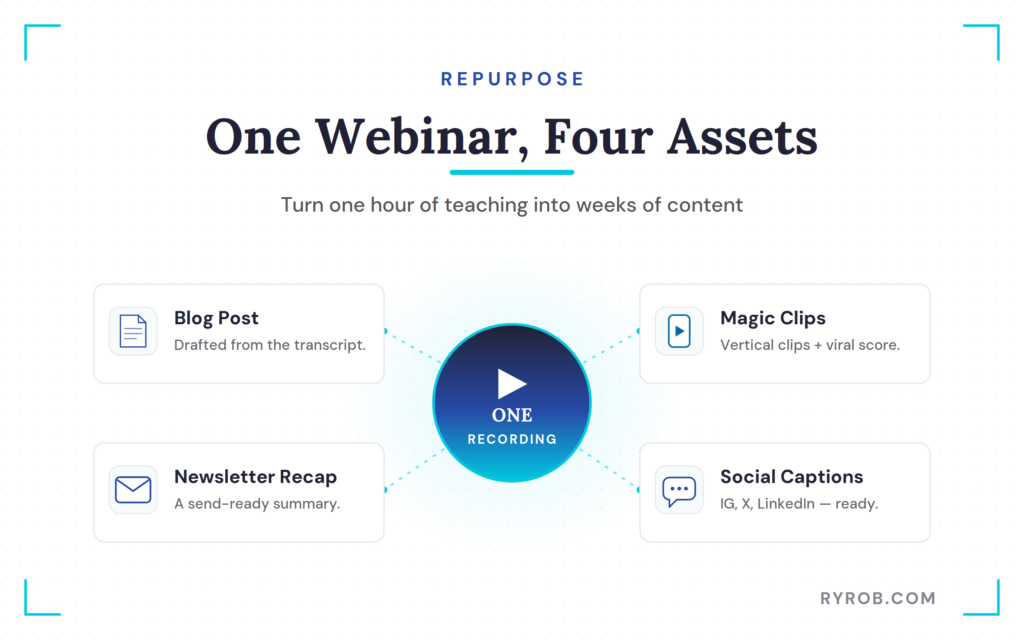
Then Riverside turns that one recording into four useful assets:
- An SEO-optimized blog post draft from the transcript. Title, subheads, paragraphs, the whole thing. Give it a light edit, make it sound like you, and publish it. That one post can bring in search traffic from people who never saw the webinar live.
- Co-Creator can draft you a newsletter recap. With one good prompt, you get a send-ready summary you can paste into your email platform. That is a fast way to pull existing subscribers back to the replay and get the content shared beyond the original registrants.
- Magic Clips of vertical short-form cuts are automatically created. The AI scans the transcript, pulls out strong moments, and prepares vertical clips for social media, including Reels, TikTok, and Shorts. It even gives each clip a viral score. I love this because I used to guess which moments would hit. Now I can sort by score, grab the top three, and move on.
- Social captions to promote the event on your channels. They start in an Instagram-friendly format, but you can remix them with Co-Creator for X, LinkedIn, or wherever you post.
Doing all of that by hand can eat 8+ hours or more per webinar. That is the real killer. Most people do not have that kind of time, so their webinar gets one live shot and then dies.
The whole point of using the right platform is turning one hour of teaching into weeks or months of usable content.
Step 4: Send the Replay Email Sequence
This is where the webinar turns from an event into a system. A steady follow-up outreach plan keeps your content working for you long after the live session ends.
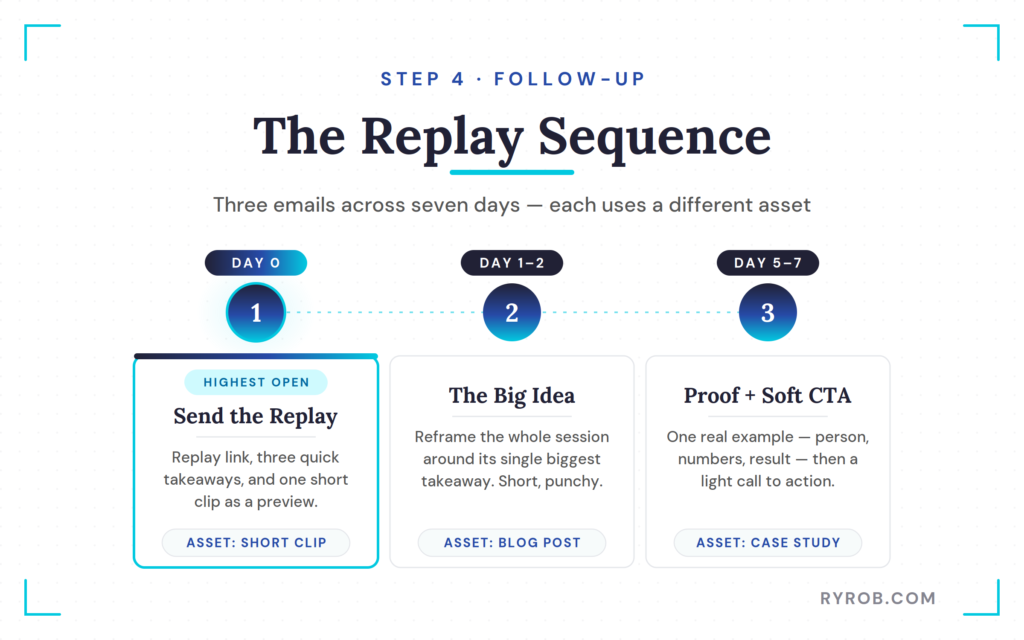
The replay sequence is simple: three emails across seven days. Each one should use a different asset from the webinar so you are not sending the same message three times with a new subject line.
Email one goes out on day zero, ideally within 30 minutes after the webinar ends. Send the replay link, include three bullet takeaways, and add one of your short clips as a preview. This is often the highest open email in the entire sequence because the event is still fresh.
Email two goes out one or two days later. Focus on the biggest takeaway from the webinar. Reframe the whole session around that one idea. Keep it short and punchy. This is also the perfect place to link the companion blog post so people can revisit the material in written form.
Email three goes out on day five to seven. Use a real example if you have one. Real person, real numbers, real result. That is what builds belief. Then wrap it with a soft call to action and let people know they will roll into your normal newsletter cadence after that.
Most people do not convert from the live room. They convert after trust builds. Often that is email two or email three, not the first one.
If you want another solid example of how webinar follow-up emails can be paced, this webinar email marketing sequence breakdown is worth a look.
Four Mistakes That Hurt Webinar Conversions
I have made all four of these mistakes. They are common, and they cost you more than you think.
1. Making the Webinar Too Long
Once you push past 60 minutes, attention starts to drop fast. You will lose a big chunk of the room in the last 20 minutes. That is why I prefer to keep sessions around 50 minutes. It is long enough to teach something useful and short enough to keep energy high.
However, length is not the only problem. Unexpected technical issues can derail your event immediately.
To avoid this, always conduct a thorough practice run before you go live. During this test, make sure your microphone is clear and verify your internet connection is stable.
2. Skipping the Replay Sequence
This mistake throws away a shocking amount of value. When most of your registrants do not attend live and you never follow up, you lose the biggest part of the list-building upside from the event.
The replay emails are not a bonus. They are an essential part of the webinar experience.
3. Pitching Too Hard at the End
A hard sell can wreck the goodwill you just built. People already gave you their email address, which is your first conversion.
You do not need to hammer them with a long sales pitch when most of the room still is not ready to buy. A short, clear call to action is enough to move the right people toward your offer.
4. Choosing the Wrong Topic
The webinar topic that gets clicks is not always the one that brings in qualified leads. That is why you need to test titles and pay attention to specific pain points.
One of the most boring-sounding webinars I have ever run beat several smarter, punchier titles. Why? Because it was clear: it named the problem and promised a direct outcome.
Specificity wins every time.
FAQs About How to Host a Webinar in 2026
Here are a few more common questions worth answering.
Can You Host a Webinar on Zoom?
Yes, Zoom is a common choice for those learning how to host a webinar because it handles basic audio and video recording well. However, the limitation is often a lack of advanced CRM integration.
If you have to manually transfer leads and manage follow-ups, the process becomes labor-intensive compared to using a dedicated professional webinar platform.
What Should You Put on a Webinar Registration Page?
Keep it simple but effective. Use a headline that addresses a specific pain point, list the date and time, include three benefit bullets, and showcase a photo.
To maximize attendee engagement during the session, consider planning for interactive elements like live polls or Q&A segments, which help keep viewers active.
Do I Need Specialized Presentation Tools?
At a minimum, you will need a clear slide deck to guide the audience through your talking points. If you are demonstrating software, you should also ensure your setup supports high-quality screen sharing to avoid visual confusion for your viewers.
What Are Automated Webinars?
Automated webinars allow you to replay a previously recorded event as if it were live. This is an excellent way to scale your efforts, as it allows your content to work for you around the clock without requiring you to be present for every session.
Final Thoughts on How to Host a Webinar
If you want to host a webinar that grows your email list, the live event is only half the job. The real lift comes from choosing one problem, keeping the registration page simple, promoting it hard enough for 7 to 10 days, and following up after the room clears out.
The right platform matters because the value of your virtual event is not just in the live broadcast, but in the long-term utility of the webinar recording. That recording serves as the primary asset for your business.
One strong webinar can bring in subscribers on day one, keep the no-shows warm, and keep pulling in attention weeks later. That is when this process stops feeling like a one-off event and starts acting like a real channel.
Get My Webinar Hosting & Recording Tool of Choice: Riverside
Riverside is my go-to platform for hosting webinars, livestreams, podcast interviews, and meeting with my team. Their studio tools are awesome. If you create video content, I can’t recommend them more highly. Plus, enjoy one month free with my code 👉 RyanR
