
If you want to grow your authority online in the age of AI, you’ll need a website that loads quickly and serves the content AI search crawlers are looking for. Modern search now runs on speed, and slow sites get left behind. Enter: My guide to speeding up WordPress for greater AI visibility.
There’s a quiet shift happening in how people find information online. Instead of typing a query into Google, half of your potential customers now ask AI. They chat with ChatGPT, talk to Claude, or turn to Gemini for answers.
These AI engines pull their data from sites like yours. But they only cite you if your site loads fast and offers a smooth experience.
I’ve been tracking AI search traffic to my own sites for years now. The traffic is very real. The websites getting cited all share one big thing: they’re incredibly fast. So, if you run a slow WordPress site, you’re basically invisible to these new AI bots. Watch my full breakdown here:
Key Takeaways for How to Speed Up WordPress
AI search engines have a much tighter response window than human browsers. Load slowly, and they skip your pages for a faster competitor.
- Hosting is the foundation: You cannot fix a slow site with plugins if your hosting is shared and sluggish.
- Target low TTFB: Aim for a Time to First Byte under 400 milliseconds so AI bots do not time out.
- Use global edge caching: AI crawlers hit your site from data centers worldwide, so regional speed matters.
- Structure for citations: Use clear definitions and schema markup so AI engines can easily extract your data.
The Hosting Behind My AI Citations: Cloudways
When I moved my sites to Cloudways, my AI citations went from basically zero to regular mentions. Yes, the speed foundation is that important!
Why AI Search Crawls Your Site Differently Than Google
AI search engines do not behave like the Googlebot we have known for decades. Traditional search might index one URL at a time. But AI bots hit more pages per session to build deep context.
They are trying to understand the intent behind your content, not just the keywords.
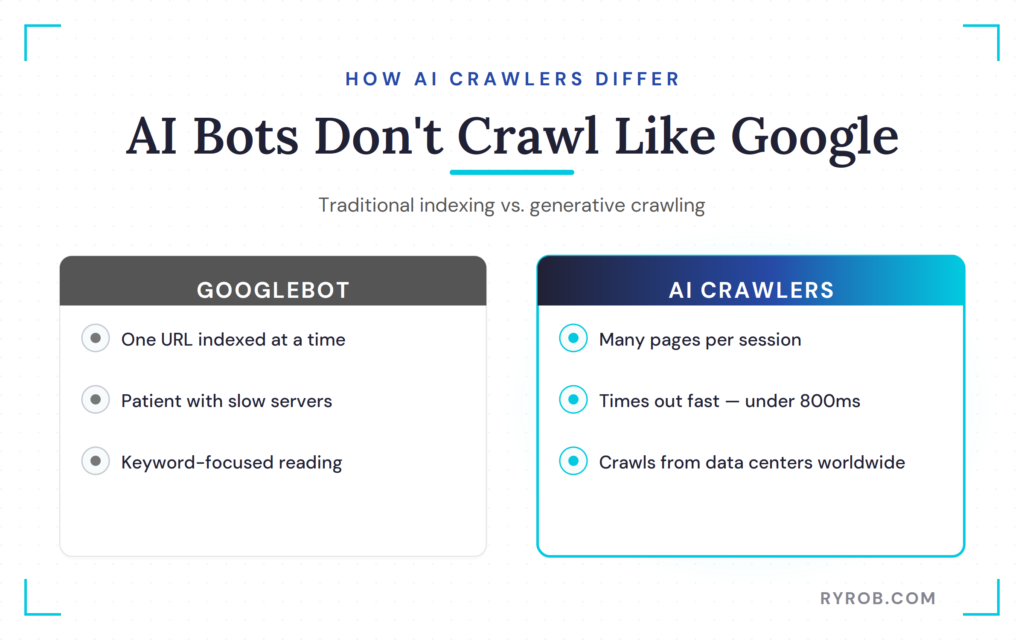
These bots also have a very short fuse. They time out much faster than a human would. If your server takes too long to wake up, the bot assumes your site is down or unreliable.
They also crawl from data centers across the globe. So your site needs to be fast everywhere, not just in your home region.
I have seen that if your server response time is over 800 milliseconds, AI engines routinely skip your content. It is a brutal reality.
If your page load time is not optimized, you effectively do not exist in the world of generative search. This can severely impact your overall SEO ranking.
The Four Metrics That Decide If AI Engines Skip You
You need to know exactly what to measure if you want to win this game. I recommend using tools like GTmetrix or Google PageSpeed Insights to run a comprehensive audit. Here are the four numbers I watch like a hawk on all my sites.
- Time to First Byte (TTFB): This is how fast your server starts responding. Your target should be under 400ms. If you are seeing numbers over 800ms, your hosting is likely the problem.
- Largest Contentful Paint (LCP): This measures how fast your main content visually appears. I aim for under one second.
- Regional Response Time: You might be fast in New York, but are you fast in Tokyo? AI engines crawl from everywhere, so you need consistent speeds globally.
- Page Weight: Keep your total bytes under 2MB. That lets bots crawl more of your URLs without hitting a wall.
TTFB and LCP are critical components of Core Web Vitals. These provide a standardized way to measure user experience and site performance.
Start With Faster Hosting and Caching
Everything rests on your foundation. If you are on a cheap web hosting plan, you are sharing resources with hundreds of other sites.
AI bots will never get the lightning-fast response they demand from that kind of setup. You need managed WordPress hosting to really stand out.
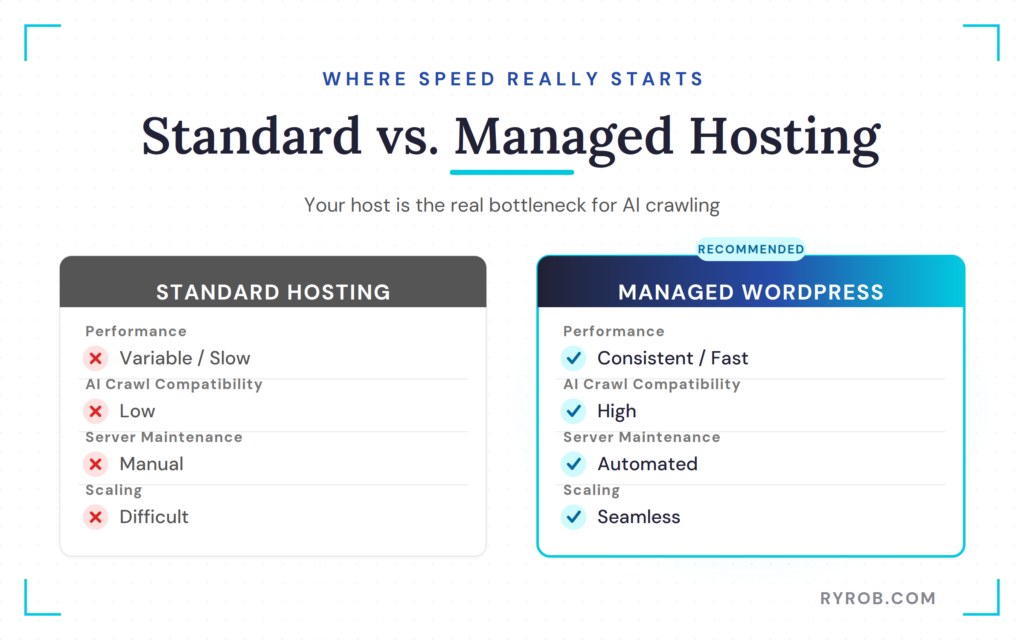
I use Cloudways for my sites because their infrastructure is optimized for performance out of the box. It gives you a massive performance boost compared to standard shared environments.
When I moved my sites over, I saw a 65% improvement in baseline speed. That is a big deal for AI discoverability.
The real secret weapon I have found is their Cloudflare Enterprise add-on. It acts as a powerful content delivery network, giving you global edge caching.
This ensures your site is served from hundreds of data centers around the world. That keeps TTFB low no matter where the AI bot is crawling from.
Why Your Hosting Is the Real Bottleneck
You can spend weeks tweaking plugins, but optimizing WordPress for faster page loads starts at the server level. If the foundation is slow, the rest of your tweaks will not matter. Managed WordPress hosting ensures you have dedicated CPU power to handle aggressive AI crawling.
A high-quality host also considers your server location. By choosing a server closer to where your primary audience resides, you reduce latency significantly.
Furthermore, most generic security setups accidentally block legitimate AI crawlers like GPTbot or Perplexity. Good hosts whitelist these bots by default. That way you do not shut the door on the traffic you are trying to attract.
Optimization on a Budget
If you are not ready for a premium provider, you can still achieve impressive results with careful configuration. Here is where to start:
- Install a free caching plugin: A tool like LiteSpeed serves static HTML versions of your pages. This reduces server strain.
- Prioritize database optimization: This keeps your site lean and responsive.
- Connect to a free CDN: A free content delivery network distributes your assets globally. This keeps your site accessible to AI bots no matter their geographic origin.
Add Page Caching on Top
Once your hosting is solid, you need a layers-based approach to caching. Page caching should be turned on by default.
Some sites are heavy on data or full of dynamic elements. For those, adding Object Cache Pro can be a massive win for performance.
The goal is to serve a static version of your page whenever possible. This reduces the load on your server and allows the content to reach the AI bot much faster. It is a simple fix that pays huge dividends in crawlability and visibility.
Optimize Your Digital Assets for Faster Crawling
Your images and scripts are often the primary cause of page weight bloat. If you are still using large JPEG files, it is time to switch. I convert everything to WebP or AVIF formats, which are 30% to 50% smaller and highly efficient for both modern browsers and AI bots.
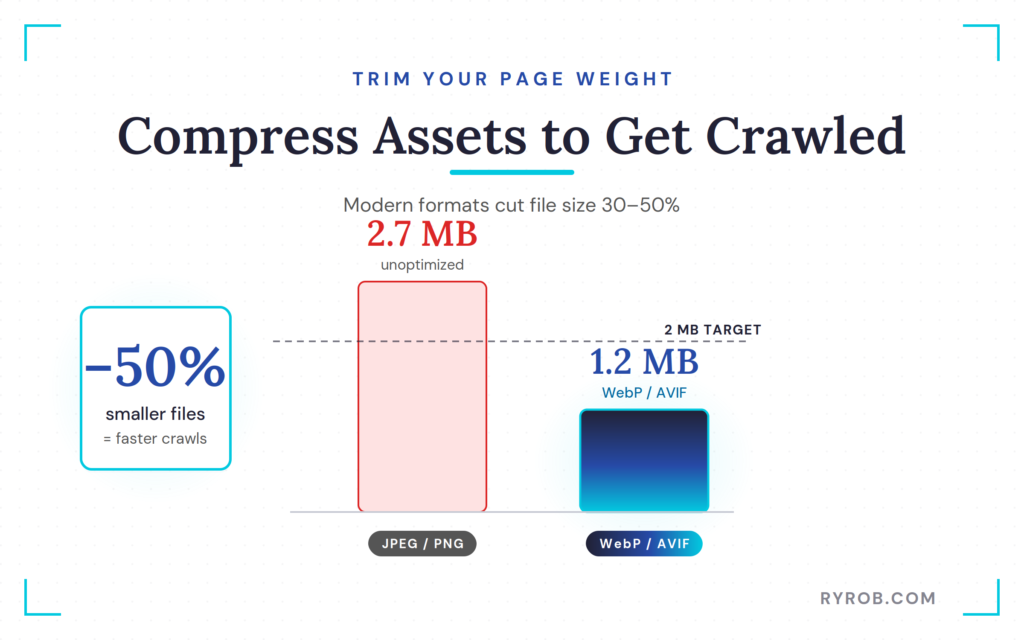
Implementing proper image optimization is the quickest win for your site speed. While you can use a plugin to handle this, it is even better if your hosting provider performs these optimizations at the server level to reduce site overhead.
When it comes to your JavaScript and CSS, the rule is simple: defer or delay everything that is not essential for the initial viewport. Most sites load dozens of scripts they do not actually need immediately.
Using a tool like WP Rocket is an excellent way to improve your AI search performance because it allows you to automatically minify CSS and JS and easily enable lazy loading for images and iframes. You can even connect WordPress to Claude to handle these speed fixes through a simple chat conversation.
These steps are crucial for resolving render-blocking resources that confuse AI crawlers. By choosing an all-in-one performance tool, you can streamline your site architecture while avoiding the common trap of plugin bloat that often slows down WordPress sites.
How to Structure Content So AI Engines Actually Cite You
Speed might get you crawled, but your content structure is what gets you cited. AI engines look for clear, unambiguous information.
If your writing is vague or buried in fluff, the AI might still process your page. But it will fail to link back to you as a source.
A well-structured page does more than earn citations. It improves the overall user experience. That lowers your bounce rate and smooths the path to higher conversion rates.
I like to use what I call clear definitions. If I am explaining a concept, I define it explicitly in one or two sentences early in the post. AI engines love to pull these direct definitions into their summaries. It is one of the easiest ways to become the primary reference for a topic.
You should also use specific numbers and concrete claims. Instead of saying “this makes your site faster,” say “this optimization improved load times by 47%.”
AI engines prefer data and measurements over generalities. Being specific builds authority and makes your content much more citation-friendly.
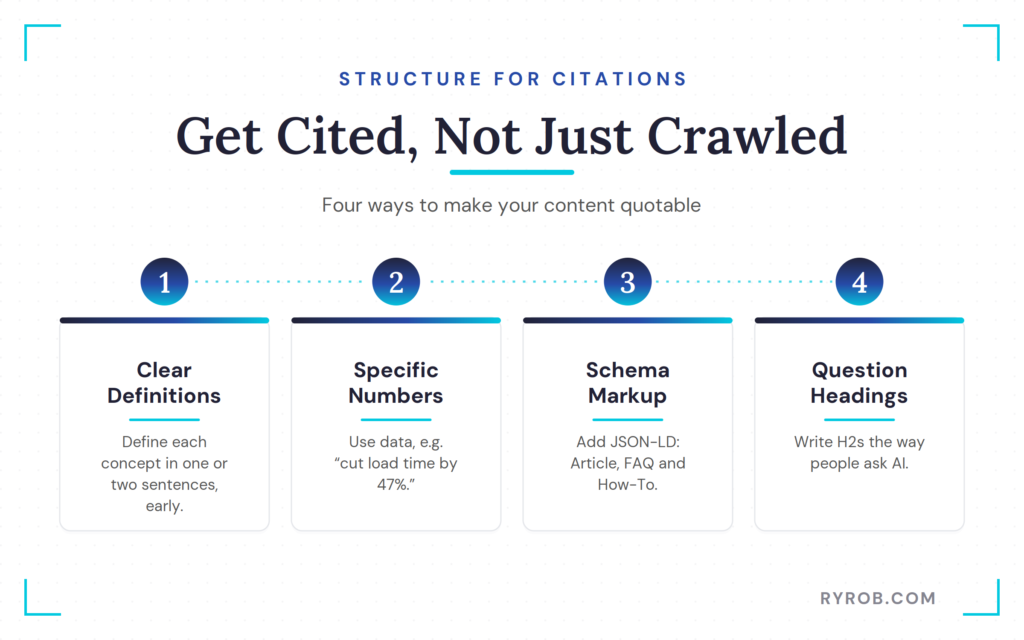
Clear Definitions, Specific Numbers, and Schema Markup
Schema markup is no longer optional. It is the technical layer that tells AI engines exactly what your content is about.
I use JSON-LD on every post, specifically Article, FAQ, and How-To schema. This structured data is like a roadmap for AI bots, making it easier for them to parse your facts.
When you use essential speed fixes for better visibility, you make it easier for bots to find this markup. If a bot times out before it reads your schema, you have lost your chance. You will not appear in an AI overview.
Format Your Headings as Real Questions
One of my favorite tactics for Generative Engine Optimization (GEO) is to format H2 and H3 headings as questions. Think about what people are actually asking ChatGPT or Perplexity. Questions like “How does X work?” or “What’s the difference between Y and Z?” are perfect.
AI engines often extract these question-and-answer pairs directly for their responses. By mirroring the way people search, you increase your chances. Your content becomes the one chosen to answer the query.
How to Track Your AI Search Traffic
You need to know if all this work is actually paying off. In Google Analytics, you can filter your referral traffic by source.
Keep a close eye on referrals from ChatGPT, Claude, and Perplexity. These aren’t just bot hits. They are real human beings clicking links inside AI answers.
If your AI referral numbers aren’t growing after a month of optimization, run a technical audit:
- Check your PHP version: Make sure you are running at least 8.2 or higher for optimal server performance.
- Use a lightweight theme: Pick one that does not bloat your code.
- Confirm caching and compression: Verify that browser caching and GZIP compression are active.
- Consider advanced tools: Options like NitroPack or LiteSpeed Cache handle automated image optimization and resource minification.
Beyond these technical checks, look at your content structure. Usually, if you are fast but not getting cited, the bottleneck is how you have organized your information.
I also suggest doing manual spot-checks. Go to ChatGPT and ask it the questions your blog posts answer. See if you show up in the citations.
If you don’t, look at who the AI is citing instead. Figure out what they are doing differently with their speed or structure.
FAQs About Speeding Up WordPress
Below are additional questions you might ask.
u003cstrongu003eWhat is the most important metric for AI search?u003c/strongu003e
TTFB (Time to First Byte) is often the dealbreaker. While all metrics matter, this is the one that decides whether a bot stays or leaves.
If your server takes more than 800ms to respond, AI bots are likely to time out. They will skip your site entirely.
u003cstrongu003eCan I fix my speed issues with just plugins?u003c/strongu003e
No, plugins cannot make up for bad hosting. They can help, but only on top of a solid foundation, which starts with avoiding the 7 WordPress hosting mistakes I see most often.
If your hosting is slow, plugins are just a fresh coat of paint on a crumbling building. Start with managed cloud hosting first.
u003cstrongu003eDoes schema markup really help with AI citations?u003c/strongu003e
Yes, absolutely. Schema provides a structured way for AI engines to understand your content.
It acts as a set of instructions for bots. That makes it much easier for them to extract facts and cite you as a source.
u003cstrongu003eShould I stop caring about Google and only focus on AI?u003c/strongu003e
Not at all. These speed and structure fixes help you with both at once. Google also rewards fast sites and clear structure. So you are essentially killing two birds with one stone.
Final Thoughts On Speeding Up WordPress Site
Staying visible in an AI-driven search world is not a mystery. It comes down to five key moves: managed cloud hosting, response times under 400ms, asset compression, schema, and question-based formatting.
Focus on those five things and you will be ahead of most of your competition. A single fast-loading page can show up in ChatGPT, Claude, and Google’s AI overviews all at once. That is the kind of leverage that makes the effort to speed up WordPress worth it.
Remember that this is an ongoing process. Speed is just one piece of the bigger effort to grow a blog over time. Selecting the right caching plugin and consistently monitoring your Core Web Vitals will keep your site visible in generative search for the long term.
The Hosting Behind My AI Citations: Cloudways
When I moved my sites to Cloudways, my AI citations went from basically zero to regular mentions. Yes, the speed foundation is that important!
