Here we go. ChatGPT ads for small business are now a thing. I’ll be honest… when I first saw a “Sponsored” tag beneath a ChatGPT answer, my reaction was, “Oh no, here we go again.” But the self-serve option with no minimum spend got me interested.
For a small business, that makes testing digital marketing possible without a huge commitment. I’d still check whether ChatGPT knows about your business first, before putting money behind it. I break down how to do this in the video below.
Here’s how I approached the setup of ChatGPT ads campaigns without handing every decision over to the platform itself:
Key Takeaways for ChatGPT Ads for Small Business
- Review your organic AI visibility and brand authority
- Edit your ChatGPT ad copy yourself
- Start with a test CPC (cost-per-click) ad campaign to collect conversion data for 2-3 weeks
1. Check Your AI Visibility Before Spending
An ad can feel more credible when ChatGPT already recommends your business in its AI-generated answers. If your brand is unfamiliar, that placement has less context working in its favor.
That’s why answer engine optimization (AEO) and generative engine optimization matter before ad spend. My guide to improving AI search visibility covers the groundwork for organic AI visibility.
I tested this with RightBlogger, my SaaS company:
Someone asks you how to automate your blog as a beginner. Based on everything you know, would you recommend RightBlogger? Be honest. Don’t just tell me what I want to hear, and tell me which other tools you’d recommend first.
ChatGPT gave me a qualified yes, then flagged a need for more external proof and stronger brand authority. That’s useful homework.
An AI search audit makes this check more systematic by reviewing customer search queries, brand mentions, and accuracy.
2. Open Your ChatGPT Ads Manager Account
There are three buying paths: agency partners, existing adtech platforms, and the self-serve OpenAI Ads Manager. For small businesses, self-serve is the relevant route for ChatGPT ads in this openai advertising strategy.
Sign up, verify your business, and add a payment method before running paid placements. OpenAI reviews the account before it goes live, so build in some approval time.
Before launching, review OpenAI’s ChatGPT ads FAQ. It covers eligibility, personalization, privacy, and user controls.
3. Prepare Your Product Feed and Tracking
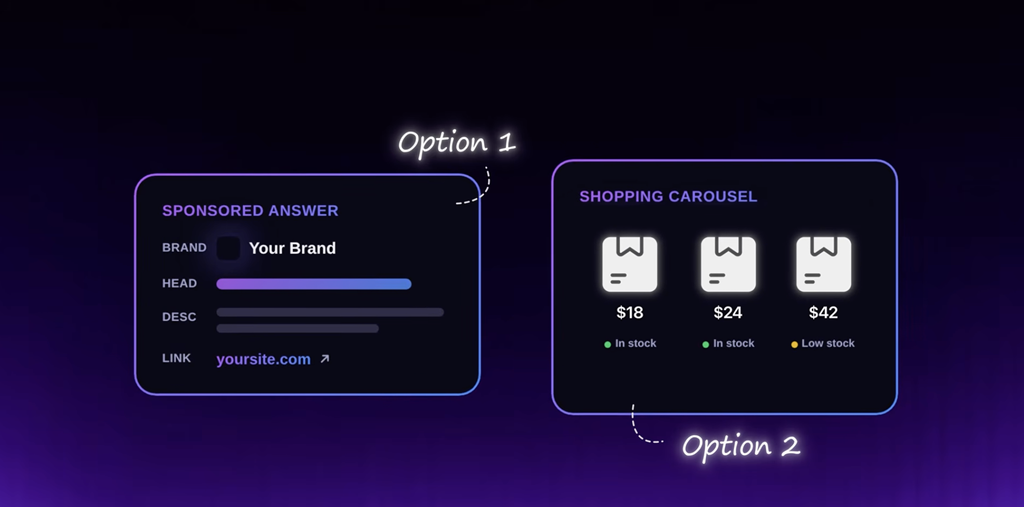
Before launching a ChatGPT ads campaign, it’s worth taking a few minutes to dial in your product feed and your conversion tracking.
Review Your Product Details
If your campaign uses a Shopify integration or Etsy product feed, check prices, inventory status, and photos.
Wrong prices or outdated images can hurt performance before an ad gets a fair shot. Spending 10 minutes on the feed is worth it.
Connect Conversion Tracking
Once approved, install OpenAI’s conversion pixel and connect the conversions API if your setup supports it. Track whether clicks lead to conversions and monitor conversion rates.
Third-party measurement is still catching up, so attribution data may be limited. The pixel is the main measurement tool discussed in my walkthrough.
If your setup supports CRM integration, it may help connect campaign activity to customer acquisition outcomes.
4. Write Ad Copy for the Question Before the Purchase
Think about the question someone asks right before they’re ready to buy. Match the conversational intent behind relevant search queries, rather than starting with a keyword list.
The character limits are tight. Every word has to earn its place.
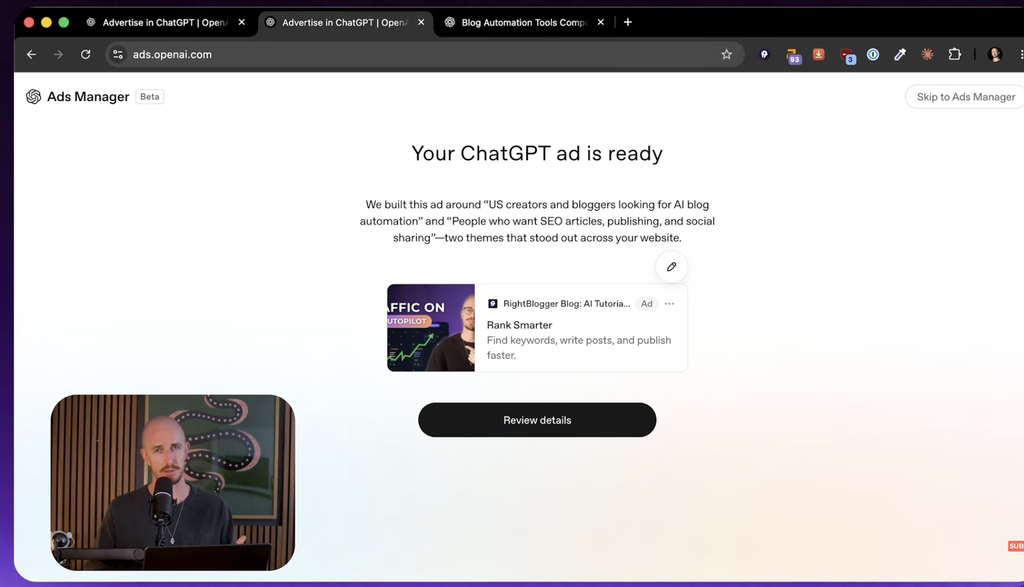
Ads Manager generated a preview and suggested a campaign with an average daily budget. It understood RightBlogger’s audience pretty well, but I wanted more control over the copy.
I used ChatGPT to draft variations for my ad strategy, and they looked stronger than the first suggested ad. Still, I’d edit every line myself before publishing. I’m not outsourcing the sentence that has to convince a stranger to click.
5. Start With a Small CPC Test
For ChatGPT ads, I’d start with cost per click (CPC), rather than CPM pricing. CPC makes it easier to compare spending with Google Ads or Meta.
Run a small test that fits your marketing budget for two to three weeks before changing it. That gives you time to get a useful signal and account for your sales cycle.
My account also showed a $500 credit after spending $500. That offer may not appear in your account.
FAQs About ChatGPT Ads for Small Business
Here are a few of the most frequently asked questions I’ve been fielding about ChatGPT ads so far.
How Detailed Is the Measurement?
Expect proxy metrics rather than mature attribution. Account approval can also take time. Treat this as an early channel, and don’t mistake dashboard activity for reliable evidence in AI-generated answers.
Does AEO Replace Google SEO?
No. As my generative engine optimization guide explains, AI visibility builds on traditional SEO. Generative engine optimization is a geo strategy for improving organic visibility, not a promise of inclusion in AI answers. Strong Google rankings alone don’t guarantee inclusion.
Build Visibility Before Scaling Your ChatGPT Ad Spend
Strong organic AI visibility gives paid placements more context. Generative engine optimization can help build that visibility. But buying ads doesn’t earn organic citations.
Start with brand authority. Then judge the campaign by tracked results, not the excitement of entering a new channel early.
Comment below if you have a request for a deeper dive breakdown on running ChatGPT ad campaigns 👇
