
I’ve got two versions of the same website live right now, and figuring out how to vibe code a website the right way came down to one choice. I built one by just describing it in a chat box, never touching code… the other inside an AI coding tool where I got my hands on the real files.
Both went live in under fifteen minutes, but they solve completely different problems. Vibe coding split into two lanes this year, and knowing which one fits what you’re building saves you from picking the path that fights you the whole way.
Here’s the full video walkthrough where I built this exact speaker portfolio site both ways, start to finish.
Key Takeaways on How to Vibe Code a Website
- AI website builders get your site live in minutes instead of weeks, and they don’t require any coding knowledge.
- AI coding tools give you local file ownership and deeper control when you want to manage individual project folders yourself.
- A real, trustworthy site needs four things, a custom domain, proper DNS setup, SSL security, and reliable hosting behind it.
- Your prompt decides your result, so the clearer you describe your business, colors, and voice up front, the less cleanup you’ll face later.
- Neither lane writes your real content, the words, photos, and customer proof that make the site feel human are still on you.
- The deploy step is the real wall, and a connector that pushes your local files live in a couple of clicks is what gets most people over it.
How I Got the Builder and Coded Site Live: Hostinger
Hostinger ended up being the whole backbone of this project. It built my first site in lane one and pushed my coded site live in lane two, all from one account with no config files or terminal headaches. Use my code RYANROBINSON for 10% off an annual plan, first-year domain included👇
How to Vibe Code a Website: The Two Lanes
Andrej Karpathy helped popularize vibe coding, and the practice quietly split into two directions this year. According to the definition of vibe coding, it’s a software development approach that relies on describing your intent in natural language to an AI.
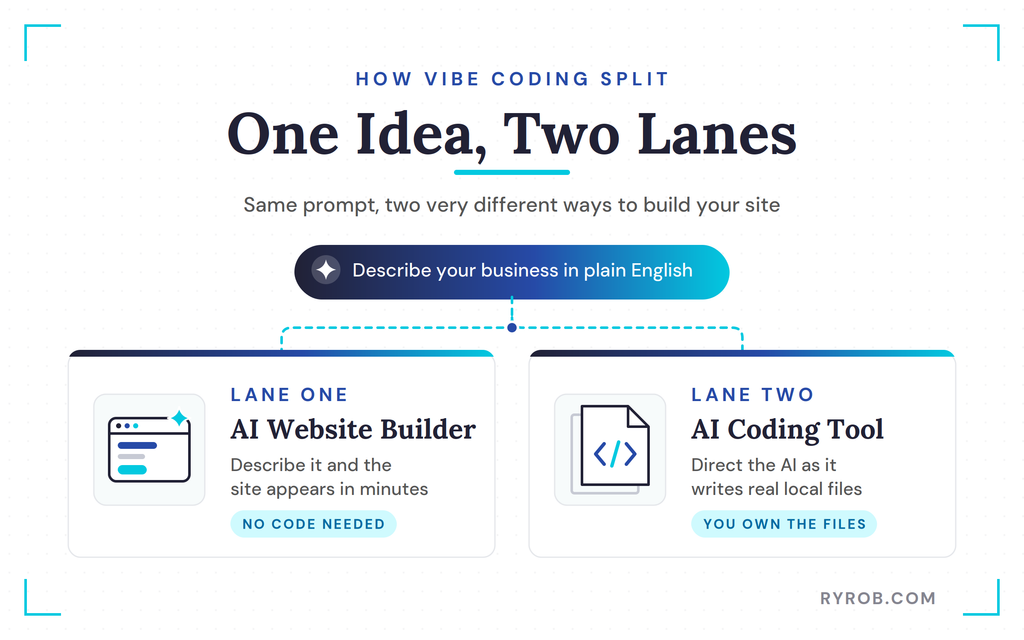
Lane one lets you describe a business and watch a website appear. Lane two puts you inside an AI coding tool, where the system writes real code into real files while you act as the director.
Lane One: Describe It and the Website Appears
If you love the idea of never looking at code, lane one is for you. You type a description of your business, and that’s conversational coding in its simplest form.
The builder constructs the layout, writes draft copy, and pulls in relevant images. You refine the result by chatting with the builder instead of adjusting individual elements by hand.
Lane Two: Direct an AI Coding Tool That Writes Real Files
If you enjoy cracking open files and organizing a project structure manually, you belong in lane two. You use AI app builders like Bolt.new, Lovable, Cursor, and Fabricate to write real code into real files stored right on your computer. That process relies on code generation.
You guide the process step by step through chat prompts. This conversational coding approach still rewards good prompt engineering. This route offers maximum control over every single line of code.
The Quick Question That Reveals Your Lane
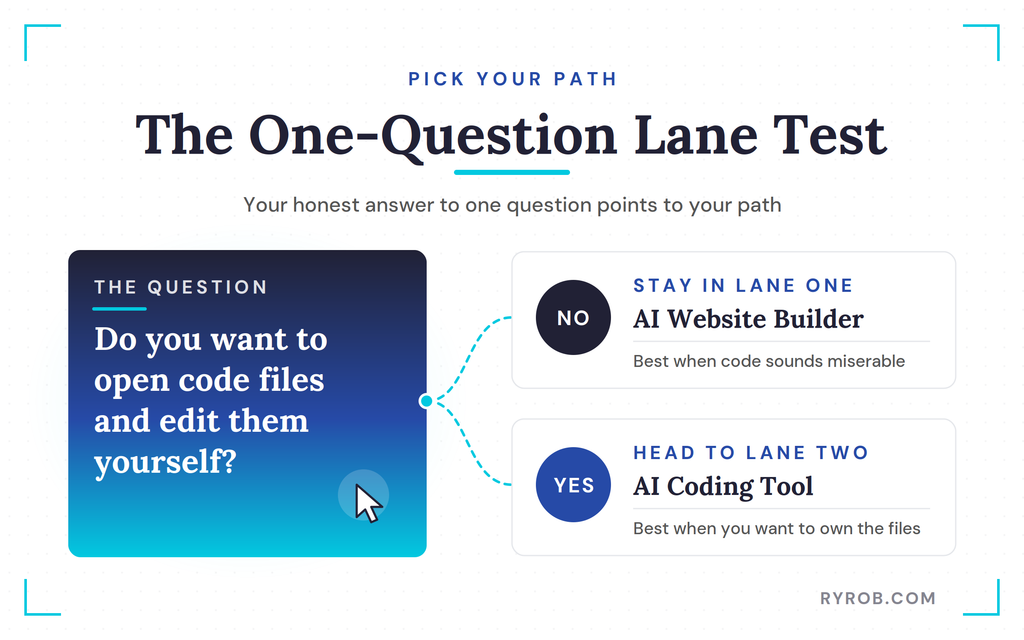
Choosing your path comes down to one simple preference. Do you want to open up code files and make manual edits yourself?
For non-technical founders, the answer is usually no, and that’s exactly why vibe coding exists. If that thought sounds miserable, stay in lane one with a true AI website builder. If you want full ownership of the underlying files, head straight to lane two.
Building the Site With an AI Website Builder
For the first build, I used an AI website builder to create a speaker portfolio site, and I stuck with Hostinger for both lanes.
I actually teamed up with them on this one because it’s the rare toolkit that handles the no-code builder and the coding connector in the same place. If you want to build along, my code RYANROBINSON takes 10% off an annual plan.
The goal was simple, giving event organizers a place to see my background, my talk topics, some social proof, and a contact form.
From One Prompt to a Finished Page
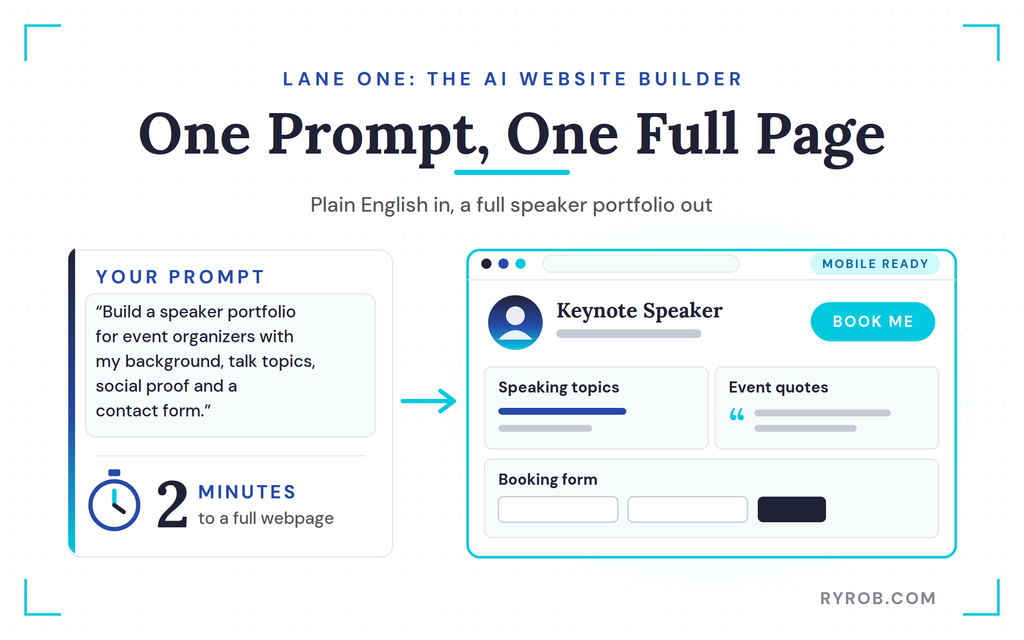
I picked the agentic option and used plain, natural language to describe my business, which is conversational coding at work. In about two minutes, it built an entire webpage.
It even found a photo of me online and placed a clear book me button front and center. The layout included my speaking topics, past event quotes, and a booking form, and mobile optimization was handled out of the box.
It also understood what a strong page layout should do, which is the part that usually eats my time with a classic builder.
Editing by Chatting Instead of Clicking Menus
Old website builders forced you to click into every single element to make changes. With this tool, conversational coding and iterative refinement let you update headlines or tweak text in the user interface.
A live preview shows changes as you chat. You can still make manual edits if you want to swap images or adjust spacing by hand.
Where Contact Form Submissions Actually Go
A contact form is useless if you don’t know where the submissions land. This builder includes a data tab that collects every inquiry in one place.
When someone submits a request to book a speaking gig, their name, email, and event details show up right in that dashboard. You can also view the underlying code if you want extreme flexibility.
Building the Same Site in an AI Coding Tool
The second build used an AI coding app with the exact same project brief as a natural language prompt. This approach lets the tool create a real project sitting on your local machine, instead of living inside a hosted builder.
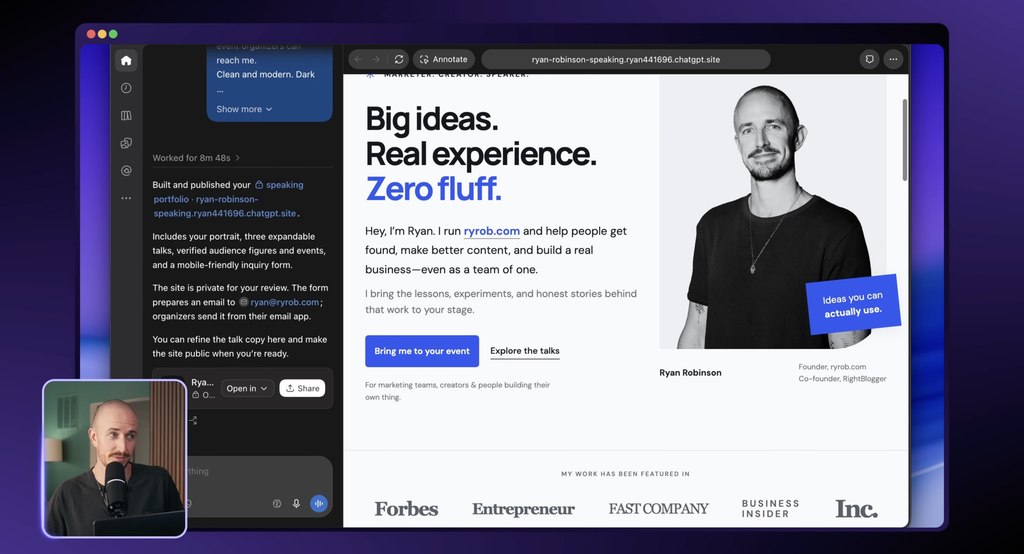
Watching Real Files Stack Up in Codex
I fed the same prompt into ChatGPT and watched Codex use conversational coding to handle the code generation. It wrote out real files for a React frontend and a Python backend on the left side of my screen, one more way of building a website with ChatGPT.
The AI researched my background and added a credibility bar at the top of the page. It chose a different color palette, but delivered a clean, functional speaker portfolio.
The Deploy Wall That Stops Most Projects
Local files and a live preview from your development server are great, but nobody else on Earth can see a project running only on your machine. Getting a site live on the internet through web hosting stops more creators than anything else.
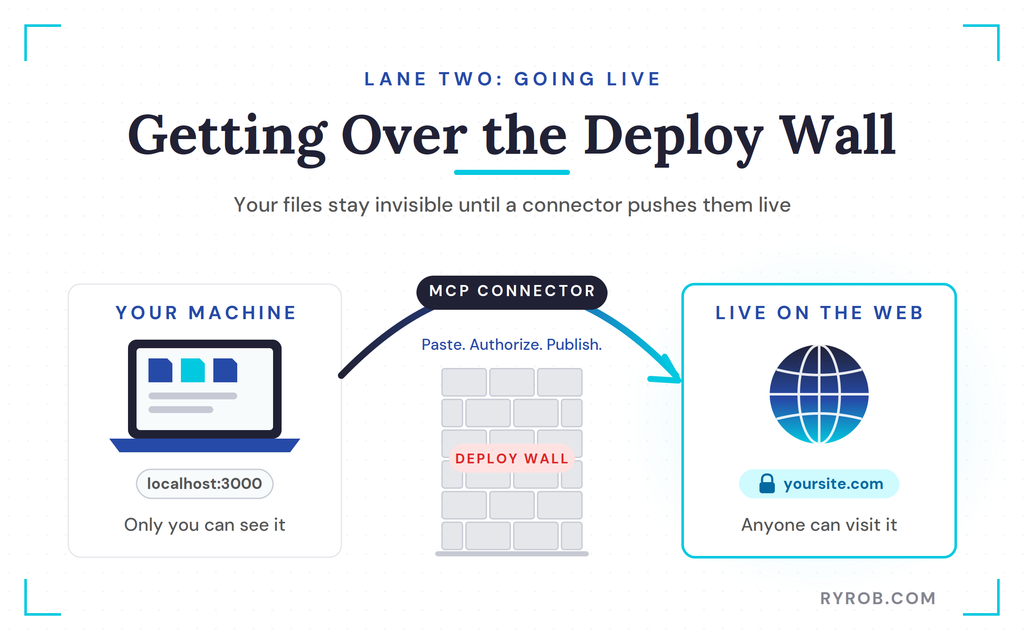
You need a simple way to push your local files to a live server without any terminal gymnastics.
Going Live With the Hostinger Connector
To get past the deploy wall, I grabbed an MCP snippet and pasted it straight into the chat. That connected my local session directly to my hosting account through the Hostinger connector.
I authorized the connection through my browser without touching API keys or config files. Then I asked chat to publish the site, and it came back with a live URL almost instantly.
The Builder vs the Coding Tool: My Verdict
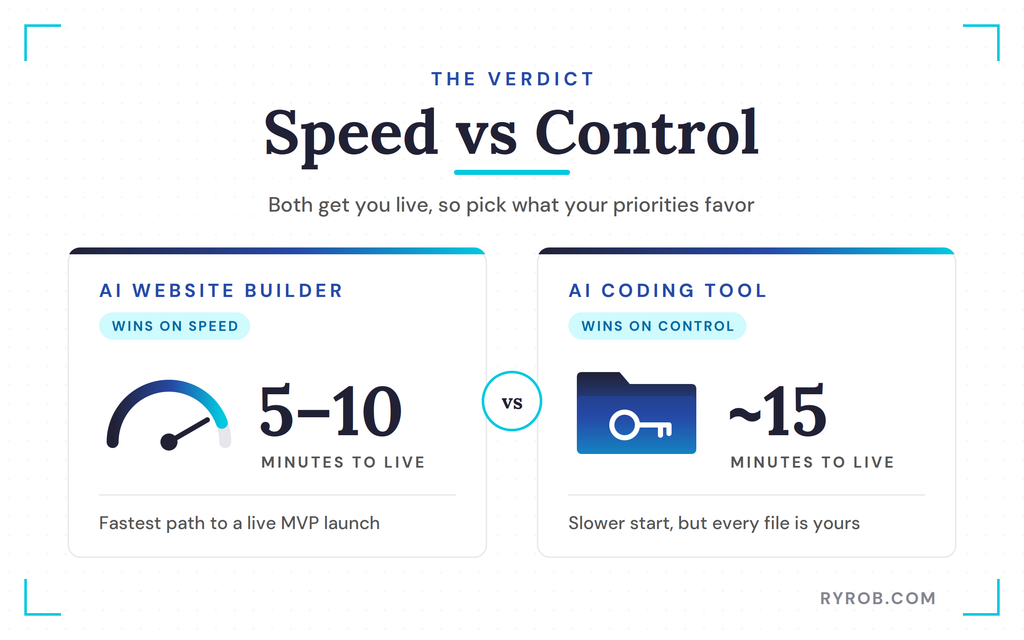
Both methods get you a live website, but vibe coding trades speed for control. Once you know your own priorities, the right choice gets obvious.
Speed to Launch Goes to the Builder
Lane one wins easily on speed, and an AI website builder took about five to ten minutes from start to finish. That pace suits non-technical founders who want a fast MVP launch. Conversational coding still gives quick results, though iterative refinement may add a few minutes.
Codex took closer to fifteen minutes because setting up local files adds a few extra steps. If you need a portfolio online today, use the builder.
Control and Ownership Go to the Coding Tool
Lane two wins on control. An AI coding tool lets you own the actual files on your machine, which supports full-stack applications and custom software.
If you want to customize every folder and grow a complex web app over time, that local file ownership is worth the extra effort. It also helps with code generation, project management, database migrations, and long-term software development.
Cost Is Closer Than You’d Think
Web hosting costs are similar either way when you use a reliable hosting provider. Building locally is where it shifts, since your AI usage costs depend on how much you prompt the tool.
Heavy coding sessions can rack up token usage on paid plans. Website builders usually run on a monthly system of message credits, which makes spending easy to track, though those message credits can run out if you build a lot.
FAQs About How to Vibe Code a Website
A few more questions I hear a lot when people start vibe coding their first site.
Do I need coding skills to use an AI website builder?
You don’t need any coding experience at all. You describe your business in plain English, and the AI uses conversational coding to generate the layout, design, and draft copy for you.
Can I edit the content after the AI generates it?
Yes. You can chat with the builder to request changes, generate new images, or update text directly with manual editing controls.
How long does it take to build a website with AI?
In my test, the AI website builder had a full page live in about five to ten minutes, while the AI coding tool took closer to fifteen. Your own timing depends on how much you refine the result and how complex your site is.
Do I still need web hosting if I build my site with AI?
Yes. The AI handles the design and the code, but your site still needs a custom domain, DNS, SSL, and reliable web hosting before anyone else can reach it.
What makes a website officially real and trustworthy?
According to browser security certificate documentation, your site needs a custom domain, proper configuration, an active SSL certificate for secure connections, and reliable web hosting. Those four pieces are what keep browsers from flagging your site and what make visitors trust it.
Final Thoughts on How to Vibe Code a Website
If your site sits in front of an existing business like a portfolio or a service page, take the builder lane and aim for an MVP launch today. Get the technical setup off your plate and get back to the actual work.
If your website is your business, or you plan to build custom features and handle project management for it, take the coding lane and accept a slower start for more freedom later. Either way, remember that the last ten percent of any AI-built site always comes from you.
Bring your own words, your real photos, and your authentic customer proof to finish the job. It’s also on you to make sure the finished site actually gets found in AI search and Google, since a great-looking page won’t rank on its own. Pick a lane today and start vibe coding your site instead of waiting for the perfect moment.
How I Got the Builder and Coded Site Live: Hostinger
Hostinger ended up being the whole backbone of this project. It built my first site in lane one and pushed my coded site live in lane two, all from one account with no config files or terminal headaches. Use my code RYANROBINSON for 10% off an annual plan, first-year domain included👇
