

If you’ve ever shopped around for cheap WordPress hosting, you’ve probably hit the same wall I did. Every web hosting provider listicle out there is pretty much a ranking of whoever pays the publisher the most, and somehow… they all crown a different winner. So I ran my own WordPress hosting comparison instead.
I’ve been building websites for 15 years and I’ve used all four of these platforms at some point. I put Hosting.com, WP Engine, SiteGround, and Namecheap side by side to give you my honest take on who each one is actually built for. If you’d rather watch me walk through all four, here’s the full video.
Key Takeaways for WordPress Hosting Comparison
- No single host wins every category. The right pick depends entirely on your specific site needs and budget.
- Namecheap is the cheapest shared hosting plan to start. Its server performance is strictly budget tier, and support is chat only.
- SiteGround blends strong support with a polished managed WordPress hosting experience. The trade-off is a steep renewal price jump.
- WP Engine is the premium, hands-off option. You get stable pricing, top speed, and a strong uptime guarantee, though it’s the priciest choice.
- Hosting.com offers the best all-around balance for people who don’t sit at either extreme, thanks to an affordable entry price, real control panel access, and fast managed plans.
Skip the Hosting Headaches and Start Fast With Hosting.com
Hosting.com is the managed host I trust with my own sites. It quietly handles the speed, security, and backups that used to eat my time, with a real support team on the line whenever something breaks. Use my code RyRob for a discount on your first year👇
How I Ran My WordPress Hosting Comparison of Four Hosts Side by Side
Best means nothing without a yardstick to measure everyone against. I judged Hosting.com, WP Engine, SiteGround, and Namecheap on five things you actually feel as a website owner, and the same checklist works for any web hosting provider you weigh up.
- Price and how honest the renewal is, not just the intro sticker rate.
- Control over your own site settings and whether you get a real control panel.
- Performance and how fast your site loads out of the box.
- Support and whether you can reach a real human when your site goes down.
- Fit, meaning who each host is actually built for, which I cover at the end.
We’ll start with price, because that’s where the biggest surprises tend to hide.
Price: Why a Cheap Intro Rate Costs You More Later
If you’re trying to start a blog and make money, you’re probably tempted by the lowest sticker price on day one.
But cheap WordPress hosting can hide the real cost later, so watch the introductory pricing and renewal rates, not just the initial intro rate. Those teaser rates are one of the most common WordPress hosting mistakes I see people fall for.
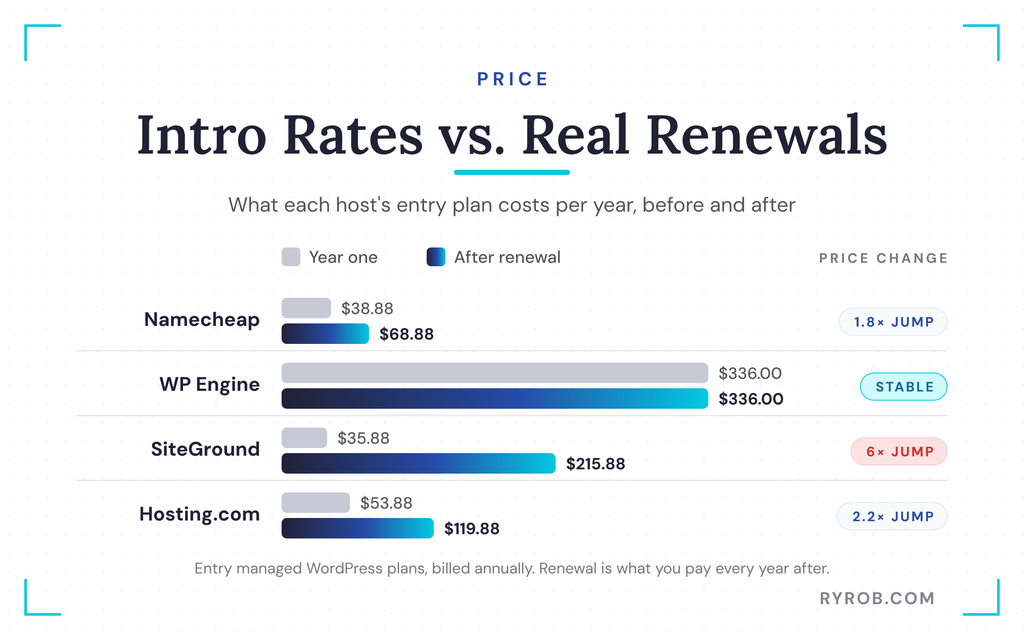
Namecheap is technically the cheapest because they offer $0 shared hosting for your first month, then $2.28 a month billed annually, which comes out to $26.88 a year. Their managed WordPress plans start at $3.24 a month billed annually and renew at $68.88 a year.
Some hosts bundle a free domain name, and Namecheap lists unlimited bandwidth plus enough storage space, but its real edge is still the lowest entry cost.
WP Engine is the priciest option, coming in at $28 a month billed annually, which totals $336 a year. To be fair, their pricing is stable. What you sign up for is what you keep paying, and there are no renewal games.
SiteGround has a great intro rate on their plans starting at $2.99 a month billed annually, but it renews at $17.99 a month. That’s a solid jump from about $36 a year up to roughly $216 a year. You have to read that renewal price line before you commit.
Hosting.com has a strong intro rate at $1.99 a month on their starter shared hosting plan, but it comes with a catch. You can only lock in that rate if you commit to a four-year plan, which comes out to $95.52 total.
Comparing apples to apples, that breaks down to $23.88 a year, making it the best annually priced deal if you’re good with a four-year commitment. After that term, your renewal rate goes up to $9.99 a month.
They also have managed WordPress plans starting at $4.49 a month billed annually, which renew at $9.99 a month. Before you lock anything in, check the money back guarantee and the renewal terms.
Control: Managed Panels Versus Full cPanel Access
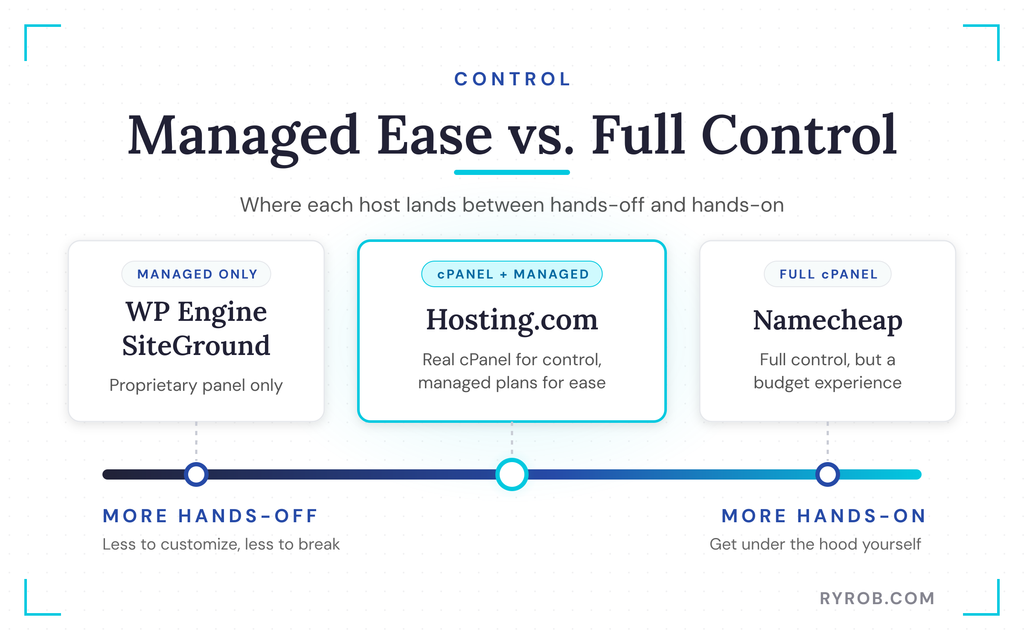
Control is the most consequential thing most people don’t notice until they’re fully locked into their WordPress host. WP Engine and SiteGround offer managed WordPress hosting only.
You get their proprietary managed control panel instead of a traditional control panel. For a lot of people that’s a feature rather than a bug, because there’s less to customize and less to break.
If you like getting under the hood, though, you’ll hit a wall with managed-only setups. Namecheap’s shared hosting gives you cPanel and full control, but it’s on the budget end and it definitely feels like a budget experience. If you outgrow shared hosting, stepping up to one of Hosting.com’s managed VPS plans is often the natural next move.
Hosting.com sits right in the middle. You get cPanel access in a traditional environment when you want control, and a managed option when you just want ease of use. That flexibility is a real edge, especially when you’re managing multiple sites or client projects with different needs.
A staging environment makes testing changes safe, and a website builder helps if you’re non-technical.
Speed: Which Host Loads Fastest Out of the Box
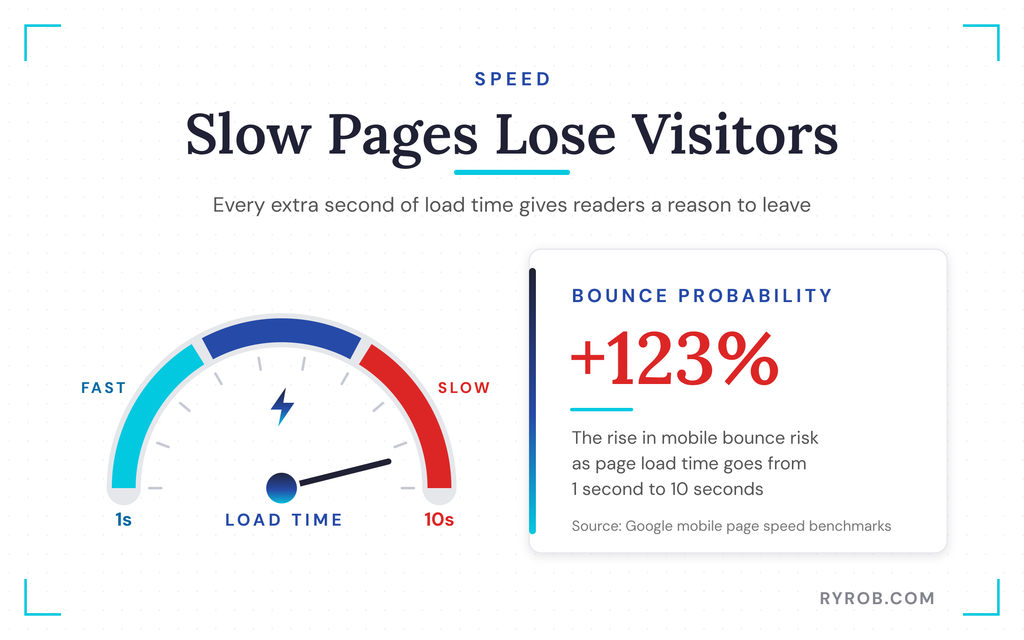
Performance dictates how fast your site loads out of the box, and page speed directly impacts whether visitors stick around.
According to Google’s mobile page speed benchmarks, as page load time goes from one second to ten seconds, the probability of a mobile visitor bouncing increases by 123%. Good server performance and the right WordPress plugins also matter for an ecommerce website.
WP Engine has strong server performance, plain and simple. It’s built for performance and it shows. SiteGround is quick too, running on cloud hosting with their own optimizer, though on the entry plan you can bump into resource limits once you get a meaningful amount of traffic.
Namecheap is fine for a smaller site, but under real traffic spikes, its load handling is the first to struggle. If you have an established site that gets traffic, budget shared hosting won’t cut it, and resource limits will show up as you grow.
Hosting.com’s managed WordPress options are the speed play. They run the Rocket.net engine underneath with Cloudflare’s enterprise content delivery network and smart caching all set up for you.
Their load handling under traffic is a real advantage too, and they’re the only host I know that backs its speed with a faster-from-day-one or a year-free promise. If you want more ways to speed up your own site, this WordPress PageSpeed optimization guide is worth a read.
Support: Human Help When Your Site Goes Down
Support is the feature people underrate until they’re stuck at the worst possible moment with a broken site.
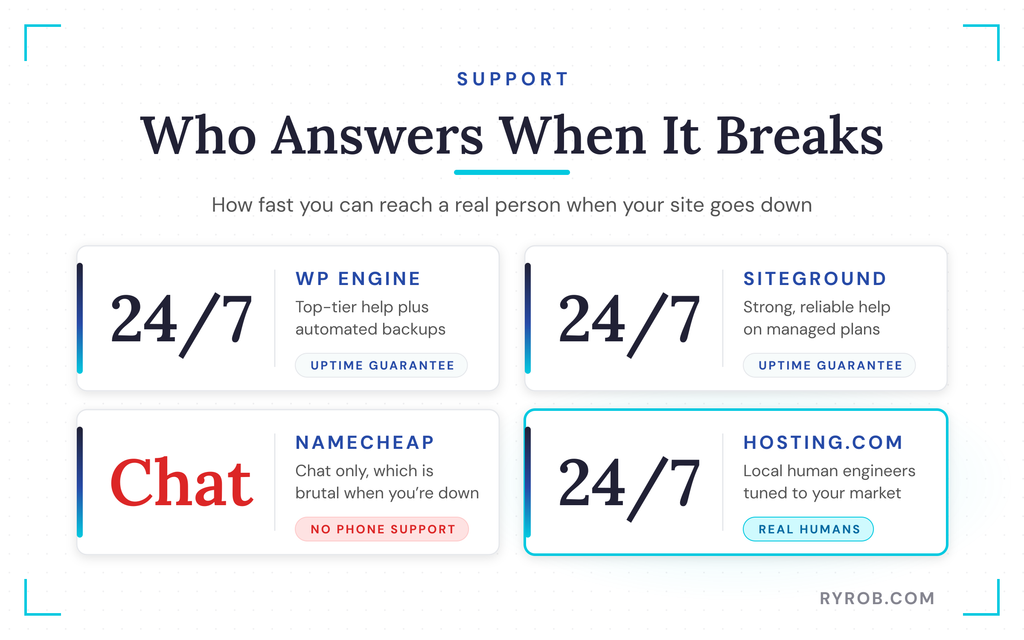
WP Engine and SiteGround both have strong around-the-clock support and an uptime guarantee, which is a real point in their favor. They also cover security features like automated backups, malware scanning, and an SSL certificate, all standard on managed WordPress hosting.
Namecheap is chat only with no phone support option. From personal experience, that is brutal when something is actually on fire, your website is down, and you don’t know how to get it back up. Check the SSL certificate and backup policy before you rely on any budget host.
Hosting.com also has 24/7 human support, and their angle is that support is localized to your market. Even if it’s late where you are, you get a fast, real human on the line who’s an engineer trained for your specific needs. Their customer support team also handles site migration for you when you move over.
I’ll be upfront that I teamed up with Hosting.com on this comparison, and that localized support is a big reason I was glad to. If you want to try them yourself, my code RYROB takes a little off at checkout over at Hosting.com.
Which WordPress Host Is Best for Your Site?
The honest answer depends entirely on your budget, your technical comfort, and how much you value having a real person pick up the phone.
Namecheap: The Cheapest Starting Point
Namecheap is best for someone who wants cheap WordPress hosting and nothing else, such as a brand new hobby blog or a test site. You get a $0 first month, a website builder, and low annual shared pricing, plus managed WordPress hosting options starting at $3.24 a month billed annually.
The trade-off is clear. You get budget-tier server performance that feels the pinch under traffic spikes, and you only get chat support with no phone option. This isn’t the right pick for an established site that already earns money and handles steady traffic.
SiteGround: Best When Support Comes First
SiteGround is best for people who want a polished, fully managed WordPress experience and reliable around-the-clock support, and who don’t mind paying more later. You get a strong intro rate, cloud hosting on Google Cloud infrastructure, and an uptime guarantee.
The catch is the renewal jump. Your yearly cost climbs from roughly $36 to about $216 when the intro period ends, so you need to budget for that increase. It’s also managed only with clear resource limits, so if you want a traditional cPanel, you’ll need to look elsewhere.
WP Engine: Premium and Fully Hands-Off
WP Engine is best for agencies, well-established businesses, and anyone who never wants to think about server infrastructure. It’s the priciest managed WordPress hosting option at $28 a month billed annually, but the pricing is stable and there are no renewal games to worry about.
You get a staging environment, automated backups, and malware scanning as part of its security features.
The server performance and 24/7 support are top-tier, and a free SSL certificate comes standard. It’s a strong fit for an ecommerce website that needs reliable hosting. You should skip it if you’re price-sensitive or if you want deep control over the finer details of your site, since it runs on a strictly locked-down managed environment.
Hosting.com: The Best All-Around Balance for Most People
Hosting.com is best for the majority of site owners who don’t fit neatly into the cheapest or the price-is-no-object buckets. You get an affordable entry price, real control panel access when you want it, and a managed WordPress option built on the Rocket.net engine for fast page load time and strong server performance.
Their medium managed plan hosts up to five different websites for close to the price of the small plan, which is a great deal if you run multiple sites.
They also offer free site migration if you’re moving existing sites over, alongside a localized 24/7 human customer support team. A content delivery network and robust security features are included, and there’s a money back guarantee if you want to test them.
Beyond shared and managed WordPress, they scale all the way up to dedicated servers when you need a whole machine, or unmanaged VPS plans if you’d rather run the server yourself.
To keep this completely honest, Hosting.com isn’t the answer if you want the absolute lowest price and nothing else, because Namecheap wins on pure cost.
If you want fully hands-off agency managed hosting where budget isn’t a factor, WP Engine is more specialized. But for most of us, Hosting.com strikes the best balance of features, speed, and cost.
FAQs About Picking the Best WordPress Hosting
A few quick answers to the questions I get asked most about choosing a host.
Why Do Hosting Prices Jump So Much After the First Term?
Web hosts use introductory pricing to attract new customers, knowing most people won’t want to go through the hassle of migrating later.
Once your initial term ends, pricing reverts to the standard rate, which can easily be two to four times higher than what you paid on day one. Always check the fine print for the renewal price and money back guarantee before you commit.
Do I Need Managed WordPress Hosting?
Managed WordPress hosting handles automated backups, malware scanning, SSL certificate renewals, and other security features for you. It also improves server performance and load handling, and often includes a staging environment and a customer support team.
That extra support is worth the cost once your site gets steady traffic. It frees you from technical maintenance, so beginners can start on standard shared hosting where resource limits are lower, then upgrade as traffic grows.
How Many Websites Can I Host on One Plan?
Hosting limits vary by web hosting provider and specific plan tier. Budget shared plans often restrict you to a single website or a small handful, while a cPanel setup or mid-tier managed plans like Hosting.com’s medium option let you host up to five separate sites under one roof.
Check the add-on domain limits and server performance before signing up if you plan to launch more than one project.
Can I Move My Existing Site Over for Free?
Many hosting providers include a complimentary site migration as part of their signup package to make switching easier. Companies like Hosting.com handle the heavy lifting of moving your files and databases over without downtime. They can also set up your SSL certificate, saving you from manual transfers or broken links.
Final Thoughts On Comparing the Top WordPress Hostings
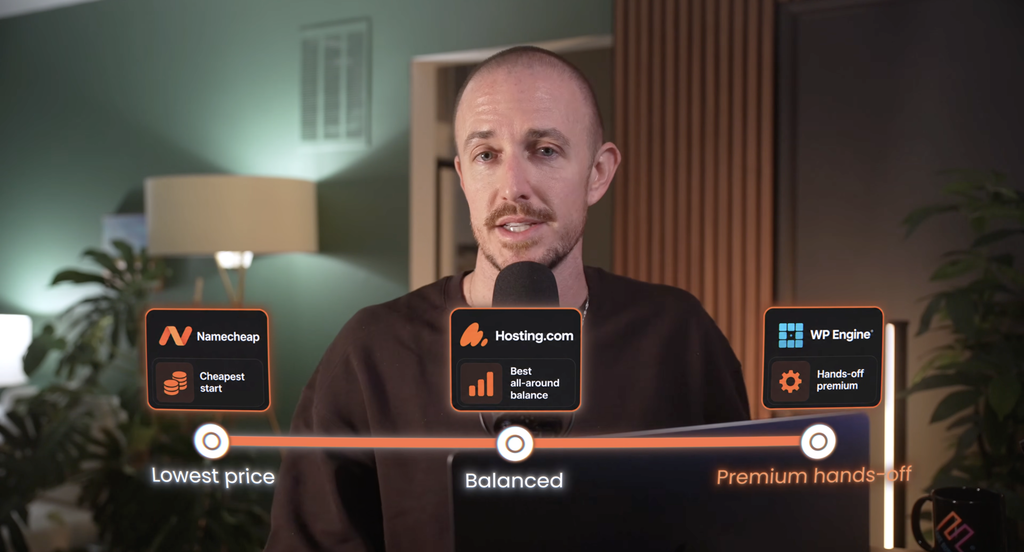
Namecheap gives you the cheapest start, and SiteGround offers support-first hosting if you can stomach the renewal jump. WP Engine delivers hands-off premium managed WordPress hosting, while Hosting.com strikes the best overall balance for most site owners.
That balance comes from strong server performance, a solid uptime guarantee, useful security features, and a free SSL certificate. No single host wins every category, so the right choice still comes down to your budget, your need for control, and how badly you want a real person on the line when things break.
Before you commit, check the money back guarantee and the content delivery network options. Then weigh your own needs instead of chasing whichever list ranks first today.
Skip the Hosting Headaches and Start Fast With Hosting.com
Hosting.com is the managed host I trust with my own sites. It quietly handles the speed, security, and backups that used to eat my time, with a real support team on the line whenever something breaks. Use my code RyRob for a discount on your first year👇
