
I have a quick confession to make. I just realized I was paying $600/mo+ for ChatGPT, Claude Premium seats for my entire team, and Google’s AI Pro (Gemini) all at the same time. Three separate subscriptions, three different logins, three entirely different AI tool environments… and having to make a constant decision about which AI tool to use for each task.
If you’re caught in that same cycle, you know how inefficient it can be. Jumping between tabs, apps, searching for old conversations, prompt templates that work great for Claude, but not so much for Chat. And most of all, paying multiple monthly fees for a fragmented workflow.
The good news: I found a way to access all of these top models in one workspace for less than I was paying across several subscriptions… and I’m glad I did. This is now simplifying my AI tool workflows & cutting costs on duplicate subscriptions.
Disclosure: Bluehost is the sponsor of this video, and at no additional cost to you, I’ll earn a commission when you grab an AI All Access Pass. Know that I only recommend products and services I’ve personally used and stand behind. When you use one of my affiliate links, the company compensates me, which helps me run this blog and keep my in-depth content free of charge.
The Bluehost AI All-Access Pack brings every leading AI model together into a single dashboard & tool interface, making it easier to manage both your workflow and your budget. Watch my complete review + walkthrough of how to use this tool:
For anyone handling client work or sensitive information, the Privacy+ tier adds another layer of protection. It helps safeguard private data before it reaches the AI models, giving you greater confidence when working with confidential content.
Key Takeaways from Saving Money with Bluehost AI All-Access Pack
- Slash your monthly software costs. Replace multiple $20+ per month subscriptions like ChatGPT Plus and Claude Pro with a single dashboard that costs roughly the same as one premium AI tool.
- Unified AI workspace. Access powerful models including ChatGPT, Claude, Gemini, and Grok from one login without constantly switching browser tabs.
- Enhanced data privacy. Utilize the Privacy+ tier to protect sensitive data through prompt sanitization, masking client names, financial figures, and other private information before it reaches the AI models.
- Custom workflow automation. Build and train private AI agents to handle repetitive tasks such as YouTube optimization, research, content creation, or email drafting.
One Workspace for All Leading AI Models: Bluehost AI All-Access
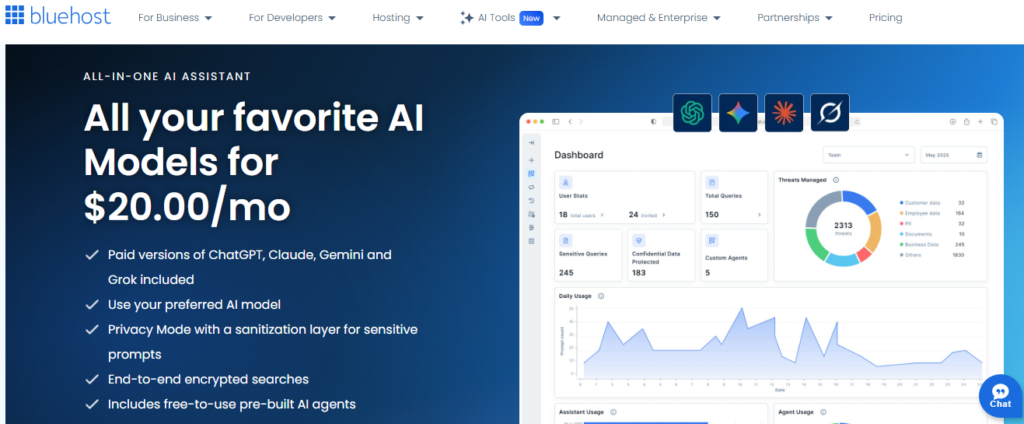
Stop juggling separate subscriptions and browser tabs every time you need a different AI model. Bluehost AI All-Access helps streamline your workflow while keeping your tools and projects organized.
The AI Subscription Problem Most People Face
We’ve reached a point where there is no single best AI model for every job. ChatGPT is fantastic for general purpose tasks, but Claude is often better at reasoning and technical writing.
Gemini is deeply integrated with the Google ecosystem, and Grok has its own unique strengths. Because the best tool for the job keeps changing, many of us end up subscribing to all of them just to stay ahead.
Why One AI Tool Is No Longer Enough
The reality of modern work is that different projects require different “brains.” If I’m writing code or producing a technical guide, I want Claude’s precision.
If I need a quick answer or want to browse the web, I might reach for ChatGPT or Grok. Gemini is also great for quick work. However, when we manage multiple AI models by subscribing to them individually, we often force one tool to do things it wasn’t really built for.
We leave better answers on the table simply because we do not want to pay for another subscription with another login.
The Hidden Cost of Switching Between AI Tools
Beyond the 60 to 100 dollars you might be spending every month on a full AI stack, there is a serious productivity drain. Bouncing between different AI platforms just to get a side-by-side comparison of an answer is a flow killer.
This fragmentation is particularly difficult for a small business, where time is money and efficiency is vital. This friction leads most people to default to whatever tab is already open. In many cases, a different model would have handled the prompt much better.
It is a classic case of paying for the whole stack but only getting a fraction of the value.
What Is Bluehost AI All-Access?
The Bluehost AI All-Access Pack is essentially a single dashboard that consolidates the top-tier AI models in one place. Instead of managing separate accounts, you have a simple interface that allows you to switch between models like ChatGPT, Claude, Gemini, and Grok with ease.

The AI All Access Pack streamlines both your billing and your daily workflow into one convenient destination.
Four Leading AI Models in One Dashboard
Having all four models in one workspace means you can finally stop guessing which one is the best fit for your needs. You can run the same prompt through ChatGPT, then switch between models with a single click to compare outputs.
This is a game changer for content creators and marketers who need to vet responses to find the most natural-sounding text. You are getting the best AI tools for small business growth without the massive monthly overhead.
How Privacy+ Adds Data Protection
One of the biggest concerns for business owners is data security. You certainly don’t want to feed client financial details or private names into a public model that uses that information for training.
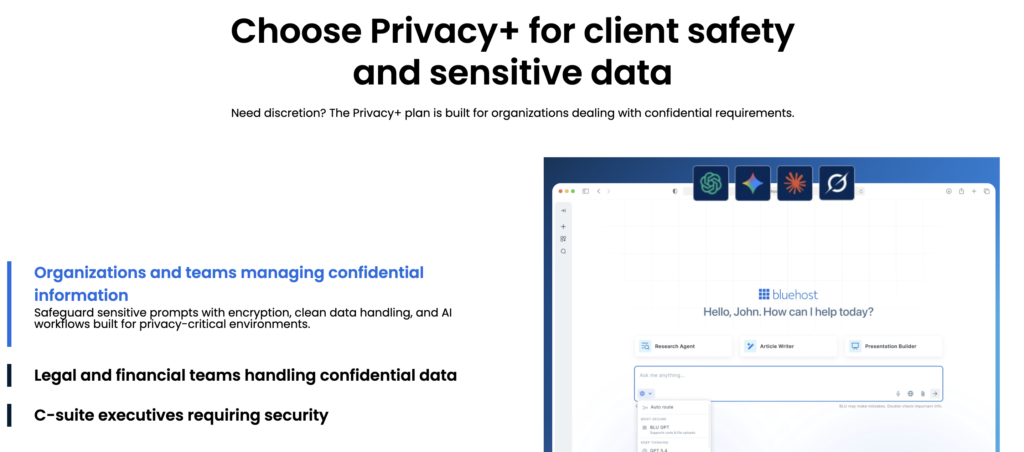
The Privacy+ tier adds a reliable layer of protection through prompt sanitization. By masking sensitive details before the prompt leaves your computer, the system replaces names or figures with placeholders until the response is generated.
The dashboard then automatically restores your original data into the final output.
Who Can Use Bluehost AI All Access?
One common misconception is that you need an active Bluehost hosting plan to utilize this software. Fortunately, you do not need to be a customer of their web hosting services to get started.
This is a standalone product, meaning anyone can sign up for the platform to begin using these powerful AI tools. It is an ideal solution for any small business, freelancer, or agency that needs industrial-grade intelligence without the complexity of managing individual APIs.
Three Real World Ways to Use Bluehost AI All Access
To see how this works in a daily routine, I have been putting the Bluehost AI All-Access Pack through some practical tests. It is not just about having the tools; it is about how they actually change the way you handle the boring, repetitive parts of running a business.
1. Drafting Client Emails Securely
I tried drafting a firm follow-up email for an overdue $5,000 invoice. Normally, I would have to strip out the names and amounts myself to be safe.
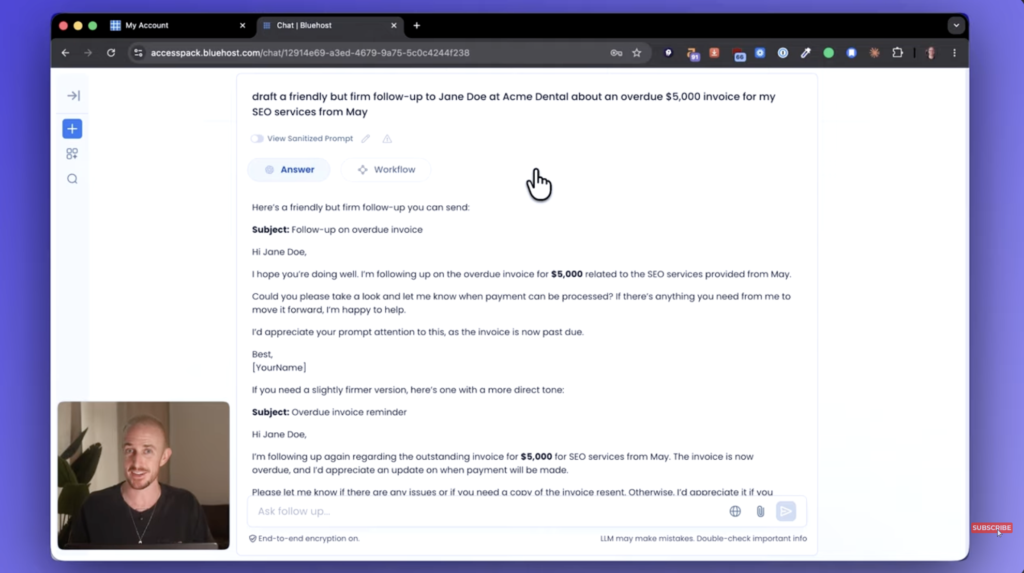
With the Privacy+ tier enabled, the tool caught the client’s name and the dollar amount, masked them, and then seamlessly re-inserted them into the final draft. I got a personalized, ready-to-send email without ever exposing sensitive data to the AI model’s training set.
2. Researching and Creating Content
When building an outline for a blog post, I often use the built-in research agent. It pulls actual citations and web sources, which is a life-saver for making sure you are not just making things up.
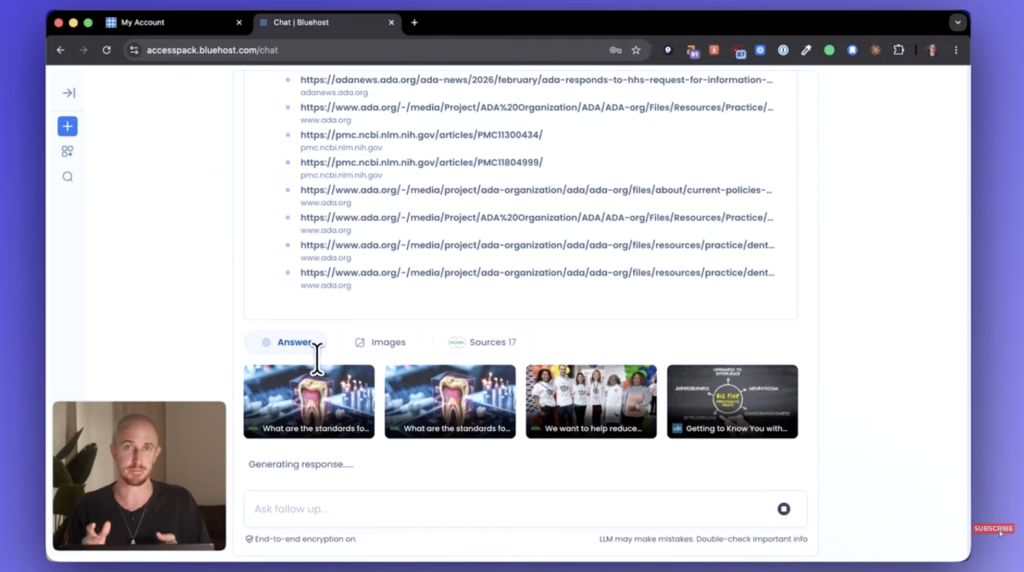
Because the platform provides multiple AI models, you can act as your own AI article writer by using Claude to draft the creative sections and ChatGPT to handle the structural logic. You can even check out other AI-powered SEO tools for content creators if you want to expand your reach.
3. Analyzing Financial Documents
If you have ever had to categorize a big pile of credit card transactions for a bookkeeper, you know it is a nightmare. I shared a PDF of transactions in Privacy Plus mode, and the tool grouped everything and totaled it up in seconds.
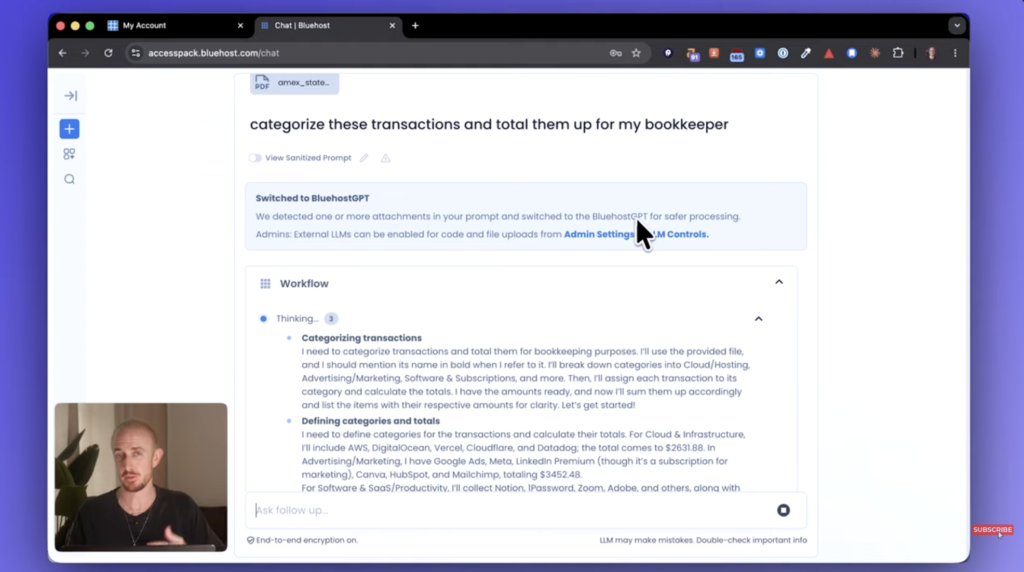
Because of the private LLM access, the platform identified the need to switch to a more secure GPT model for the calculations. For anyone doing their own books, being able to export that data directly into a CSV is a massive win.
How AI Agents Help Automate Work
The real time-saver in this pack is the ability to use and build AI agents. Think of an agent as an AI that has been given a specific job and a workbook of your specific knowledge to pull from.
Using Prebuilt Research Agents
Bluehost includes out-of-the-box agents for tasks like content creation and deep research. For instance, the pre-built research agent is excellent for exploring new topics, while the built-in AI article writer helps streamline your content pipeline.
If I tell the research agent I am making a new video, it will run sub-queries across the web to find what is trending and what my audience actually cares about. It provides a mapped-out introduction and key takeaways based on actual data rather than just guessing.
Creating a Custom AI Agent
The My Agents tab lets you build something totally unique to your business. You give it a title, instructions, and most importantly, your own Knowledge Base.
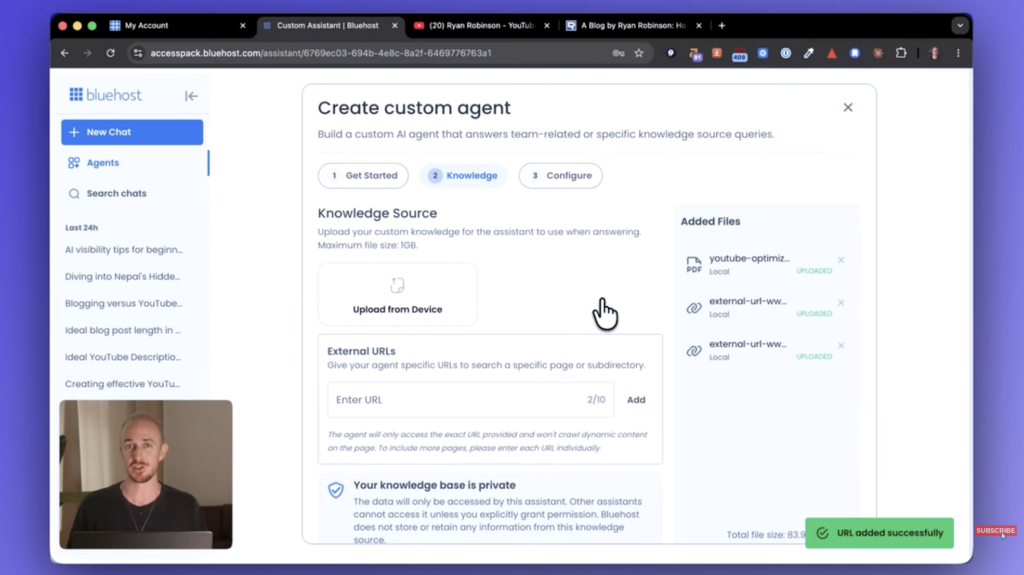
This is where you upload PDFs or links to your website so the AI understands your specific tone and rules. This provides private LLM access where your data remains secure and curated, making it a powerful solution for streamlining small business workflows compared to a generic chatbot.
A YouTube Optimization Agent Example
In my full video tutorial above, I built an agent to help optimize my YouTube videos. I fed it a 15-page document of instructions on how I like my titles and descriptions written.
Now, when I give it a draft title, it gives me three optimized options with rationales, thumbnail concepts for my designer, and a full description with chapter markers. It is essentially like having a specialized assistant that already knows my brand inside and out.
Unlike many other AI platforms, this setup allows me to verify facts by checking cited reports directly. This helps ensure that my content remains accurate and perfectly aligned with my brand guidelines.
FAQs About Using Bluehost AI All-Access Pack
Below are the few questions you might also ask.
u003cstrongu003eDo I need to have a website with Bluehost to use this?u003c/strongu003e
No, you do not. The AI All-Access Pack is a standalone tool. You can use it regardless of which web hosting provider you currently use, or even if you do not have a Bluehost hosting plan or a website at all.
u003cstrongu003eIs there a free trial for the Bluehost AI All-Access Pack?u003c/strongu003e
While there is no formal free trial available, the service offers a robust money-back guarantee, which is consistent with the standard policies found across most Bluehost hosting platforms.
u003cstrongu003eWhat happens to my data after the subscription ends?u003c/strongu003e
To maintain high security, any sensitive data uploaded or processed is purged following the end of your subscription. This is part of the Privacy+ tier retention policy, which ensures that thorough prompt sanitization is carried out to keep your information secure and compliant.
u003cstrongu003eIs this for power users who want every new experimental feature?u003c/strongu003e
Bundled tools like this can sometimes lag slightly behind native apps when it comes to brand-new experimental voice modes or beta features. It is built for business owners who want a reliable, cost-effective, and secure workspace rather than for bleeding-edge tinkerers.
u003cstrongu003eHow does the pricing compare to individual subscriptions?u003c/strongu003e
For about the price of one single Pro subscription (around 20 to 25 dollars), you are getting access to multiple AI models in one place. If you are currently paying for two or more individual subscriptions, you will likely save 40 dollars or more every single month.
To see how these stack up against other options, check out the best AI productivity tools in 2026.
Final Takeaways on the Bluehost AI All-Access Pack (Review)
The Bluehost AI All-Access Pack is a practical solution for anyone tired of managing multiple AI subscriptions. By bringing ChatGPT, Claude, Gemini, and other leading models into one dashboard, it simplifies both your workflow and your monthly software costs.
The added Privacy+ tier helps address one of the biggest concerns around AI adoption: handling sensitive data securely. For small business owners, freelancers, and marketers, it offers a more efficient way to use AI without juggling multiple platforms.
If you are looking to streamline your workflow and reduce subscription costs, consolidating your AI tools into a single workspace is a logical next step. It is a simple way to work smarter while keeping your business data under your control.
One Workspace for All Leading AI Models: Bluehost AI All-Access
Stop juggling separate subscriptions and browser tabs every time you need a different AI model. Bluehost AI All-Access helps streamline your workflow while keeping your tools and projects organized.

And how is the use of the Codex, for example? If I want to open on my computer and create apps based on the All Access subscription that includes chatGPT Plus, will I be able to?