
I remember my first time publishing a new post and seeing the “Discovered, currently not indexed” status in Google Search Console. I was frustrated (because I had no idea what that even meant), and then concerned. First step for you here today is to take a breath. We’re going to fix it right now. My Free Sitemap Checker Tool is super helpful for following along, too. It gives you a full technical SEO health report with clear steps on how to fix any issues across your website.
The good news is that with the right “discovered, currently not indexed” fix will show Google that your content is worth indexing, and I’ll walk you through the process of testing the live URL & submitting a priority crawl request, to get your page indexed ASAP. Watch the full tutorial for my step-by-step process:
One of the biggest reasons more site owners are seeing the Discovered – currently not indexed error inside Search Console today, is that Google is more selective than ever due to the surge of low-quality content online. In many cases, this status simply means your page lacks strong enough signals for their algorithm to choose indexing it. That is why understanding what Google looks for is super important.
In this guide, I’ll walk you through my CRAWL framework that helps you quickly diagnose the root cause of this GSC issue. You’ll learn how to fix indexing issues step-by-step and help your pages get indexed faster.
Free Sitemap Checker: Test Your Site’s SEO Health
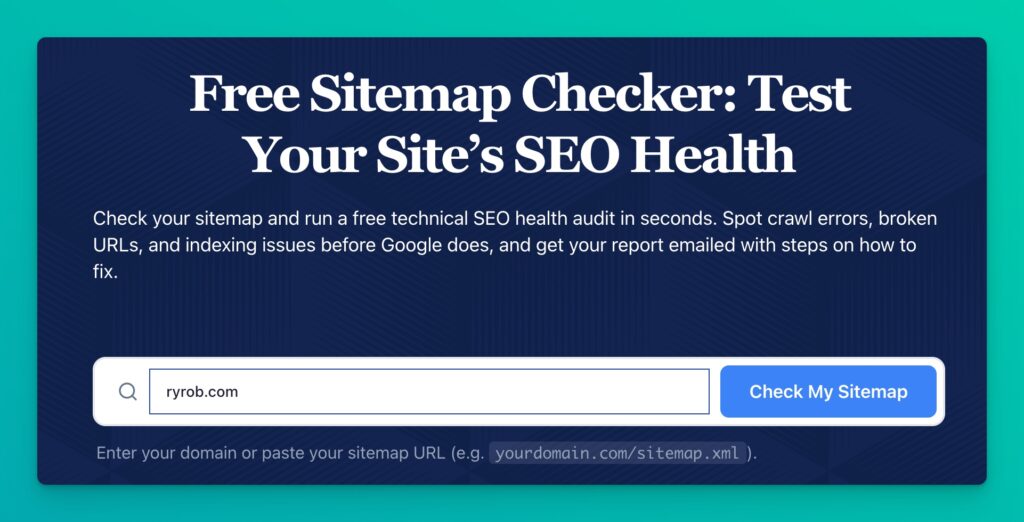
Check your sitemap and run a free technical SEO health audit in seconds. Spot crawl errors, broken URLs, and indexing issues before Google does, and get your report emailed with steps on how to fix.
Key Takeaways for Discovered Currently Not Indexed Fixes
- Google knowing a URL exists is not the same as indexing it.
- The fastest discovered currently not indexed fix is to check your page in order: connection, recognition, access, worth, then linked.
- A clean sitemap, correct canonical tags, and strong internal links fix a surprising number of indexing problems.
- Use Search Console’s Request Indexing feature only after the page is clean and only for the URLs that matter most.
What Google Means by Discovered, Currently Not Indexed
This status is simple once you strip away the technical jargon in Google Search Console. Google has discovered your URL, but it has not fully crawled it or added it to the index yet.
A few years ago, a standard blog post often reached the index within a day or two. That’s not how it works today. Google’s index is crowded, and the search engine has become much more selective about where it uses crawl budget.
Because of this, Google is prioritizing content quality more than ever before. Newer sites, lower-authority sites, and pages with thin content often get stuck in this status for longer than their content quality actually warrants. That’s the real bummer.
Google is NOT saying that your page can never rank. It’s simply signaling that while the page is on its radar, it’s chosen not to be in a hurry to process it.
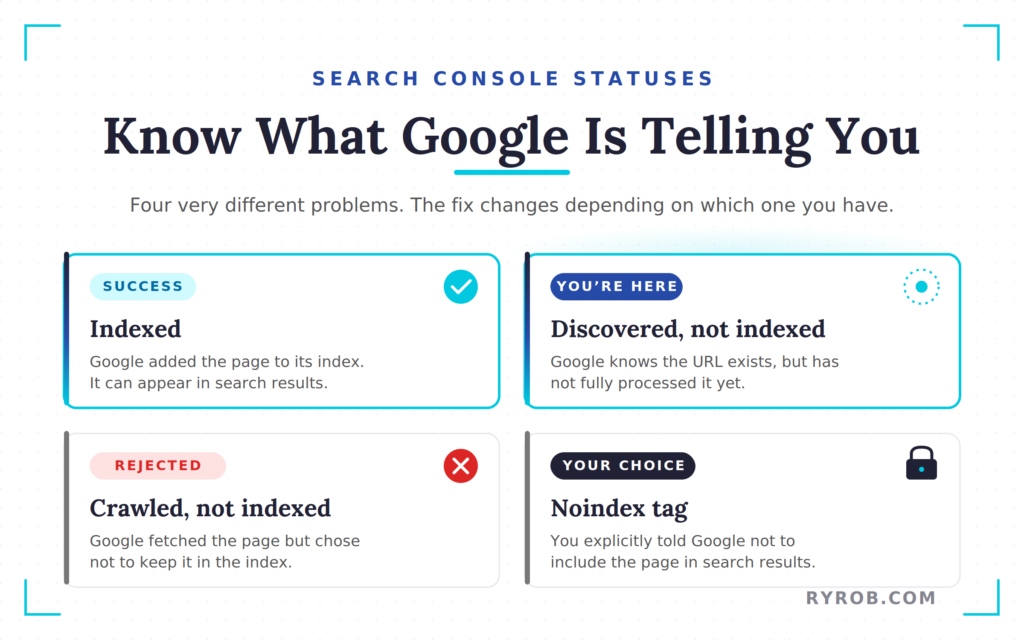
It also helps to understand what this status is not:
- Indexed: Google has added the page to its index, so it can appear in search results.
- Crawled, currently not indexed: Google already fetched the page, but chose not to keep it in the index.
- Noindex tag: You have explicitly told Google not to include the page in search results.
- Discovered, currently not indexed: Google knows the URL exists, but has not fully processed it yet.
That difference matters because the fix changes depending on which status you are dealing with. You do not want to guess. You want to diagnose.
Create Automated SEO Blog Posts in Minutes with RightBlogger

Join 45,417+ bloggers, marketers, writers & business owners in using RightBlogger, my very own Autoblogging solution with a built-in automated Content Schedule, and a kit of 80+ powerful tools for blogging, SEO, and marketing. You’ll create AI SEO-optimized content faster & get more traffic from Google and ChatGPT today. Plus, you’ll access online courses, a community, and more.
Use the CRAWL Framework to Find the Real Problem
When a page will not index, most people jump between random fixes. They resubmit the URL, tweak a title tag, or add a backlink, then hope for the best. That approach is slow and usually misses the real issue.
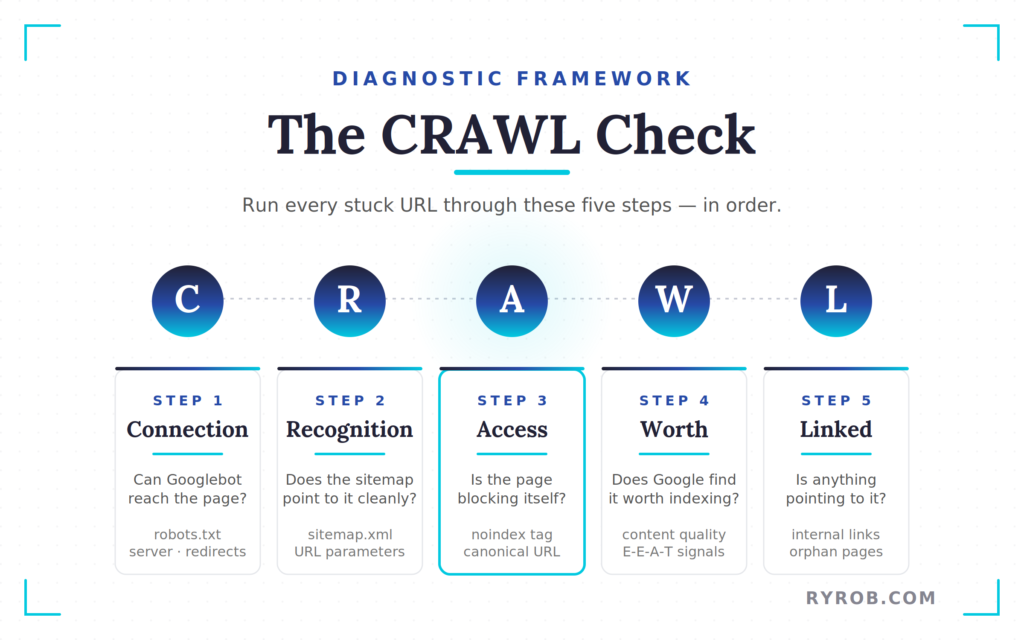
A better way is to run the page through a simple five-part check:
- C – Connection
- R – Recognition
- A – Access
- W – Worth
- L – Linked
You need to check them in that order. If Googlebot cannot reach the page, content quality does not matter. If your sitemap is broken, repeatedly requesting indexing will not fix anything.
This framework works because it narrows the problem down fast. It also aligns with what technical SEO research has found, including issues like sitemap errors, duplication, weak internal links, crawl waste, and server performance.
Step 1: Connection
Start with the boring stuff first, because boring stuff breaks indexing all the time.
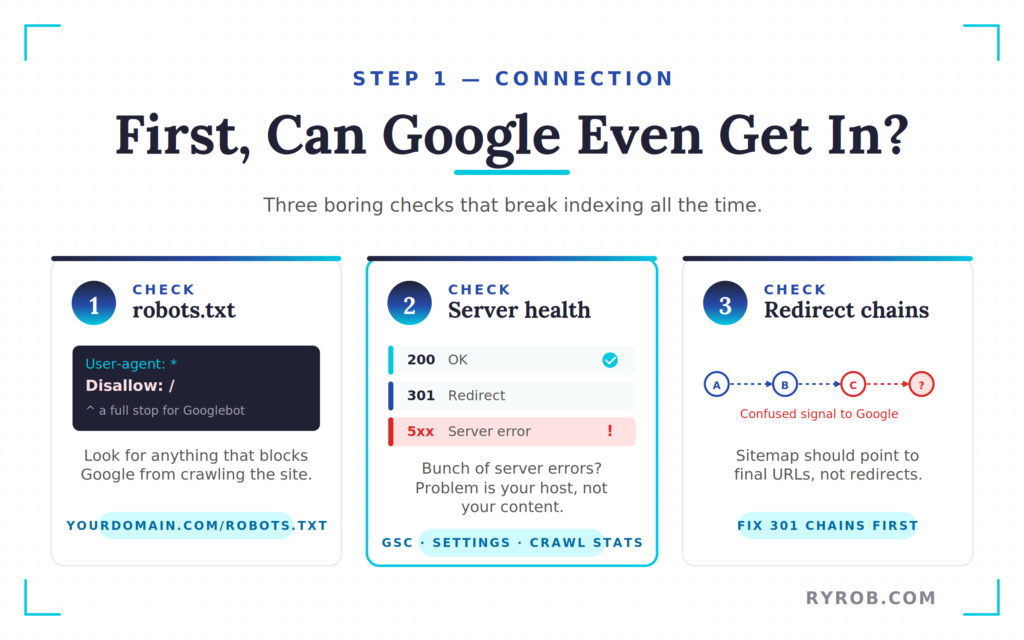
Open your robots.txt file by typing your domain and adding /robots.txt. You are looking for anything that blocks Google from crawling the whole site. If you see Disallow: /, that is a full stop. Google has been told to stay out.
Next, look at server health in Search Console. Go to Settings > Crawl Stats and check the response codes. If Google is getting a bunch of server errors, the problem is not your content. It is your server, your host, or your server response time failing when Googlebot tries to fetch pages.
Redirects matter here too. If a page goes through messy redirect chains, or if your sitemap points to redirected URLs instead of final URLs, Google gets a confused signal. If you need a refresher on how to use 301 redirects, fix those before you do anything else.
Connection problems are first-level blockers. Until they are cleaned up, the rest of the checklist does not matter.
Step 2: Recognition
Once Google can reach your site, the next question is whether Google has a clean path to discovering the page.
That is where your xml sitemap comes in. Open it by typing your domain and adding /sitemap.xml. If the sitemap is missing important posts, your site architecture might be the culprit. Many sites also use an html sitemap to help Google find pages more easily.
If you have issues with faceted navigation, you might be creating thousands of unnecessary URLs. These URL parameters often cause crawl bloat. When Googlebot encounters too many URL parameters, it wastes its time on junk rather than your core pages.
Good sitemaps are selective. They usually include posts and pages while excluding tag archives or attachment pages. A clean sitemap does not force Google to index your content, but it tells Google where your content is and which URLs you believe matter.
For many sites, optimizing the sitemap path is the discovered currently not indexed fix that gets things moving again.
Step 3: Access
Now you need to make sure your page is not blocking itself.
Use the URL inspection tool in Search Console and paste in the page that will not index. Check the field that says Indexing Allowed. If it says No, there is a noindex tag active somewhere.
Next, check the canonical. If Google’s selected canonical is a different URL, Google may treat your page as duplicate content.
This issue is easy to miss because the page looks fine in the browser. Behind the scenes, it may be telling Google not to index it.
Step 4: Worth
This is the step a lot of tutorials skip, and it is often the main reason pages stay stuck.
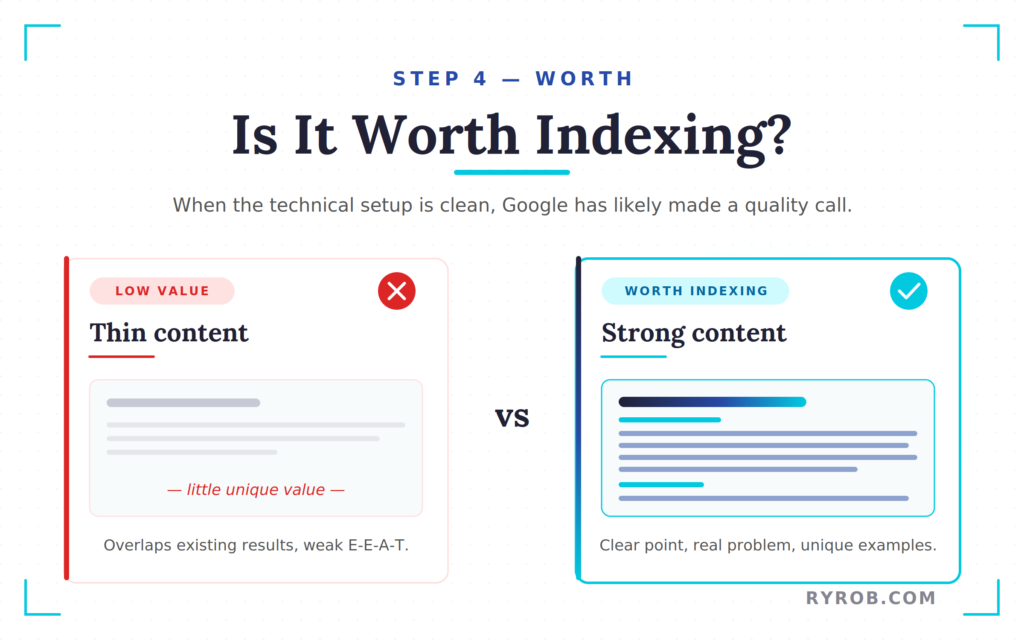
If the technical setup is clean and the page still shows “discovered, currently not indexed” after a reasonable wait, Google has likely made a quality decision. In most cases, it means the page is not strong enough yet.
This usually comes down to thin content. Google looks for strong E-E-A-T signals, and if your post offers little unique value compared to existing results, it may be treated as low value content. Improving content quality is the only way to show that the page deserves a place in the index.
Ask yourself:
- Does the page have a clear point
- Does it solve a real problem
If the answer is unclear, improve the content. Strengthen the introduction, remove overlap with other posts, and add unique examples. The goal is to make the page worth indexing.
If you want the broader playbook after indexing is fixed, here is my guide on how to get your pages indexed faster and rank higher on Google.
Step 5: Linked
Even good pages can stay unindexed if nothing points to them.
To Google, orphan pages look unimportant. If the page is not linked from anywhere on your site, it has very low crawl priority.
The fix is simple. Add internal links from three to five relevant, already indexed posts.
External backlinks still help, but internal links are the fastest move you control. They pass authority and show Google that the page matters, which is often enough to get it indexed.
Fix Your Sitemap the Right Way in Search Console
Since sitemap issues are such a common bottleneck, this part deserves its own section.
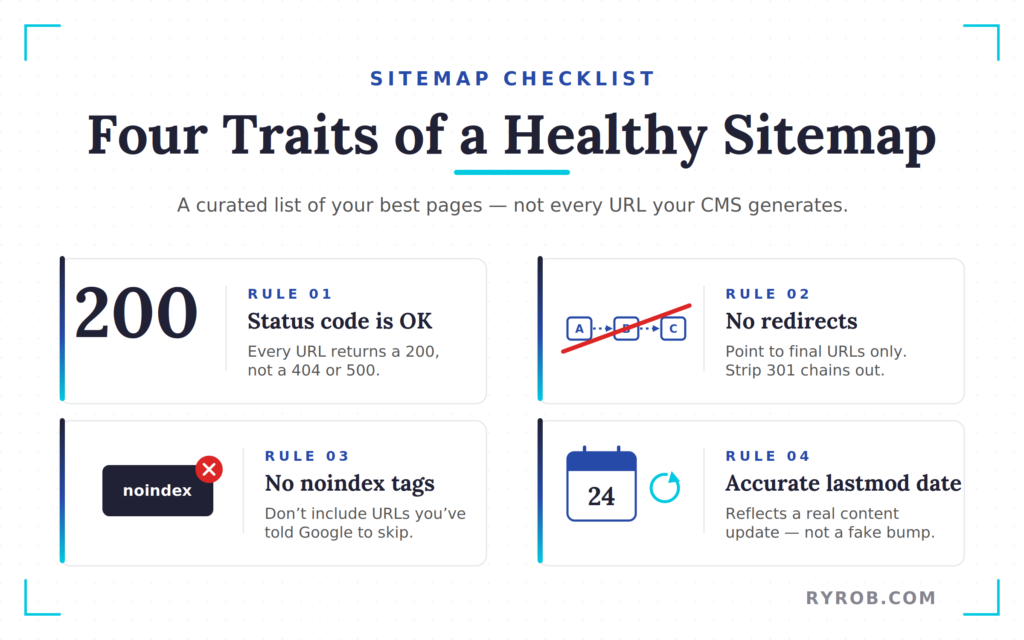
A healthy xml sitemap has a few key traits:
- Every URL should return a 200 status code
- None of the URLs should redirect
- None should carry a noindex tag
- The lastmod date should reflect a real content update
That last point is where many site owners get tripped up. They generate a sitemap and assume the job is done, but it is not.
Look at your sitemap closely. Are tag pages, author archives, or thin search results pages included? If yes, clean them out. Your sitemap should be a curated list of your best pages, not a dump of every URL your CMS generates.
Excessive low-quality pages can hurt crawl efficiency and lead to issues with duplicate content. This is one of the most common hidden causes behind discovered, currently not indexed pages.
To ensure your setup is solid, use tools like Screaming Frog or Ahrefs to audit your structure and identify crawl errors that might not be obvious.
Next, go into Google Search Console and submit the sitemap path. If the status returns as Success, you are in good shape. If something looks off, here is what it usually means:
- Fewer discovered URLs than expected: Google may be struggling to parse the file or your server may be slow due to server response time
- “Couldn’t fetch”: Often caused by a redirect loop or server timeout
One final note: submitting a sitemap does not mean Google has indexed those pages. It only means Google now knows they exist and can queue them for review.
If cleaning up your sitemap was the main bottleneck, you may see movement within a few days. On newer sites, the process can take longer, which is normal.
Request Indexing on Search Console the Smart Way
Once you have worked through the framework and cleaned up the problem, it is time to ask Google for a fresh look. This is one of the few actions in Search Console that can speed things up when used correctly.
Make Sure the Page Is Ready Before You Request Indexing
Paste the page URL into the URL inspection tool at the top of Search Console and wait for the report to load. Before doing anything else, run Test Live URL.
This forces Google to fetch the page as it exists right now. If the result shows the URL is available to Google, you are in good shape and can move forward with requesting indexing.
Fix first. Request indexing second.
If the canonical is wrong, the page has a noindex tag, or the content is still weak, requesting indexing only tells Google to look at a broken version faster.
Save Your Indexing Requests for the Pages That Matter Most
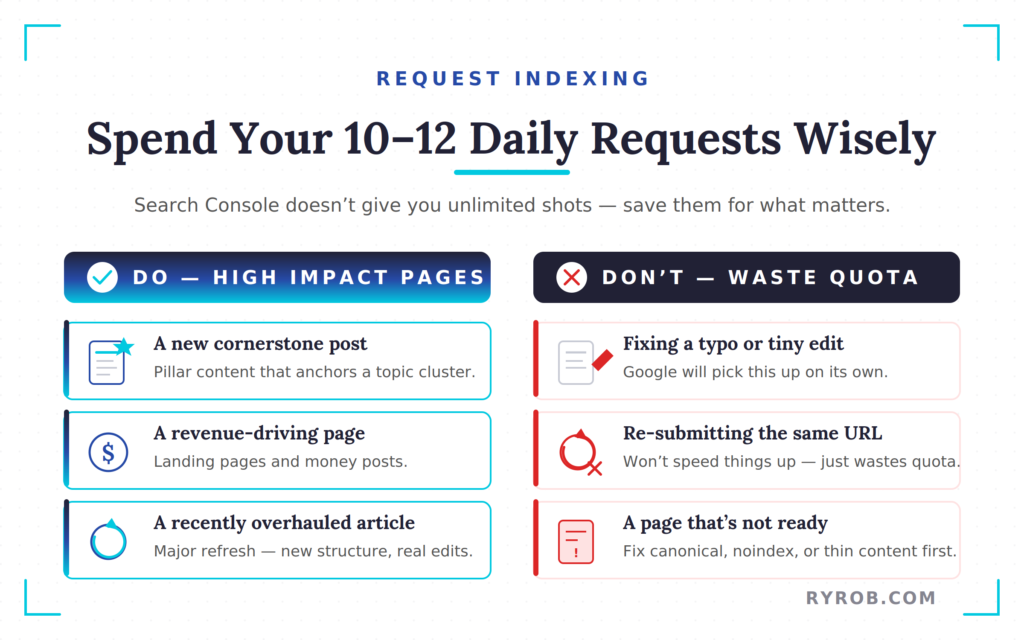
Search Console does not give you unlimited requests. Most site owners hit a limit of around 10 to 12 URLs per day per property.
Do not use these on every small update. Focus on high-impact pages such as:
- A new cornerstone post
- A revenue-driving landing page
- An article you recently overhauled
This approach improves crawl efficiency and helps your most important content gain crawl priority. Since your site has a limited crawl budget, use these requests strategically instead of exhausting them on minor changes.
When the page is clean and strong, this process can work quickly. The live test confirms the page is reachable, and the request can push it toward the front of the queue. It does not guarantee indexing, but it often leads to crawling within hours and indexing within a day or two.
Avoid Shortcuts That Can Make Things Worse
There are a few mistakes that can slow you down instead of helping:
- Do not request indexing on the same URL repeatedly. It will not speed things up and only wastes your quota.
- Avoid sketchy services. Most are charging for something you can already do yourself.
- Do not send a page for indexing before it is ready. Fix issues like broken sitemaps, weak canonicals, thin content, and orphan pages first.
If you manage a large site, the Google Indexing API can be an advanced option. Otherwise, stick to the standard process and avoid shortcuts that can create bigger problems.
If Search Console says the tool is temporarily unavailable, do not panic. That happens occasionally. Wait and try again later.
How to Tell a Real Indexing Problem From a Normal Delay
Not every delay is a problem. If your site is new, has limited authority, or does not publish often, Google may take days or even weeks to revisit a page.
This happens because your crawl budget is finite, and Google prioritizes pages based on its internal crawl demand.
A normal delay usually looks like this: the sitemap is clean, the page has no technical errors, the canonical points to itself, internal links are in place, and the page is valuable. At that point, time may be the only missing ingredient.
However, if a large percentage of your site is listed as crawled currently not indexed, it can signal poor site-wide quality to Google and potentially hurt your search rankings.
A real blocker is easier to spot once you know what to look for. Common issues include:
- Server errors
- A messy sitemap
- A noindex tag
- Zero internal links
If your last crawl date was weeks ago and the page has not moved, Google may be struggling to justify its crawl demand for that URL. This is often caused by duplicate content or low value content that does not provide a unique perspective.
If you have addressed the technical issues and waited a few weeks with no movement, the problem usually shifts from access into content quality or internal linking.
That is when refining your topical relevance and adding stronger internal links do the heavy lifting.
If you want a second walkthrough of where to find this report inside GSC, ZipTie has a visual guide to the discovered currently not indexed report.
FAQs About the Discovered Currently Not Indexed Fix
Here are the possible questions you might be curious about.
How Long Should a Page Stay in Discovered, Currently Not Indexed?
A few days to a week is usually normal. A few days is rarely a cause for concern, and even a week can still be expected on smaller or newer sites.
However, if you see a stagnant last crawl date for weeks within Google Search Console, it is time to run a full diagnostic check. Persistent status issues usually stem from technical bottlenecks, quality concerns, or a lack of internal links pointing to the page.
Does Submitting a Sitemap Guarantee Indexing?
No, submitting a sitemap does not guarantee indexing. A sitemap only acts as an invitation, telling Google that the URL exists.
Google still decides whether the page is worth crawling and keeping in the index. Submitting your sitemap is helpful, but it is not a guarantee of immediate indexing.
Can Internal Links Alone Fix This Problem?
Sometimes, yes, internal links alone can fix this problem. If the page is technically clean but isolated, adding relevant internal links from pages that are already indexed can provide the authority needed to get Google moving.
Strengthening your internal links structure remains one of the simplest ways to help discovery and pass value to new content.
Should I Request Indexing for Every New Post?
No, you should not request indexing for every new post. Save your daily indexing requests for pages that matter most, such as pillar content or money pages.
If you exhaust your quota, you might consider using an indexing api for automated submissions. Even then, prioritize high-quality pages to avoid wasting your resources.
What’s the Difference Between Discovered, Currently Not Indexed and Crawled, Currently Not Indexed?
Discovered, currently not indexed means Google found the URL but has not fetched or accepted it yet. Crawled, currently not indexed means Google visited the page but chose not to include it in the index.
That second status often points toward low value content, duplication, or other quality signals that fail to meet Google’s standards.
Final Thoughts on Discovered, Currently Not Indexed
The best discovered currently not indexed fix is not about random clicking or guessing. It starts with a clear diagnosis done in the right order.
Begin by confirming that Google can reach your page. Make sure your site architecture is clean, your pages are discoverable, and your sitemap is updated. Then check for technical issues, and remember that improving content quality is often the most effective way to earn a higher crawl priority.
Strengthening your internal linking structure also helps Google allocate your crawl budget more effectively. Only use the Request Indexing tool once you are certain the page is ready.
Most indexing problems feel unclear at first because the cause is hidden. Once you identify the actual blocker, the fix is usually much more straightforward than it seems.
Create Automated SEO Blog Posts in Minutes with RightBlogger
Join 45,417+ bloggers, marketers, writers & business owners in using RightBlogger, my very own Autoblogging solution with a built-in automated Content Schedule, and a kit of 80+ powerful tools for blogging, SEO, and marketing. You’ll create AI SEO-optimized content faster & get more traffic from Google and ChatGPT today. Plus, you’ll access online courses, a community, and more.

Hi Ryan! I went through your guide and I’ve done all the things mentioned there and the pages are still in Discovered – Currently Not Indexed.
My website is quite recent, less than 3 months so i wonder if this is google putting my website in sandbox mode. Do you know any strategy that can help getting out of that state?
best and congrats on the content provided, it help knowing I did all I could 🙂