
I asked Claude one question about my business, and it gave me a search volume so clean and confident I almost planned a month of content around it… until it hit me the number was a guess. There’s no real AI search volume data behind the model, which is why how to use Claude for SEO the right way means giving it something real to work from.
The dangerous part is that a made-up number and a real one look identical coming out of an AI. You can end up steering a whole content strategy off figures that were never true, and I still catch myself trusting a number that just shows up in a confident sentence.
So I fixed it. I connected Claude to live search data using DataForSEO, the platform I run over at RightBlogger, and it instantly became a genuinely useful AI SEO toolkit.
Here’s the full video where I walk through the setup and use it live:
Key Takeaways for Using Claude for SEO
- AI tools guess without live data. Claude has no real search index behind it, so it estimates instead of measuring.
- A live connector gives Claude ground truth. Linking it through the Model Context Protocol with a connector like DataForSEO feeds it real data before it answers.
- You can measure real AI search visibility. See whether ChatGPT, Perplexity, and Gemini actually name your business when buyers ask for a recommendation. This matters most when buyers are ready to choose.
- Real search volume reveals the words customers use. It surfaces the phrases people actually type instead of industry jargon, so you target terms with real traffic.
- Setup takes seconds and works everywhere. The same connector runs in Claude, ChatGPT, and Cursor just as easily.
See What’s Really Ranking With DataForSEO
Plug this into Claude once and you’ll stop wondering whether your search numbers are real. There’s no subscription to keep track of, you only pay for what you use. Use my link below to start with $5 in trial credits instead of the standard $1!
Why AI Pulls Search Data from Nowhere
I started with a simple question about my own business. What’s ranking on page one for a term I care about, and how many people search for it each month? Claude answered right away with helpful insight, telling me page one was mostly review sites and directories, but it couldn’t confirm an exact number.
Here’s the real issue. There was no real search data behind that answer, even though modern search now spans Generative Engine Optimization, answer engine optimization, and AI Overviews optimization.
Maybe you’ve got web search turned on and figure it can handle this, but Claude still produces a best-guess range that looks like a real number and hands it to you as fact.
That’s what makes it dangerous rather than just annoying. A wrong answer and a right answer to an SEO research question look almost identical when they come from an AI assistant. I’ve used AI tools for years, and I still catch myself believing a number because it arrives in a complete, confident sentence.
This isn’t a flaw in the model. It’s answering blind because nobody gave it anything to examine. A live bridge, like a DataForSEO connector, removes those blind estimates by feeding it real data to reason from.
How to Connect Claude to Live Search Data
The setup is genuinely fast. I walked through it from start to finish, and most of the time was spent talking, not clicking.
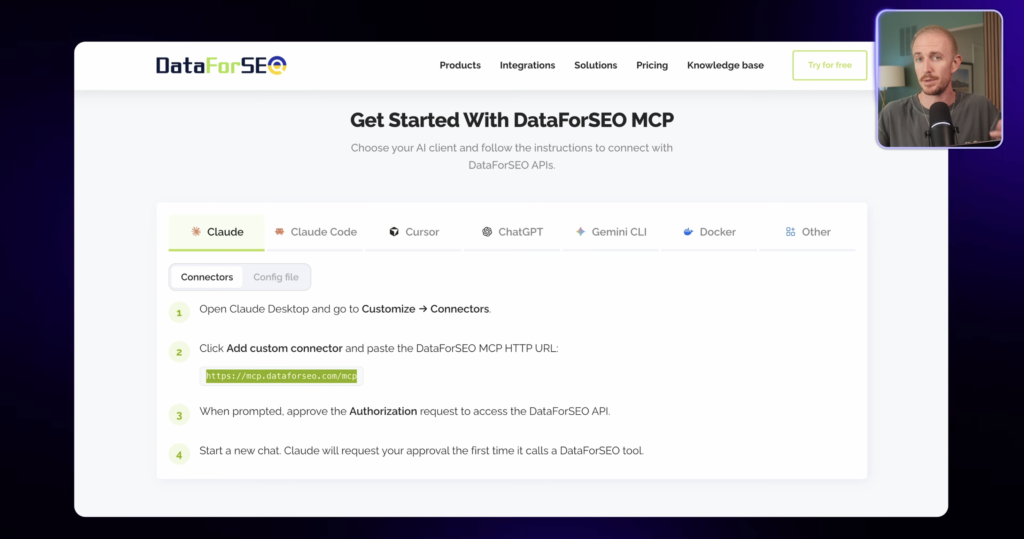
Step 1. Go to Connectors in Claude Desktop
Open Claude Desktop, head to Settings, and click Connectors. This is where you add the DataForSEO connector.
Step 2. Add the Custom Connector URL
Click “Add a custom connector” and paste in the DataForSEO MCP URL. That URL runs on the Model Context Protocol (MCP), the same open standard behind modern MCP connectors.
You can grab the copy-paste link from the video description, and their MCP page explains exactly what the connector does.
Step 3. Approve and Set to Always Allow
Claude will ask you to approve the connection, and that’s it, you’ll be linked in about ten seconds. I recommend you switch the permission setting to Always Allow right here, so you’re not approving every tool call during a chat.
Just remember that using these tools counts toward your account usage.
That’s the entire setup, and the connector isn’t limited to Claude. It works with ChatGPT, Cursor, and other assistants that support the same standard.
What the DataForSEO Connector Unlocks
I underestimated this part at first. The connector doesn’t just hand you one tool, it opens their entire platform, with more than ten APIs available at once.
That means you can combine live search results, keyword data, site audits, backlinks, and business listings in one place, plus the AI optimization tools where my business has seen the biggest wins lately.
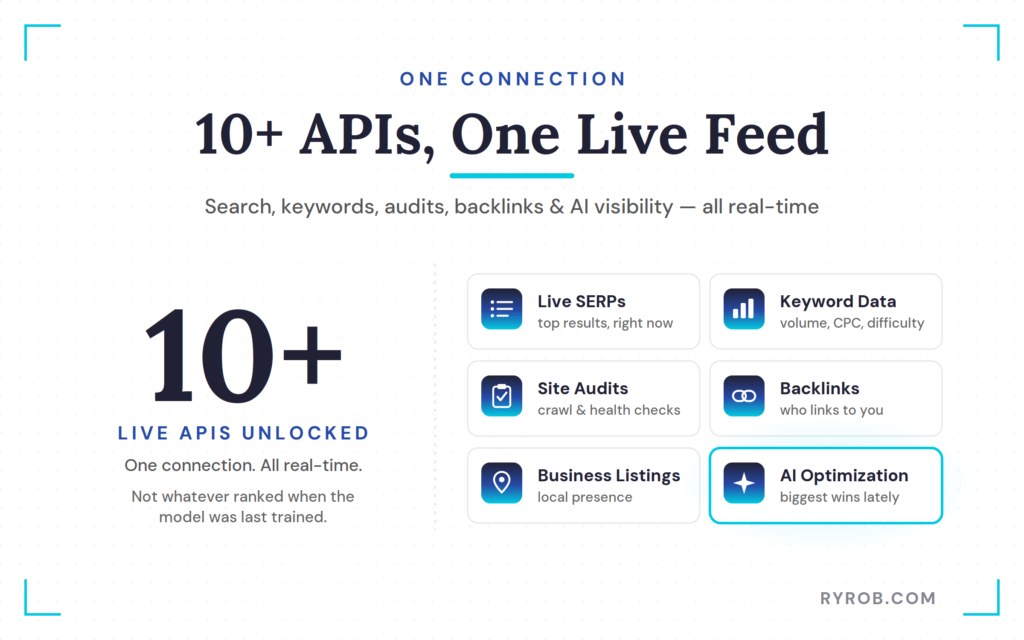
The crucial shift here is access to real-time data, not whatever ranked when the model was last trained. When you ask Claude a question now, it reasons over the results sitting at the top of search today.
Pair that with real-time SERP analysis, and you fuel the sustainable organic traffic growth that underpins any solid SEO strategy.
4 Ways to Use Claude for SEO With Real Data
Now that the connection is live, here are four things I do with it every week.
1. Pull Real Search Volume and Live Rankings
I went back and asked the exact same question I opened the video with. Show me the top 10 results for best blog automation tools, and how many people search for it each month, this time pointing Claude at the new connector.
It pulled from multiple tools inside DataForSEO, and the difference was obvious. I got a full breakdown of all ten results, plus the video pack, which showed one of my own YouTube videos ranking at the top. Best of all, it returned real monthly search volume estimates in a clean table.
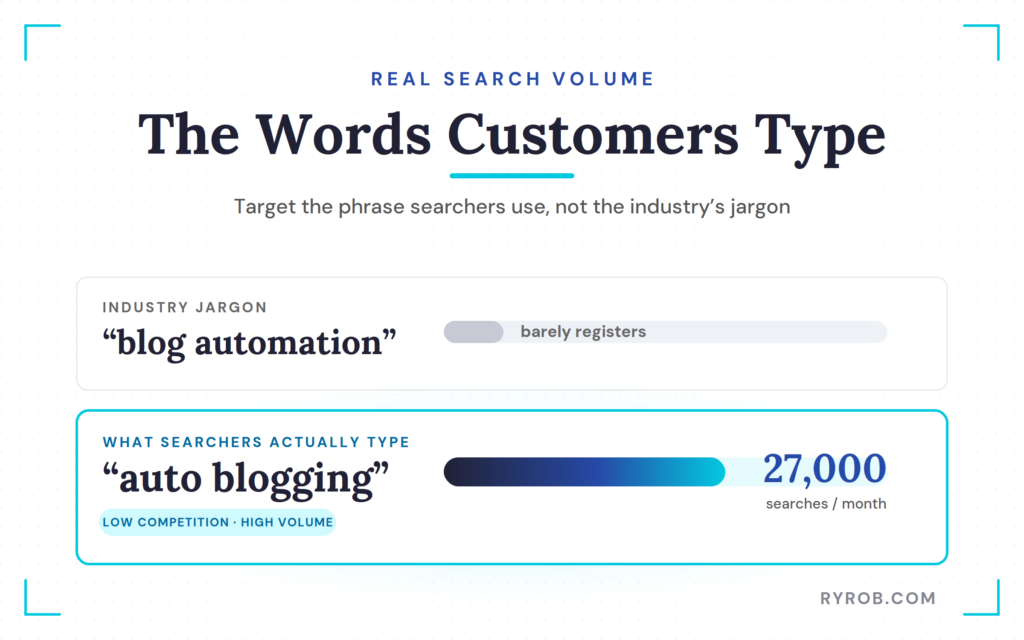
The biggest insight was the topic itself. Auto blogging pulls around 27,000 monthly searches while the related terms barely register, and Claude flagged it as a low-competition term with meaningful volume. It even made the practical read that blog automation is the phrase the industry uses, while auto blogging is the phrase searchers actually type.
This is real, right-now data, not what ranked when the model was trained. That means I can follow up and have Claude reason over live results instead of remembered ones.
2. Measure Your AI Brand Visibility Across Chat Assistants
This is by far the most useful thing for my business right now. When someone asks ChatGPT, Perplexity, or Claude for a recommendation in your category, does your business actually come up?
Until recently, my honest answer was that I had no idea. I could ask a chat myself and get one answer, with no way to know whether it was typical or biased toward my account.
This kind of ai citation tracking is becoming a core benchmark, as the Digital Marketing Institute guide on AI Overviews lays out.
Here’s how you actually measure AI visibility instead of just guessing at it.
- Pick the question a buyer would really ask, not your brand name, unless you’re already well known.
- Pull the answers as data rather than asking a one-time question in a chat thread.
- Count who gets named, and how often, across the assistants.
- When your brand is missing, work out why, since there are usually four different reasons and four different fixes.
I ran this on my own company. Instead of asking what people know about RightBlogger, I asked the category question about AI auto blogging tools for marketing agencies.
Claude referenced the AI optimization LLM response feed inside DataForSEO, which runs the same prompt through ChatGPT, Perplexity, and Gemini.
Either way you get a clear number, and a number is something you can improve. The report card for RightBlogger came back mixed.
- Number one in Perplexity
- Best overall for agencies in Gemini
- Missing from ChatGPT entirely
That ChatGPT gap is the important piece. Claude paired with DataForSEO didn’t just show the number, it told the story, pointing out there’s no consensus answer right now, which means the category is up for grabs at the AI layer.
Because this mattered, I asked Claude how we should increase our ai search visibility on questions like this. It referenced another tool, ran a quick competitor content analysis, and flagged specific problems with specific fixes, turning a report card into an action plan.
3. Find Keywords You Can Actually Rank For
I’m about to decide what to create content about for the next month, and that one choice carries real weight. There’s a genuine opportunity cost if I pick the wrong topics, and historically I made these calls on gut feel and numbers I only half trusted.
So I asked my data-powered Claude for the search volume, competition score, and cost per click on how to automate a blog, plus 20 related terms. It pulled a different set of APIs and built the answer in front of me, then flagged that how to automate a blog doesn’t have enough volume and recommended stronger options instead.
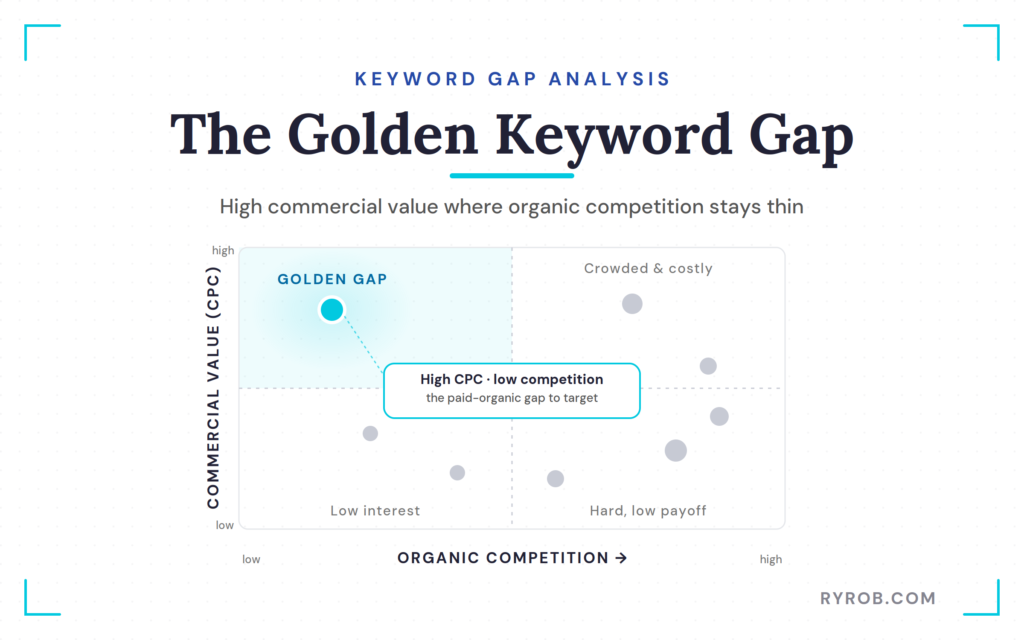
That’s a completely different snapshot than Claude would give without a real data source. I got 20 recommended keywords with their competition scores and cost per click, which is really just a fast keyword gap analysis.
My eye went straight to a term with a high cost per click but a relatively low competition score. That combination is a kind of paid organic gap analysis, telling me advertisers see real value there while organic competition stays thin, so it’s a topic we clearly need content about.
Then I asked which of those terms had real commercial intent for RightBlogger and low enough competition that a site my size could realistically rank for. Claude checked how the site is doing now, from ranked keywords to where we sit on position-one terms, and gave me an honest assessment.
Auto blogging came back as realistic, and Claude handed me five terms with the most commercial appeal, including some I never would have picked myself.
This used to be a spreadsheet and a gut-feel decision with my head pounding. Now it’s an easy, prioritized content calendar that actually drives the bottom line.
You can run a lighter version of this yourself with my free keyword tool to find low-competition terms.
4. Audit Your Meta Descriptions Fast
This one comes with homework, because chatting with AI is fun but you still have to take action to see results. I asked Claude to crawl my site and list every page with a missing, duplicate, or shabby meta description.
Claude went and did it, which is a small miracle given I’d been meaning to run a proper technical SEO audit for about a year and a half. It’s the kind of job I’d normally pay someone for, lose a week over, or just never get around to and quietly suffer the consequences.
Claude plus DataForSEO recognized our issues right away, and the problem turned out to be quality, not absence. That’s good news, but the content quality analysis still surfaced plenty of real problems, and lining them up next to Google’s best practices for meta descriptions made the gaps obvious.
Because I know I won’t hand-edit all of them, I asked Claude which ones matter most and worked through them in priority order, almost like a running SEO health score for the site. I even had it draft a doc to share with my team, and all of this happened in one conversation with no exports and no switching tabs.
FAQs About Using Claude for SEO Data
A few quick answers to the questions I hear most about using Claude for SEO with live data.
Does This Work With ChatGPT, Not Just Claude?
Yes. Whether you connect DataForSEO or another MCP-based tool, the open protocol supports Claude, ChatGPT, Cursor, and other compatible assistants.
Do I Need a Paid Plan for DataForSEO?
No monthly plan exists. You’re charged per request, so there’s nothing to subscribe to, and a month with no usage costs you nothing.
Is Real Search Volume Different From What Claude Guesses?
Yes, and noticeably. Without a data source Claude estimates from memory and presents the guess as fact, but with a connector it pulls current numbers it can cite and reason over.
Will Connecting Live Data Guarantee My Site Ranks?
No. The data shows what’s ranking and what’s realistic to pursue, but you still need to create strong, useful content and do the work. It removes guesswork, not effort.
Final Thoughts About Using Claude for SEO
Learning how to use Claude for SEO with live data makes the biggest risk in AI-powered SEO both visible and fixable. Instead of trusting blind hallucinations, you see what ranks today, what people genuinely search for, and whether ChatGPT and Perplexity mention your brand.
That shift lifts your ai search visibility and supports confident, data-backed decisions built on numbers you can trust.
So try the connector yourself. Ask Claude a real question about your business, notice the jump in answer quality, and decide whether you want it to keep guessing or finally see the data. That’s a better way to market.
See What’s Really Ranking With DataForSEO
Plug this into Claude once and you’ll stop wondering whether your search numbers are real. There’s no subscription to keep track of, you only pay for what you use. Use my link below to start with $5 in trial credits instead of the standard $1!

The point about not trusting AI-generated search volume really stood out to me. It’s easy to accept a confident-looking number without checking where it actually came from. Connecting AI with live SEO data seems like a much more practical way to turn it into a reliable research assistant rather than just another source of estimates.
The idea of using Claude to speed up SEO research is really interesting, especially for local service businesses. Understanding what people are actually searching for can help businesses create content around real customer needs instead of guessing at keywords. For a service like car towing, that could mean targeting specific questions people search when they need roadside help or vehicle recovery.