
I asked Claude one question about my email list, and it quietly started running the whole thing. That’s AI email marketing in practice… you connect a generative AI tool to your email marketing platform, and it speeds up work that used to eat an afternoon.
Before I touched a single dashboard, Claude told me I had 64,299 active subscribers, which fields I’d been collecting, and where most of those people came from. This works because of MailerLite’s MCP connector, which lets AI tools like Claude and ChatGPT operate right inside your account.
Here’s the full video walkthrough I recorded while setting it all up from scratch.
Key Takeaways for Running Email Marketing with Claude and AI
- Connecting Claude to MailerLite takes about a minute. No code, no API keys, just a custom connector and one approval screen.
- The MCP connector is included on every MailerLite plan, even the free one, though plans have limits on subscribers, monthly sends, and automations.
- Claude can audit your list and build segments from your signup tags, turn a blog article into a draft email campaign, and create a welcome automation from a spoken description.
- Claude works from samples of your list, not every contact one by one. The segments it builds still apply to everyone.
- Everything that would reach your subscribers waits for your approval. You should always be the one to hit send.
Let AI Build and Run Your Email Marketing: MailerLite
MailerLite is what I run this entire AI workflow on. The MCP connector comes free on every plan, so you can connect Claude and start building segments and automations right away. Use my link to grab the best deal they’ve got and help support the channel!
How to Connect Claude to Your Email Platform with MCP
An MCP connector is basically a bridge between Claude and your email marketing platform, built on an open standard called the Model Context Protocol. Once it’s in place, Claude can read what’s in your account, including subscriber data, and draft things inside it.
That data access is what makes real email personalization possible, since Claude writes based on who’s actually on your list. Anything that would reach your subscribers still waits for you to personally approve it, which is the whole reason I’m comfortable using this with my real list.
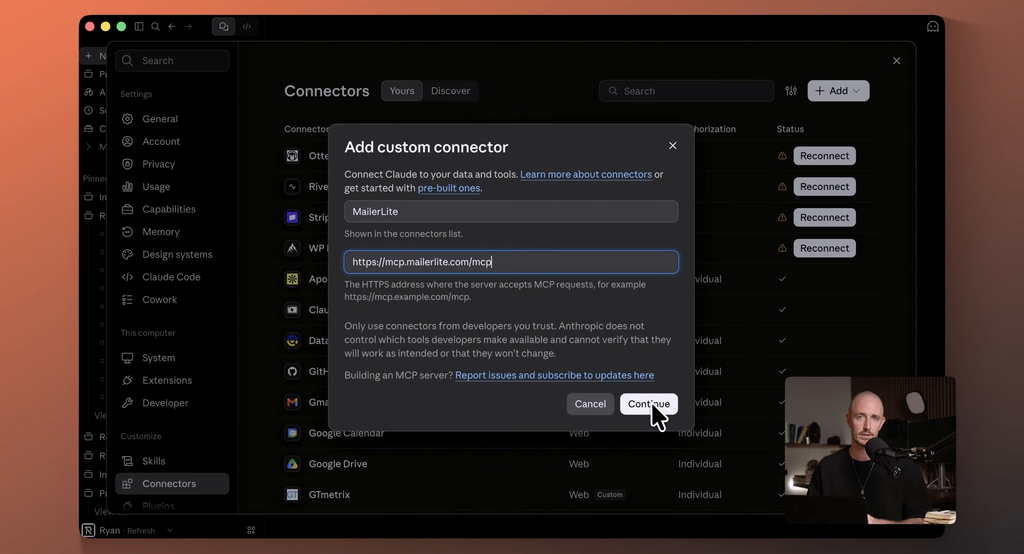
Setup is quick and only takes a few clicks.
- In Claude, open settings, then connectors, and add a custom connector.
- Name it MailerLite and paste their MCP server address.
- Hit connect, sign into MailerLite, and approve access.
That’s it, with no code and no API keys. MailerLite’s own guide covers the connection steps for other tools too.
If you spend your time in ChatGPT or Cursor instead of Claude, their setup guide handles those as well. The prompts I’ll share below should work the same way with maybe a little rewording.
What Claude Did with My Email List (Real Prompts and Results)
Here’s the game plan I ran. Every prompt I used is linked on my blog, so you can grab them and put them to work on your own list.
If you want to write sharper ones, my guide to ChatGPT prompts for bloggers walks through my whole approach.
Auditing My List Without Opening a Dashboard
My first prompt asked four things.
- How many active subscribers do I have
- What custom fields am I collecting
- Which groups and segments already exist
- What are the three things that stand out to you
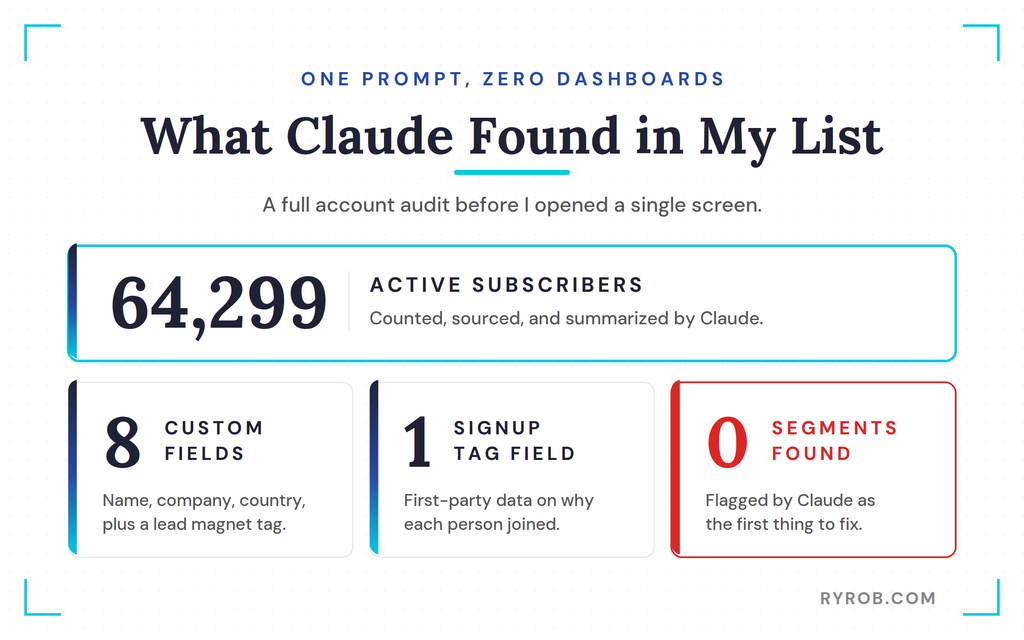
Claude ran through a few approvals to access my account, then came back with the goods. 64,299 active subscribers.
Eight custom fields, all the usual stuff like name, company, and country, plus a custom field for tags that marks which lead magnet each person signed up for. That tag is my first-party data, collected straight from the signup form, and it tells me where people came from and why they’re here.
It also reported zero segments, and correctly called that a problem. Segmentation is a cornerstone of good email marketing, because sending the same message to everyone ignores what each subscriber actually cares about.
It matters even more as your business grows and you have multiple offerings. Always know who you’re sending to.
Building Subscriber Segments from My Lead Magnet Tags
Since my account was new, Claude offered to create segments based on my main tags, the stuff people signed up in order to get. I said let’s do it, then asked it to suggest the segments worth building, explain why, and create them.
One honest note on how this works. Claude pulled a sample of my list rather than reading all 64,000 contacts one at a time.
It’s working from samples MailerLite hands it, which is plenty to get started, and the segments apply to everyone on the list.
Under subscribers, then segments, there they were. Three segments with exactly how many people in each, and I didn’t click through a single filter menu to build them.
Good segmentation also sets you up for behavior-based emails later, since each segment gives you a clear audience for a specific action or interest.
Honestly, this alone is something I’d normally skip in a different email tool, because finding granular data and building segments on it used to mean clicking through five screens at best. This is a task I now run every week.
Turning a Blog Article into a Draft Campaign
Next up is the task I’ll probably use most, turning something I’ve already written into an email for my audience. A lot of those posts began as AI-assisted drafts, so this step basically closes the loop. Here’s the prompt I used.
I asked Claude to read an article from my site and draft a MailerLite campaign from it for one of the segments we just built. I told it to include a short intro in my voice, three takeaways, and a link back to the full article.
Then the key line, leave it as a draft.
That leave it as a draft line is doing a lot of work. AI tools thrive on specificity, so always be clear in your instructions.
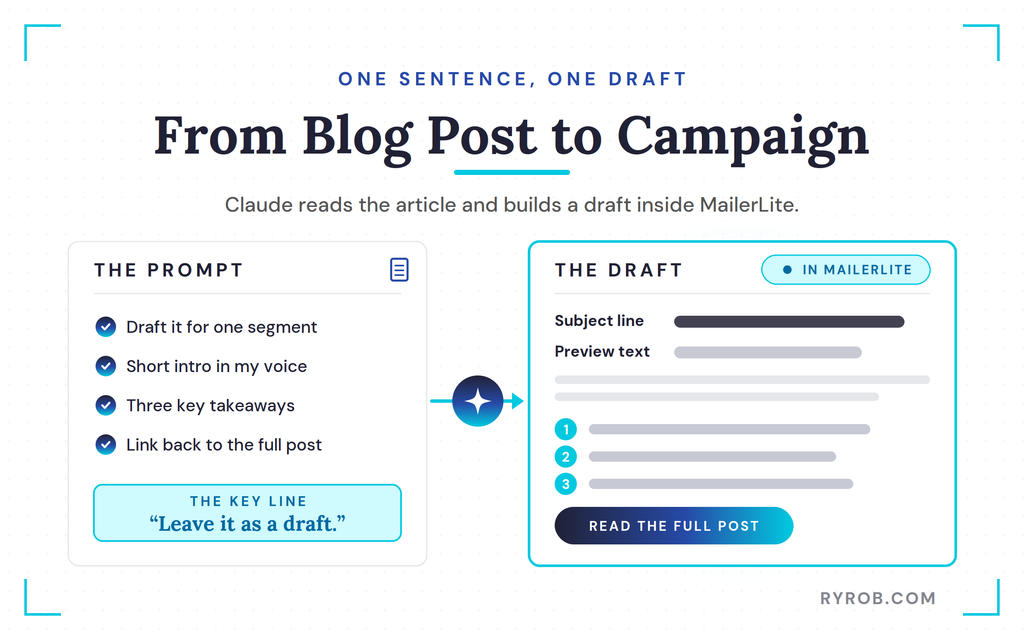
If you don’t want a tool sending an email to 64,000 people on your behalf, say so. MailerLite is set up to draft first anyway, but I like saying it out loud so there’s no ambiguity.
Claude handed me a direct link, and the draft landed right inside MailerLite’s editor with the subject line, preview text, my intro, and the three takeaways. That subject line came from the same prompt, so it works like an AI subject line generator when I want a few options to test.
Is this exactly how I’d write the email myself? Not quite, and I still spent time tuning up the copy. As a first draft that took me one sentence to ask for, though, I was super happy with it.
Creating a Welcome Automation by Describing It Out Loud
A welcome sequence is one of those things every business needs. If you’re asking people to join your list, welcoming them is how you start things off on the right foot.
It’s also the email task most people I know keep putting off for months because it seems daunting. Worth the push, though, because welcome emails consistently pull some of the highest open rates you’ll see on your whole list.
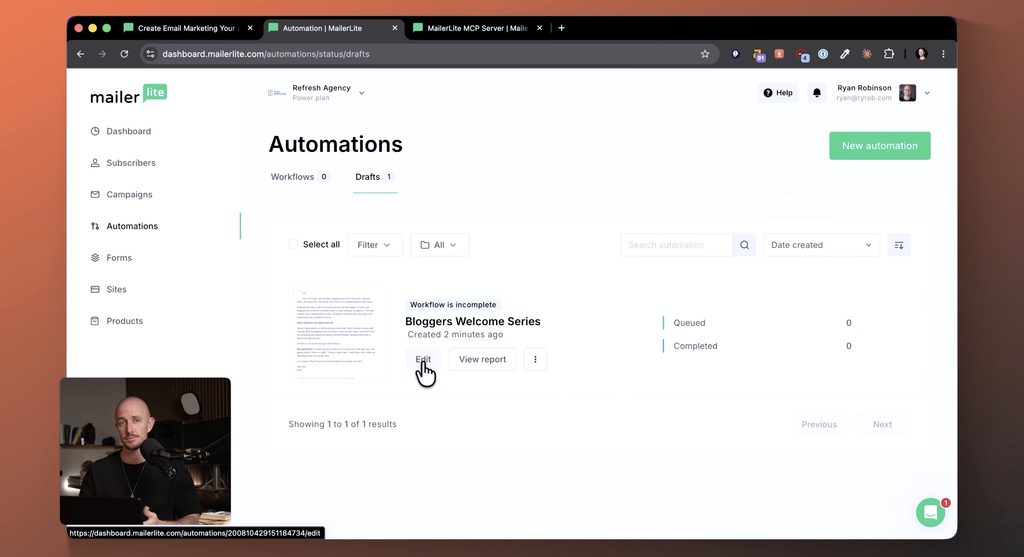
I described this one the way I’d explain it to anyone. When someone joins my bloggers group, send a welcome email right away.
Then two days later, send a second one pointing them to my three most popular articles. Build it as a draft, don’t turn it on, and run a dry test.
About five seconds later, Claude had built the whole thing inside MailerLite. It confirmed both emails were loaded in, that the dry run passed, and that it was set to draft mode.
Under automations, there it all was, the trigger, the welcome email, the two day wait, and the second email, all sitting as a draft and switched off. This kind of email automation usually takes an afternoon to set up by hand.
It’s also the easiest piece of a lifecycle email journey to build, since a welcome series greets every new subscriber the same way from day one. One prompt and a quick review instead of months of procrastination.
Once I reviewed it, I activated it, so new people in my bloggers group now get my best content automatically.
I teamed up with MailerLite on this one, so if you want to follow along, you can start free with my link to MailerLite.
Where Claude’s Work Shows Up Inside MailerLite
Claude is only one way into MailerLite, so let me show you where everything it built actually lands. The campaigns area holds every draft Claude creates, sitting right next to the content you build by hand.
The subscribers, groups, and fields it read from earlier live in here too. From there, it’s worth looking at the list-building tools that help grow your conversion rate.
There are three main ones.
- Signup forms
- Popups
- Landing pages
Some of these sit on specific plan tiers, so check what your subscription includes before you lean on them.
The popup signup forms come with a bunch of templates, from standard subscribe boxes to spinning wheel promotions. I went with the full image background newsletter opt-in because it just looks clean.
Inside the editor you can adjust headline sizes, fonts, and colors. MailerLite also supports dynamic content, which lets you tailor messages based on subscriber data and lift engagement.
If you care about compliance like I do, you can upload a privacy policy link and add GDPR fields when you want them.
Once the popup is formatted, you launch it and choose how to add it to your site. You can copy the JavaScript directly, or install the MailerLite plugin for WordPress, which is the route I took.
The One Email Marketing Step I Won’t Hand Over to AI
I asked Claude whether our first campaign was ready to go and who it would go to. It came back with a clean summary of the campaign title, subject line, sender, and the important stats pulled from my customer data.
Technically, Claude could schedule that campaign for me if I asked, and MailerLite is even built so nothing sends without my confirmation. But I go one step further in how I run my email marketing.
Sending emails with my name on them to real people is my button to push. Every time. No exceptions.
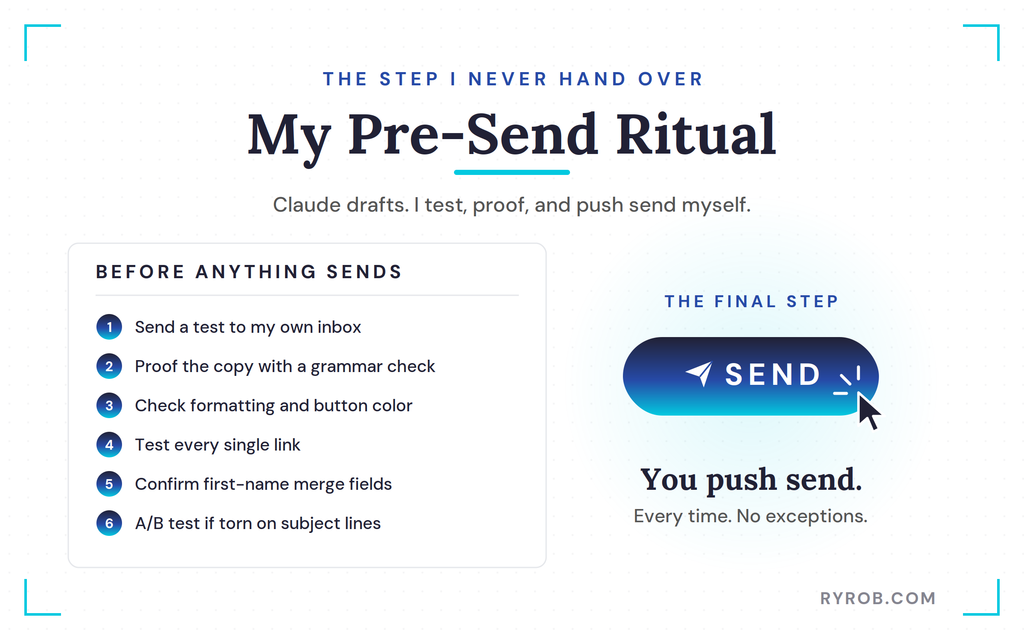
So here’s my pre-send ritual. Instead of sending the live campaign, I send a test email to my own inbox right from MailerLite, so I can proof the copy with my free grammar checker, check the formatting, and test every link.
The test even pulled in my profile photo from Gravatar, which was nice to see. Seeing the button color in my own inbox, I decided to switch it to something more on brand for my color palette.
Copywise, Claude nailed it, and the formatting looked great. The test send is also where I check personalization details, like first-name merge fields, because a broken tag is the fastest way to lose a subscriber’s trust. Little details like that are a big part of why email marketing works so well for bloggers when you get them right.
A subscriber who opens an email that says Hi, instead of their name won’t come back for a second one. Once I’ve proofed the subject line against my last few campaigns, I know whether it stands out or blends in.
If I’m torn between two subject lines, that’s when I’d run an A/B test before committing, so the data picks the winner instead of my gut. Then, and only then, I push send.
Honest Limits Before You Try AI Email Marketing
A few things are worth knowing before you connect Claude to your own account.
- Connecting means giving it access to your MailerLite data. That’s how any integration works, and it’s the reason any of this is possible.
- Claude’s copy still needs a human check. It’s a first draft at the speed of typing, and you’re still the editor.
- Every plan has limits. The MCP connection is included on each one, even the free plan, but you’ll hit caps on subscribers, monthly sends, and automations depending on your tier.
I’m on MailerLite’s power plan, which is built for scale. As your list grows, you also need to watch its health.
Churn prediction, which flags subscribers who stop opening, protects your deliverability, because internet service providers treat low engagement as a signal to filter your emails away.
Growth usually means your business is growing too, and email can easily become your highest ROI marketing channel, more than paying for the tools you run it with. MailerLite’s machine learning features, like predictive analytics on send times and link clicks, work alongside what Claude writes.
Better content written with AI writing tools also keeps subscribers opening, and engaged subscribers are what drive ROI in the first place.
If you want to dig into the growth side, my breakdown of email marketing strategies for bloggers covers it in more detail.
FAQs About AI Email Marketing with Claude and MailerLite
Before you dive in, here are the questions I get asked most about running this setup.
Does the MCP connector cost extra?
No. MailerLite includes the MCP connector on every plan, including the free one. Plans do carry limits on subscribers, monthly sends, and automations, so pick the tier that matches your list size.
Does Claude send emails automatically?
No. MailerLite is set up so nothing reaches your subscribers without your confirmation, and Claude builds campaigns and automations as drafts first. I still review and send everything myself.
Does this work with ChatGPT instead of Claude?
Yes. MailerLite’s setup guide covers ChatGPT, Cursor, and other AI tools, and the prompts I used should work the same way with maybe a little rewording.
Do I need to know how to code?
Not at all. You add a custom connector in Claude, paste the MCP server address, sign in, and approve access. No code and no API keys.
Final Thoughts About AI Email Marketing
This AI email marketing setup was the fastest I’ve ever built. Claude handled the repetitive work of building segments, drafting campaigns, and setting up the welcome automation, while I kept all the judgment and control over sending.
That combination of speed and control is what makes this workflow worth copying. It also left room for better email personalization, because Claude drafted variants quickly enough that I could tailor messages to each segment instead of sending one generic blast.
To try it yourself, start free, connect using the same process I used, and steal the prompts from this guide. Just remember the one rule that matters.
You’re always the one who pushes send.
Let AI Build and Run Your Email Marketing: MailerLite
MailerLite is what I run this entire AI workflow on. The MCP connector comes free on every plan, so you can connect Claude and start building segments and automations right away. Use my link to grab the best deal they’ve got and help support the channel!
