
If you’re trying to figure out how to track multiple income streams, one habit is quietly working against you. And trust me, I’ve been here. Managing a stack of online projects or side ventures feels exciting, right up until you open your books and see one lonely total staring back.
Every dollar from sponsorships, course sales, affiliate partnerships, and consulting was landing in the same giant bucket for years in my business, which left me flying blind. Now, I’ve corrected that by using the right tools and processes. This video breaks it all down:
Real visibility means seeing past that one number to where your time and money actually pay off. Here’s how I built that clarity, so you can stop running things on vibes and a bank balance and see each project clearly.
Key Takeaways for Building a Multi-Stream Accounting System
A quick look at what this setup gets you before we build it.
- One revenue total will never tell you enough. Bundling every income source into a single figure hides which stream pays the bills and which just eats your hours.
- Tracking categories do the heavy lifting. Tools like Xero let you label transactions by revenue source, so every report can slice by stream automatically.
- Bank rules automate the busywork. Set a rule once and repeat transactions tag themselves as they hit your account, which saves you from manual entry.
- Margin matters more than raw revenue. Flashy income sources often carry heavy production costs, while quieter streams keep far more of every dollar.
- Short-term forecasting keeps you ahead. Projecting your balance helps you spot a dip before it lands and steadies your whole financial management approach.
The Tool I Use to Track Every Income Stream: Xero
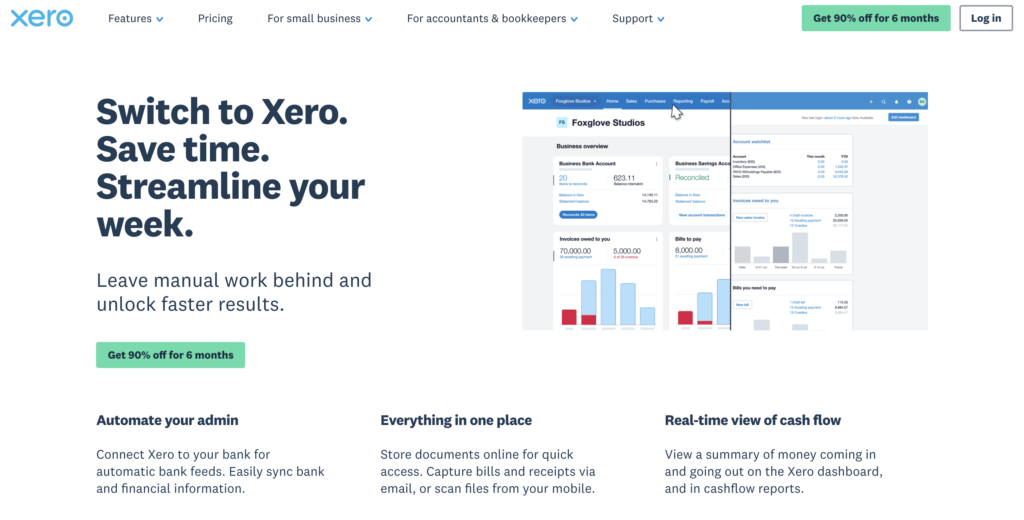
Before Xero, my income was one blurry total and I was making time decisions on gut feel alone. Now my cash, profit, and margins all live on one screen, and I check it in five minutes every week to know exactly where I stand. Get a clear view of your income now, and enjoy 90% off any plan for six months👇
Why One Income Number Hides Which Stream Actually Pays
Most creators and small business owners treat every dollar that comes in as one uniform pool. When you’re quietly running a handful of little businesses at once, a healthy total balance feels reassuring. That reassurance is the trap, because without real visibility you’re making decisions on gut instead of numbers.
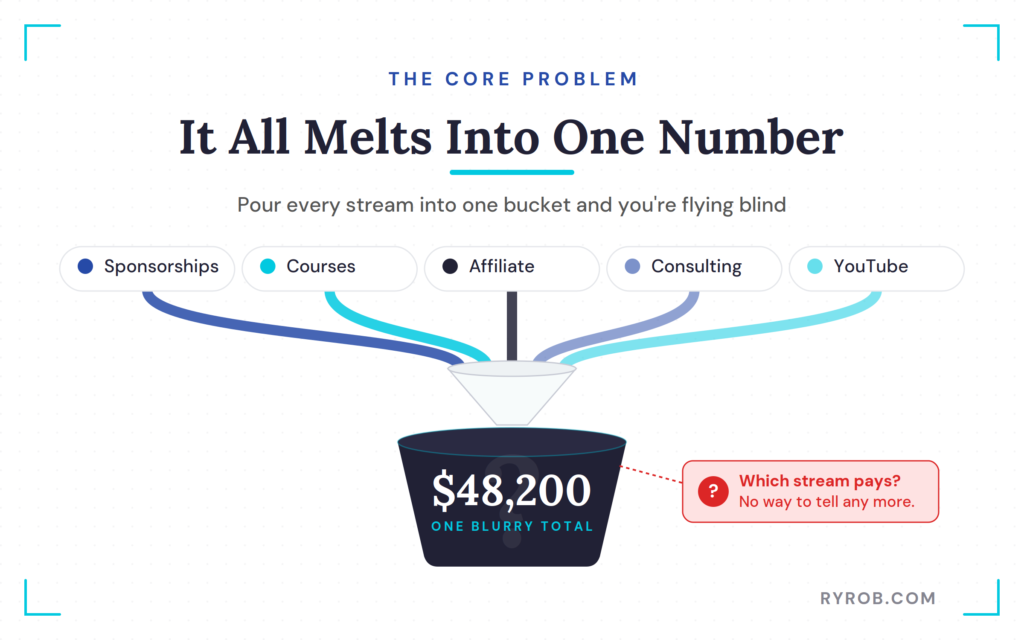
You end up guessing about where to spend your best hours. Keeping clean financial records for each stream is what replaces that guesswork with something you can actually act on.
The Danger of Feeling Busy Instead of Profitable
It’s easy to confuse hard work with real financial return. You might pour forty hours a week into a project with plenty of top-line revenue, then realize the profit margin is razor thin once the expenses come out.
Meanwhile a quiet digital product might need almost no upkeep while steadily stacking reliable profit. When every stream melts into one balance, you can’t tell those two apart, so you keep feeding your best hours to your loudest earner instead of your best one. Breaking that single number into its real parts changes everything.
How to Track Multiple Income Streams in Xero
Fixing this doesn’t take a complicated custom database. You can use standard accounting software to separate your revenue sources cleanly.
Financial platforms like Xero offer built-in features designed specifically to segment financial data without forcing you to maintain separate bank accounts for every single project.
Once your bank feeds are flowing in, you’re ready to start splitting things by stream.
👉 Want to try it yourself? Xero is giving my readers 90% off any plan for six months to get started!
Setting Up Revenue Categories for Every Business
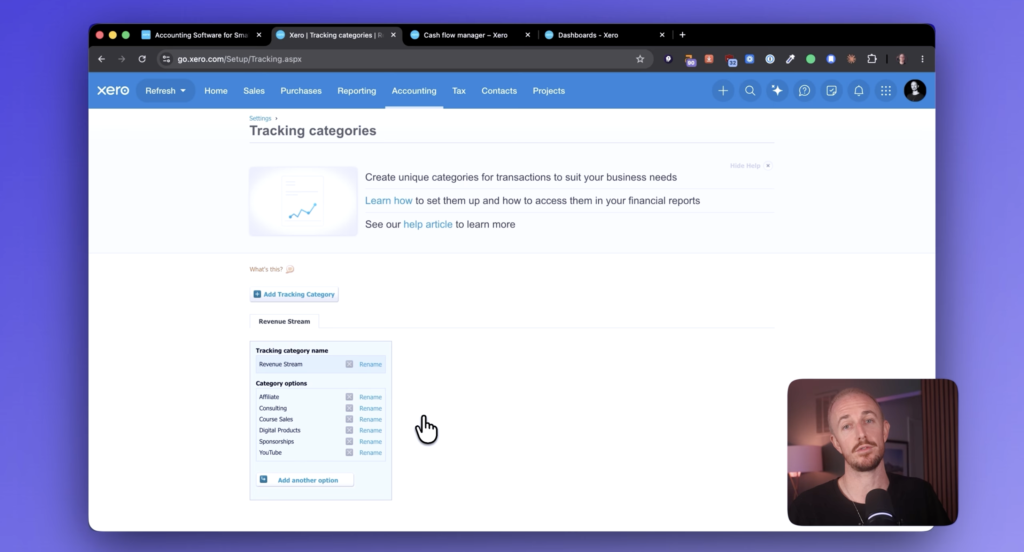
The trick to tracking multiple income streams without losing your mind is using tracking categories.
Think of a tracking category as a label you stick on every transaction, so you can tag things like sponsorships, online course sales, affiliate earnings, digital products, YouTube revenue, consulting fees, and more.
You head into your accounting settings, create a category called revenue stream, and add each option beneath it. Setting up your main business account this way takes less than a minute, but it becomes the backbone of every report you run from then on.
Recoding Past Transactions to Clean Up Your Books
Once the structure is ready, you’ll want your recent history to reflect reality. Instead of editing every past invoice by hand, you can use the bulk editing tools built into your accounting platform.
You filter recent transactions by date range, select everything tied to one client or sponsor, and recode them in a single batch. Assigning those older entries to the right revenue stream instantly shows how each part of your business performed over the past month.
Automating Your Bookkeeping with Bank Rules
Manual work kills momentum, so you shouldn’t have to tag every future transaction yourself. Bank rules automate the whole thing, letting you set a rule where any incoming transaction containing specific text gets tagged for you.
For example, you tell Xero that any payment matching your sponsored video naming convention belongs to the sponsorship revenue stream during reconciliation.
Once you build these rules for each major stream, new income sorts itself alongside your regular invoicing, which saves hours of admin over the long haul.
Find Out Which Income Stream Is Actually Most Profitable
With everything tagged, you can finally run reports that show what’s happening under the hood. This is where that bit of setup pays you back in a big way.
Sort Your Profit and Loss Report by Margin, Not Revenue
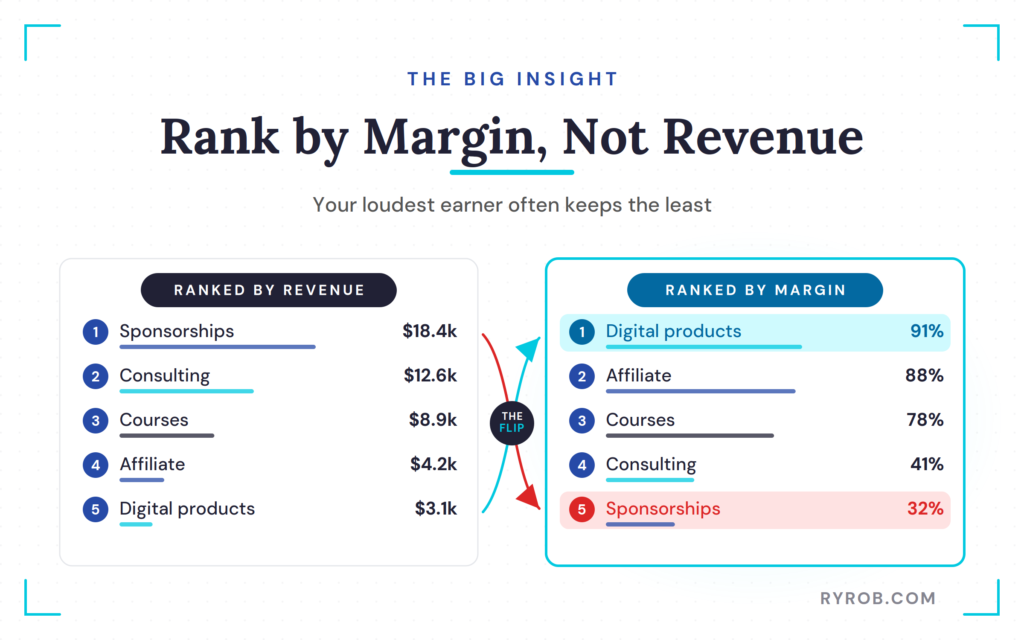
When you run a profit and loss report and filter it by your revenue stream tracking categories, your different income sources appear side by side in separate columns. At first glance, the numbers might confirm your assumptions. Sponsorships or client services might tower over everything else in raw top-line revenue.
However, when you analyze business expenses and back out the real operating costs for each stream, like video editors, production time, software, and contractor fees, the picture shifts dramatically. You will often find that passive streams, including digital products and a side hustle or two, keep far more of every dollar.
Meanwhile, flashy income sources slide toward the bottom when evaluated by true profit margins.
Turn the Margin Insight Into Better Time Decisions
Realizing your biggest earner has the worst margins completely changes how you plan what’s next. If a high-revenue stream eats eighty percent of your hours for thin returns, you’ve got hard data telling you to pull back.
You can start steering your best hours toward the work that actually pays off per hour. That’s the difference between working hard and working on the right things, and it means your project planning finally runs on financial reality instead of a hunch.
Run Your Whole Business Portfolio From One Screen
Beyond margins by stream, a well-configured system gives you a single command center for your entire portfolio career. You shouldn’t have to dig through five spreadsheets to know where you stand.
Read Your Dashboard for Cash, Profit, and What’s Due
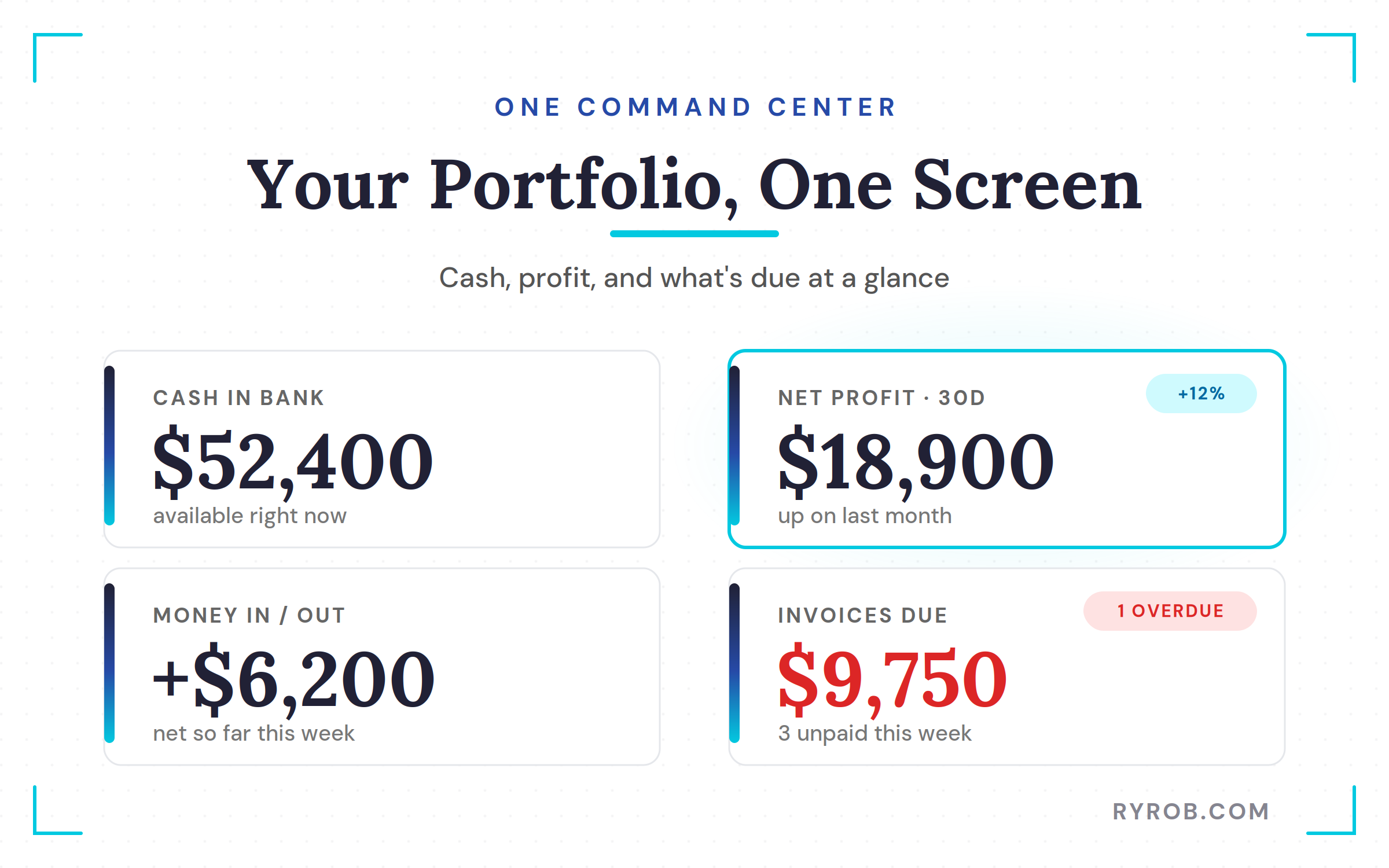
Your main dashboard should hand you an instant read on cash in the bank, net profit, cash moving in and out, and which invoices are due. When you want to go deeper on the day to day, it helps to lean on solid resources for managing freelance business finances so nothing slips through.
Checking these numbers once a week takes under five minutes, but it builds a habit that keeps you sharp. You always know who owes you, what’s due this week, and whether your cash reserves are growing or shrinking.
Forecast Short-Term Cash Flow to Catch Dips Early
Profit on paper won’t tell you when cash actually lands in your account. Short-term cash flow forecasting projects your balance across the coming month using open invoices and known upcoming expenses.
Spotting a dip thirty days out lets you adjust spending or ramp up invoicing before a tight week turns into a real problem. As your team grows and your commitments multiply, that forward look becomes essential. Pairing that forecast with an AI-driven financial planning assistant can help you sanity-check the numbers before you commit to any new spending.
Use the Numbers to Decide on Your Next Hire
Deciding when to bring on your first employee or hire a regular contractor shouldn’t be a gamble. When your profit margins, revenue streams, and cash flow forecasts live on one screen, you can answer the hardest business questions with confidence.
You no longer have to wonder if you can afford another team member. You can look at the historical data, check your recurring revenue streams, and see plainly whether your business can sustain the added payroll while keeping up with tax preparation and quarterly taxes.
FAQs About Tracking Multiple Income Streams
Here are quick answers to the questions I hear most from people setting this up.
How long does it take to set up revenue tracking categories?
Setting up your tracking categories and writing the first bank rules takes about an hour of focused work. After that, the system handles ongoing categorization on its own as new transactions arrive.
Should I use separate bank accounts for each business stream?
You don’t need a separate bank account for every income stream. Tracking categories inside one accounting platform let you segment your reporting cleanly without the mess of juggling multiple accounts.
How do I separate personal and business finances across multiple streams?
Keep a dedicated business account and card separate from your personal money. Whether you’re self employed or running a growing team, clean boundaries stop personal spending from muddying your numbers.
How often should I review my profit and loss report by stream?
Reviewing your categorized profit and loss report once a week only takes a few minutes. That routine helps you catch margin shifts early, which matters even more when you’re dealing with irregular income.
What are common mistakes when trying to track multiple income streams?
The most common one is relying on manual data entry, which leads to misclassified revenue. Set up bank rules early so your expense tracking and income tagging stay consistent across every project.
Final Thoughts on Tracking Businesses’ Income
Running a portfolio of online projects without clear financial visibility is a recipe for burnout. When every dollar mixes together in one blurry total, you end up mistaking high activity for actual profitability. Setting up proper tracking categories and margin reports replaces guesswork with hard data.
You finally know which income streams deserve your time, which ones need scaling back, and whether your business can support your next big move.
Diligent bookkeeping and clear financial visibility across multiple income sources ensure you can set realistic long term financial goals. Stop operating on a bank balance and start running your portfolio with clarity.
The Tool I Use to Track Every Income Stream: Xero
Before Xero, my income was one blurry total and I was making time decisions on gut feel alone. Now my cash, profit, and margins all live on one screen, and I check it in five minutes every week to know exactly where I stand. Get a clear view of your income now, and enjoy 90% off any plan for six months👇
